Navigation (NAV)* 125
Operating RADIO, MEDIA (audiovisual
systems)
NAME, TEL NAV, INFO CAR, SETUP
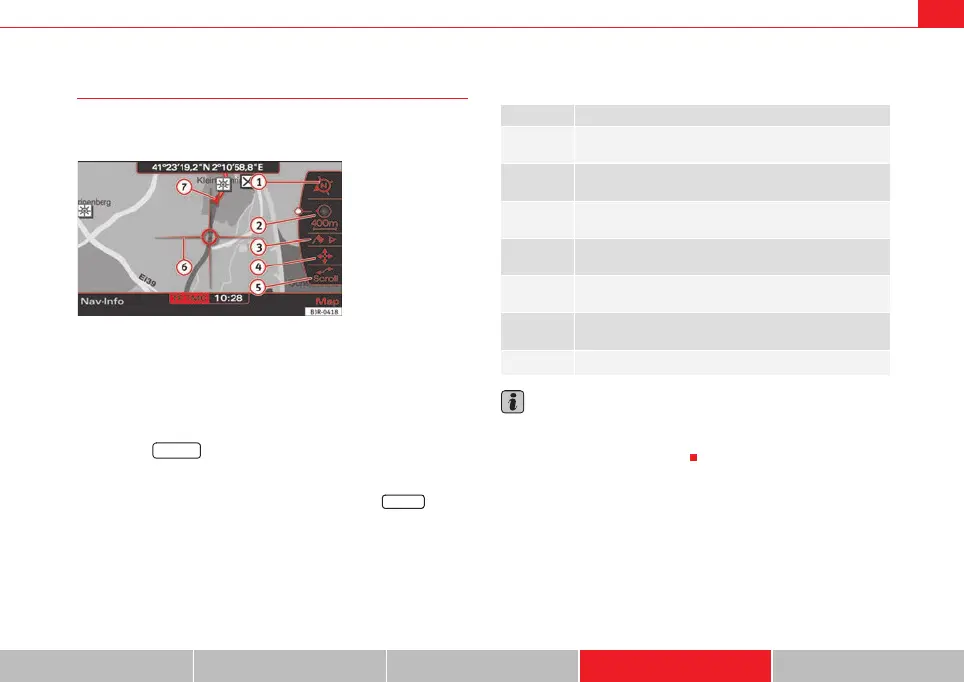
Map representation with active side menu
The map representation can be changed through the active
side menu.
– Press the Map control button in the navigation menu.
– Press the control knob to switch to the side menu.
– Select the desired submenu item by rotating and pressing the
control knob and make your changes.
– Press the ⇒ page 9 button to leave the map side menu.
If you have activated the zoom function ⇒ page 126 or the cursor
⇒ page 129 in the active side menu, you have to press the button
twice to leave the map side menu.
After you have activated the side menu, you are shown information
(city/street names and longitude/latitude) for the position you reached at the
time of activation.
The following functions can be carried out using the active map side menu:
Note
Any setting adjustments you make using the active side menu are not kept
after deactivation. You can enter permanent settings for the map display
using navigation setup ⇒ page 131.
Fig. 149 Navigation
system: Map representa-
tion with active side menu
RETURN
RETURN
Legend Function
Map orientation
⇒ page 126
Map scale
⇒ page 126
Map position menu
⇒ page 128
Activation of map cursor
⇒ page 129
Scroll
⇒ page 129 Function
Presentation of map cursor
⇒ page 129
Vehicle symbol
A
1
2
3
A
4
A
5
6
7
media_systemE_EN.book Seite 125 Montag, 21. September 2009 1:48 13



 To Next Page