Navigation (NAV)*124
Map and information display
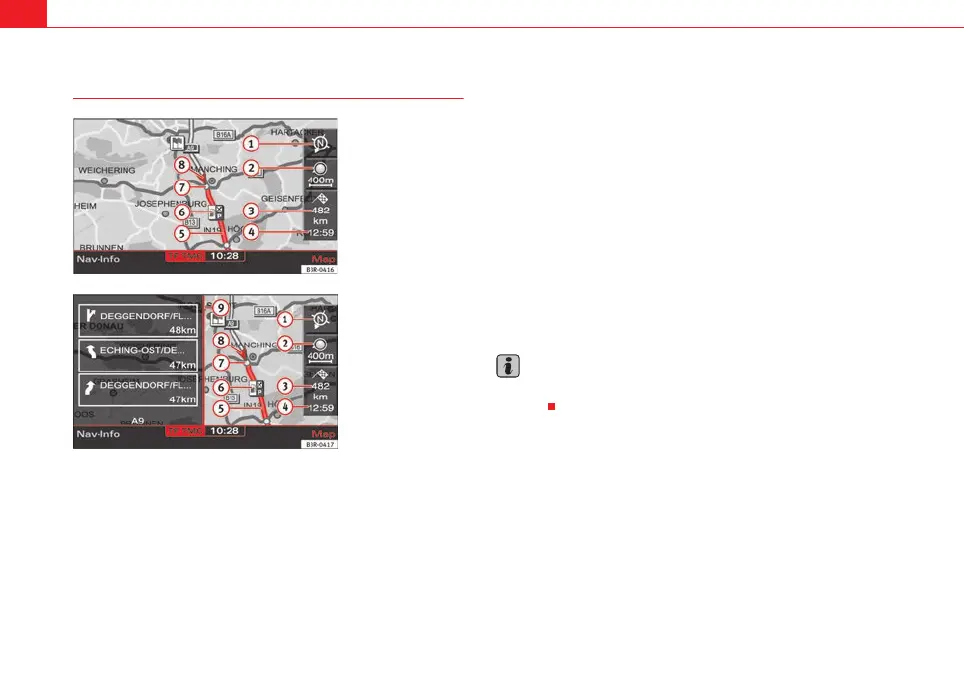
The figures ⇒ fig. 147 and ⇒ fig. 148 show the possible types of information
in the map display:
Map orientation
Map scale
Estimated distance to the next destination/stopover
Estimated time of arrival at the next destination/stopover
Route (marked blue)
Examples of selected map contents ⇒ page 134
Motorway exits are shown for a scale ranging from 500 m to 6 km
Vehicle symbol
Turn list inserted in the Setup menu ⇒ page 135
The map display modes can be changed ⇒ page 131.
Traffic jam announcements are shown automatically, showing the traffic jam
symbol on the map and marking the roads affected. If the dynamic navigation
⇒ page 121 is activated, the route will, if possible, be recalculated in order
to avoid the traffic jam.
You can select a destination directly from the map using the cursor
⇒ page 128.
You will see directional arrows in the instrument panel display ⇒ page 101
which inform you of the route guidance directions.
The degrees of latitude and longitude ⇒ page 125, fig. 149 and the current
altitude of the vehicle are shown when the map is displayed with the side
menu activated.
Note
A tunnel or underpass is displayed on the map as a broken line up to a scale
of 750 m.
Fig. 147 Navigation:
Example of map represen-
tation
Fig. 148 Navigation
system: Map representa-
tion with activated turn
list
A
1
2
3
A
4
A
5
6
7
8
A
9
media_systemE_EN.book Seite 124 Montag, 21. September 2009 1:48 13



 To Next Page