Display 17
Operating RADIO, MEDIA (audiovisual
systems)
NAME, TEL NAV, INFO CAR, SETUP
TMC symbol*
The TMC symbol indicates the reception status of traffic messages for specific
routes or road types ⇒ page 145.
Time
Displays the set or received time ⇒ page 155.
Mute symbol
The mute symbol will appear if the volume for the current audio source has
been switched off ⇒ page 10.
Signal strength
The telephone* reception signal is indicated by vertical bars. The more
shaded bars displayed, the greater the signal.
Under certain circumstances, the symbols SIM, PIN or PUK can appear in
place of the signal strength bars.
If SIM is displayed, you must insert your SIM card into the slot to be able to
use the phone.
If PIN is displayed, you must enter the PIN code ⇒ page 73 for the SIM card
being used.
If PUK is displayed, you must enter the PUK code into the mobile phone.
Bluetooth Symbol*
The Bluetooth symbol appears on the display when a mobile phone is
connected to the navigation system through the Bluetooth* connection
⇒ page 71.
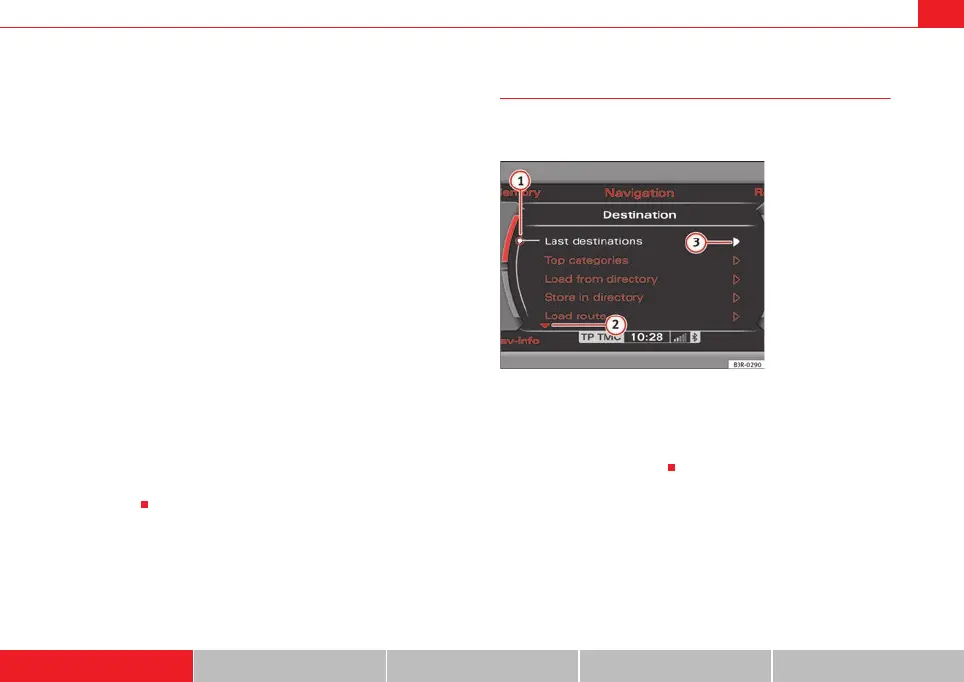
Cursor and arrows
The cursor and arrows provide orientation when navigating
through the different menus.
This cursor designates a chosen line in a menu ⇒ fig. 17.
The arrows pointing up and down indicate other menu points (equivalent
to scrolling up/down) ⇒ fig. 17.
After selection is made, this arrow points to other available selections or
possible settings ⇒ fig. 17.
2
3
4
A
5
A
6
Fig. 17 Detail of display:
Orientation symbols
A
1
A
2
3
media_systemE_EN.book Seite 17 Montag, 21. September 2009 1:48 13



 To Next Page