EasyManua.ls Logo

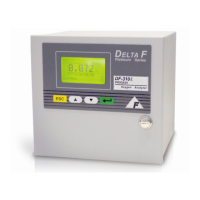
Servomex DF-310E - User Manual

Servomex DF-310E
130 pages
Print Icon
To Next Page IconTo Next Page
Loading...
Oxygen Analyzer
DF-310E
OPERATOR MANUAL

Table of Contents

Questions and Answers

  • N
    Nicole RandolphAug 1, 2025
    Why is the span reading unacceptably high on my Servomex Analytical Instruments?
    • T
      thompsonstaceyAug 2, 2025
      To address a high span reading (greater than 50% high) on your Servomex Analytical Instruments, verify the accuracy and age of your calibration reference cylinder. Note that trace O2 standards in steel cylinders can degrade over time due to oxidation of the cylinder walls. If you're using steel cylinders, standards below 100 ppm should be re-analyzed or calibrated every three months. Ideally, standards below 100 ppm, and especially those below 10 ppm, should be prepared in aluminum cylinders.
  • A
    abigailmartinezAug 22, 2025
    What to do if Servomex DF-310E Analytical Instruments analyzer reads 0.00 at all times?
    • D
      Dillon HarrisAug 22, 2025
      If your Servomex Analytical Instruments analyzer consistently reads 0.00, inspect the sensor wiring. Ensure the nuts securing the wires to the sensor are tight. Trace the wires from the sensor back to the sensor connector, verifying that the terminal pins are correctly seated in the connector plugs and making good contact. Continue tracing the wires back to the main PCB connector, ensuring the wires are correctly crimped and none have broken loose.
  • Q
    qthomasAug 27, 2025
    What to do if the Electrolyte Condition alarm is ON on Servomex DF-310E Analytical Instruments?
    • C
      cookpatrickAug 27, 2025
      If the Electrolyte Condition alarm is ON for Servomex Analytical Instruments, add Hummingbird Replenishment Solution if the electrolyte level is near or below the “MIN” mark.
  • M
    Matthew MillerNov 5, 2025
    Why does my Servomex DF-310E Analytical Instruments analyzer read low?
    • K
      Katherine WongNov 5, 2025
      If your Servomex Analytical Instruments analyzer reads low, here are a few things you can check: * First, check instrument performance using a gas standard of known Oxygen content (Span). * Second, ensure that the analyzer zero setting matches the original factory setting. * Third, check the sample delivery system for leaks. * Fourth, verify that the correct voltages are being supplied to the sensor. These voltages should be checked with the leads disconnected from the sensor. The voltages measured should be as follows: * Primary Electrodes: wht/yel (-) to wht/blk/red (+) = 1.30 ± 0.065 VDC * Secondary Electrodes: wht/blu (-) to wht/red (+) = 5.3 ± 0.5 VDC Voltage levels between any other combination of wires should be less than 0.10 VDC. * Fifth, change the electrol...
  • S
    Sarah AndrewsNov 11, 2025
    Why does my Servomex Analytical Instruments analyzer read high?
    • T
      treynoldsNov 11, 2025
      If your Servomex Analytical Instruments analyzer reads high, you can try the following: * Check instrument performance using a gas standard of known Oxygen content (Span). * Check that the analyzer zero setting matches the original factory setting. * Check the sample delivery system for leaks. * Verify that the correct voltages are being supplied to the sensor. The voltages should be checked with the leads disconnected from the sensor. The voltages measured should be as follows: * Primary Electrodes: wht/yel (-) to wht/blk/red (+) = 1.30 ± 0.065 VDC * Secondary Electrodes: wht/blu (-) to wht/red (+) = 5.3 ± 0.5 VDC Voltage levels between any other combination of wires should be less than 0.10 VDC. * Change the electrolyte. Use only electrolyte supplied by Servomex. A...
  • R
    Ryan DonaldsonNov 15, 2025
    How to fix noisy output on Servomex DF-310E?
    • J
      Jordan FordNov 15, 2025
      If the output of your Servomex Analytical Instruments analyzer is noisy, you can try the following: * Check instrument performance using a gas standard of known Oxygen content (Span). * Change the electrolyte. Use only electrolyte supplied by Servomex. Always rinse and drain the cell with distilled water at least three times before refilling the sensor with fresh electrolyte. Fill the sensor with exactly one full bottle of electrolyte (100 cc). For best results, the sensor should sit for 60 minutes before flowing gas through it. Then allow the Analyzer to operate for several hours on Nitrogen or other inert gas. A calibration check is recommended if performance was poor prior to the electrolyte change. * Remove any devices being driven by the Analyzer output, i.e., chart recorders, ...

Summary

Safety Cautions

Important Warnings

Provides critical safety instructions for operation and setup.

Installation and Setup Guide

Adding Electrolyte

Step-by-step guide for filling the sensor with electrolyte solution.

Sample Gas Connections

Instructions for connecting the sample gas inlet and outlet lines.

Electrical Power Connections

Details on connecting AC and DC power sources to the analyzer.

Power Control

Explains how to turn the analyzer on and off for AC and DC powered units.

Analyzer Options and Features

Pump

Describes the function and control of the on-board pump option.

Battery Power

Information on analyzer operation using an optional battery pack.

Sample Gas Handling

The STAB-EL Acid Gas System

Discusses using the STAB-EL system for acid gas analysis.

Sample Flow Rate and Pressure

Covers optimal flow rates and pressure considerations for accuracy.

Calibration Gas Considerations

Provides guidance on selecting and using calibration gases and standards.

External Device Connectivity

Remote Sensor Installations

Covers installation of the oxygen sensor outside the analyzer cabinet.

User Interface Navigation

Main Menu

Describes navigation through the analyzer's main menu options.

Set-Up Menu

Covers setting analyzer parameters like alarms, outputs, and ports.

Troubleshooting and Calibration Procedures

Maintenance

Analyzer maintenance recommendations for normal operating conditions.

Troubleshooting

Guide to resolving common operational situations and problems with the analyzer.

Servomex DF-310E Specifications

General IconGeneral
Measured GasOxygen (O2)
Power Supply100-240 V AC, 50/60 Hz
Enclosure RatingIP54
Measurement Range0-100% O2
Accuracy±1% of range
Operating Temperature0°C to 45°C (32°F to 113°F)
Output Signal4-20 mA, RS-232
Weight2 kg (4.4 lbs)

Related product manuals