Doc# E166703 10-43
10: Using the Optional Display
Electro Industries/GaugeTech
The Leader In Power Monitoring and Smart Grid Solutions
Electro Industries/GaugeTech
The Leader In Power Monitoring and Smart Grid Solutions
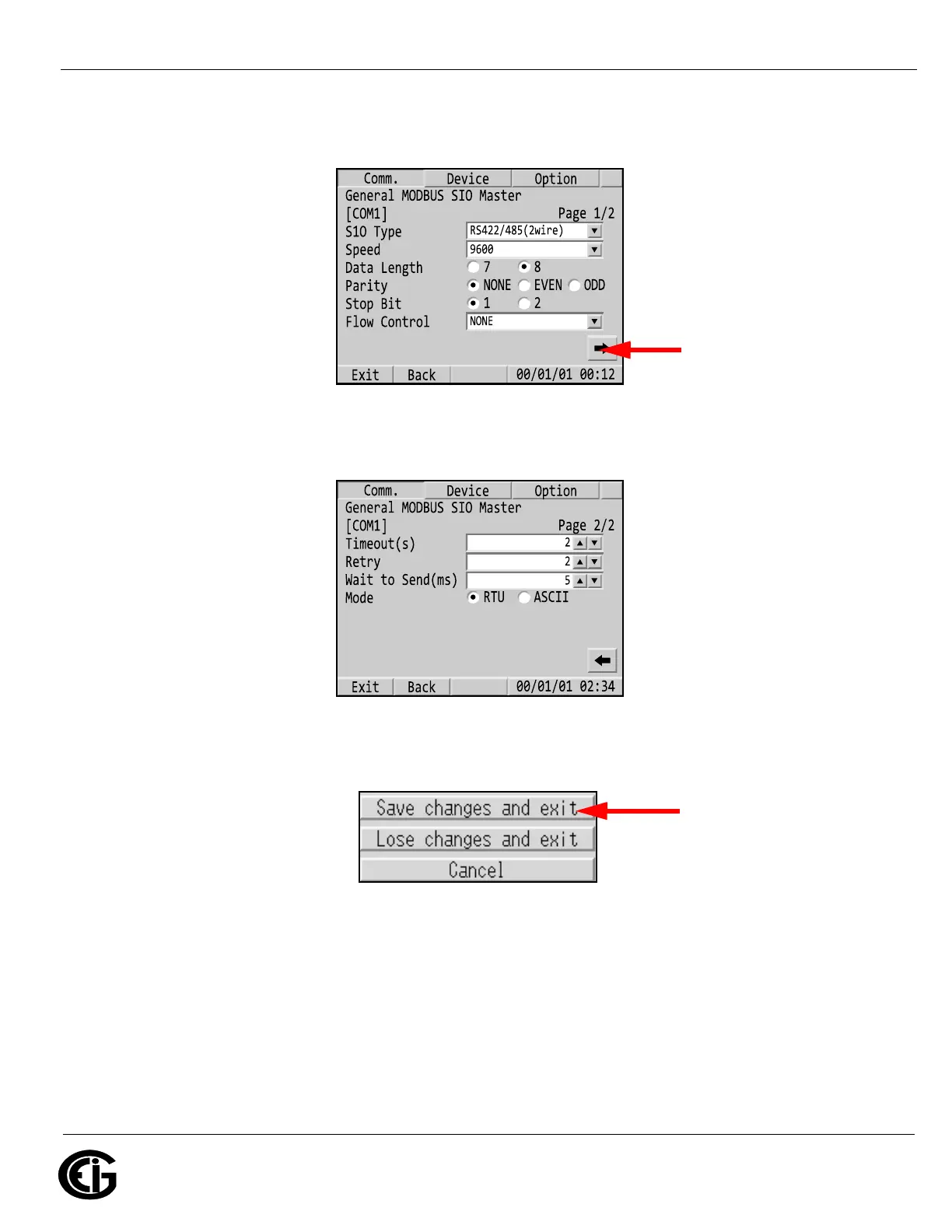
b. You will see the screen shown below- make sure the settings match the
ones shown here. Then press the right arrow at the bottom of the screen.
c. You will see the screen shown below- make sure the settings match the
ones shown here.
d. Touch Exit at the bottom of the screen. You will see a confirmation screen
with the buttons shown below.
e.Touch the Save Changes and Exit button. The display should begin to
communicate with the MP200 unit as shown in 10.6.1: RS485 Communica-
tion Configuration, on page 10-19.
• If you are connecting via Ethernet:
Make sure the fields s
are the same as this;
then
Touch this button
Make sure the fields
are the same as this



 To Next Page