Doc# E166703 5-24
5: Communicating with the Meter
Electro Industries/GaugeTech
The Leader In Power Monitoring and Smart Grid Solutions
Electro Industries/GaugeTech
The Leader In Power Monitoring and Smart Grid Solutions
Electro Industries/GaugeTech
The Leader In Power Monitoring and Smart Grid Solutions
The items you can select for Reading limits for individual meters are: Current,
Watts, VAR, VA, and PF.
The Demand group (select from the Group pull-down menu) can only have limits
set for individual meters (not All Meters).
The items you can select for Demand limits are
: Current, +Watts, +VAR, -Watts,
-VAR, VA, +PF, and -PF.
Click OK. The limit item you selected is displayed in the Limit field.
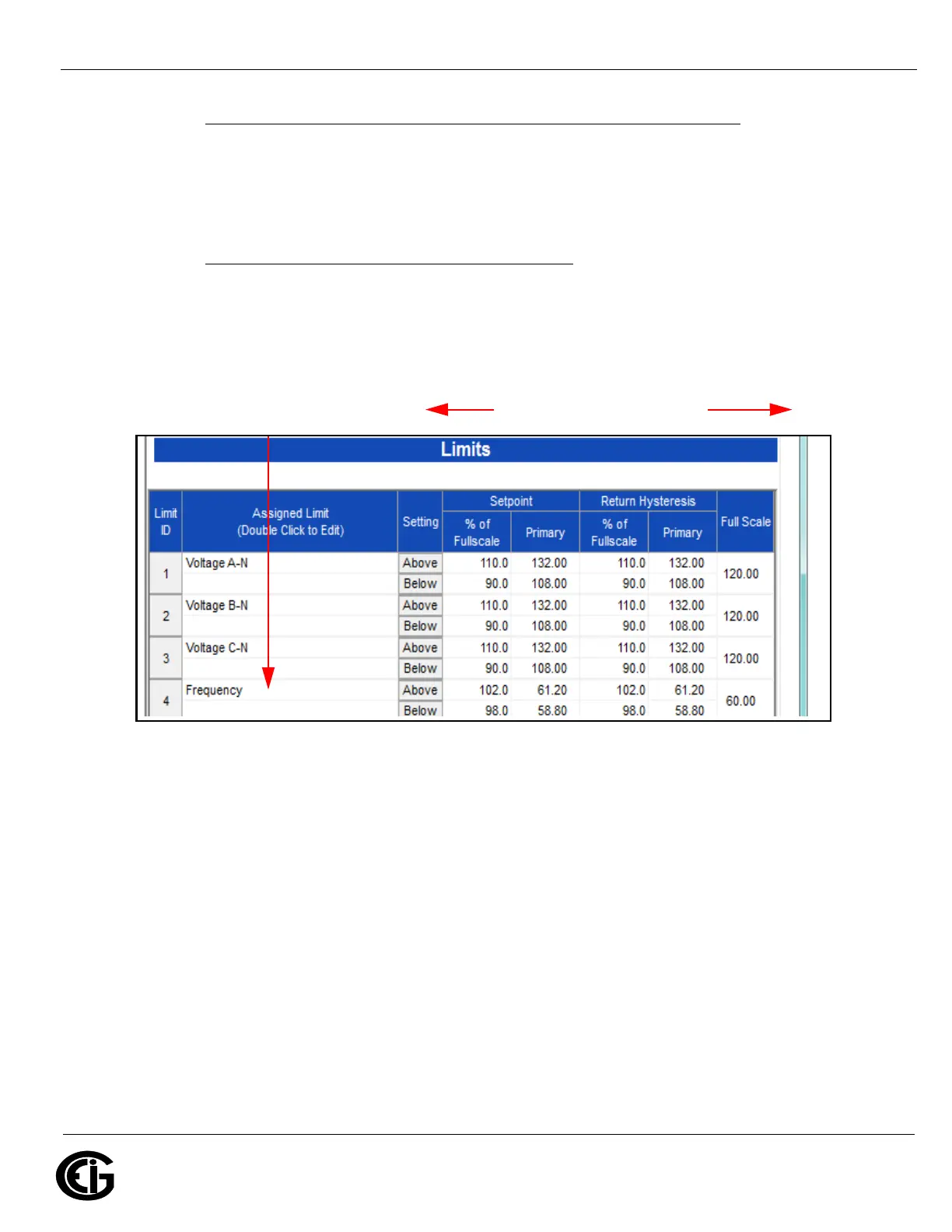
3.To configure a limit, double-click on the field to set the following values:
• Above and Below Setpoint: % of Full Scale (the point at which the reading
goes out of limit)
Examples:
100% of 120V Full Scale = 120V
90% of 120V Full Scale = 108V
Example Limit:
Frequency for
Meter 4
Setting Fields for the Limit



 To Next Page