34
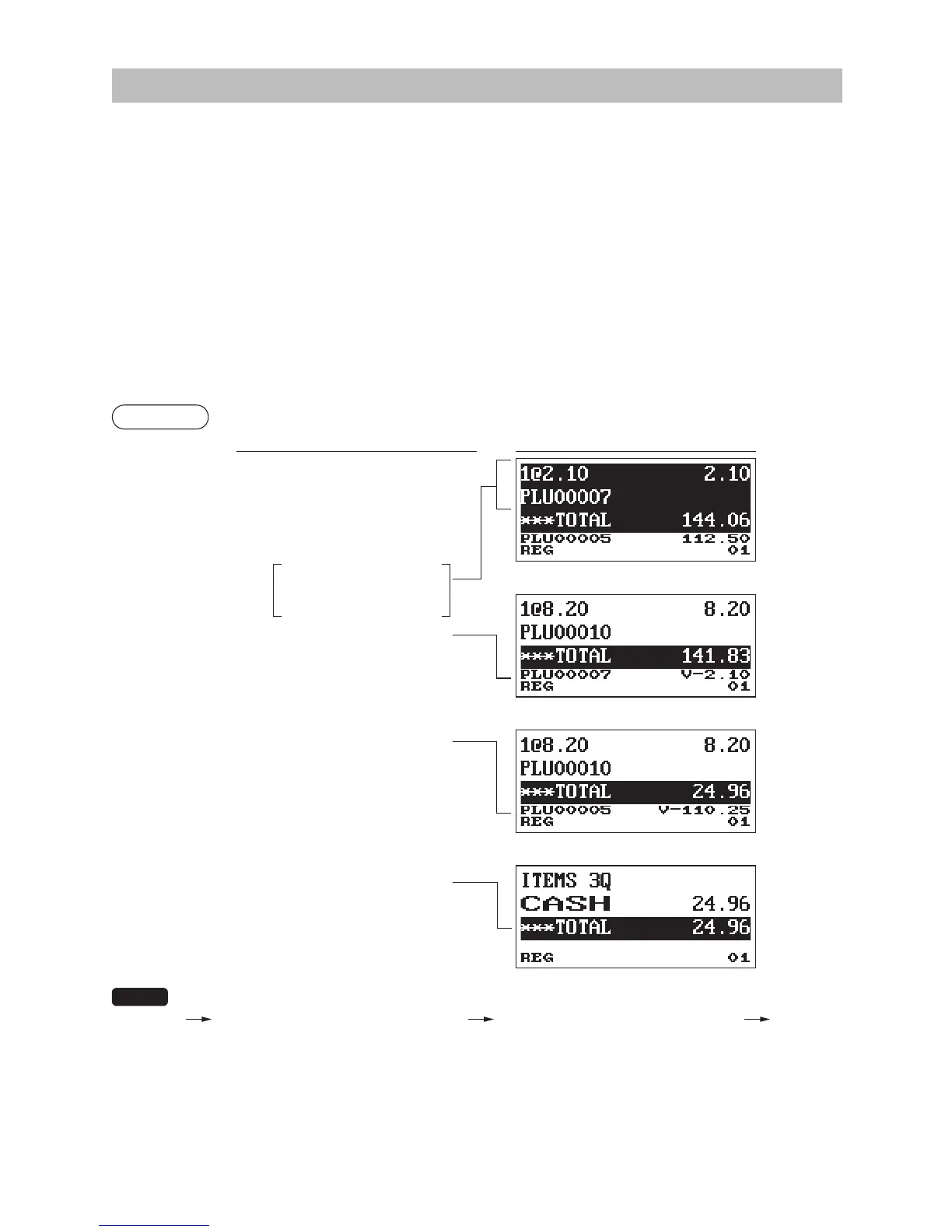
CorrectionoftheNext-to-LastorEarlierEntries(IndirectVoid)
If you nd an incorrect entry before nalizing the transaction (e.g. before pressing the
A
key), you
can void the entry by the cursor operation or the key sequence operation.
Indirectvoidbycursoroperation
You can void department, PLU/subdepartment, UPC, item refund, amount discount/premium and percent
entries.
Move the cursor to the item to be voided, and press the
t
key.
Indirectvoidbykeysequenceoperation
You can void department, PLU/subdepartment, UPC and item refund.
Press the
t
key just before you press a department key,
d
key or
p
key or just before you scan
an UPC code. For the refund indirect void, press the
t
key after you press the
f
key.
Example
(Indirect void by cursor operation)
Keyoperation Display
1310
1
7
p
10
p
50
@
5
p
t
49
@
5
t
p
A
The register allows you to enter the quantity to void only for the integer quantity.
[ Selection the item to void by cursor ] [ Entry the quantity to void ( XXXX ) ]
t
Move the cursor to the
item to be voided.



 To Next Page