77
MessageProgramming
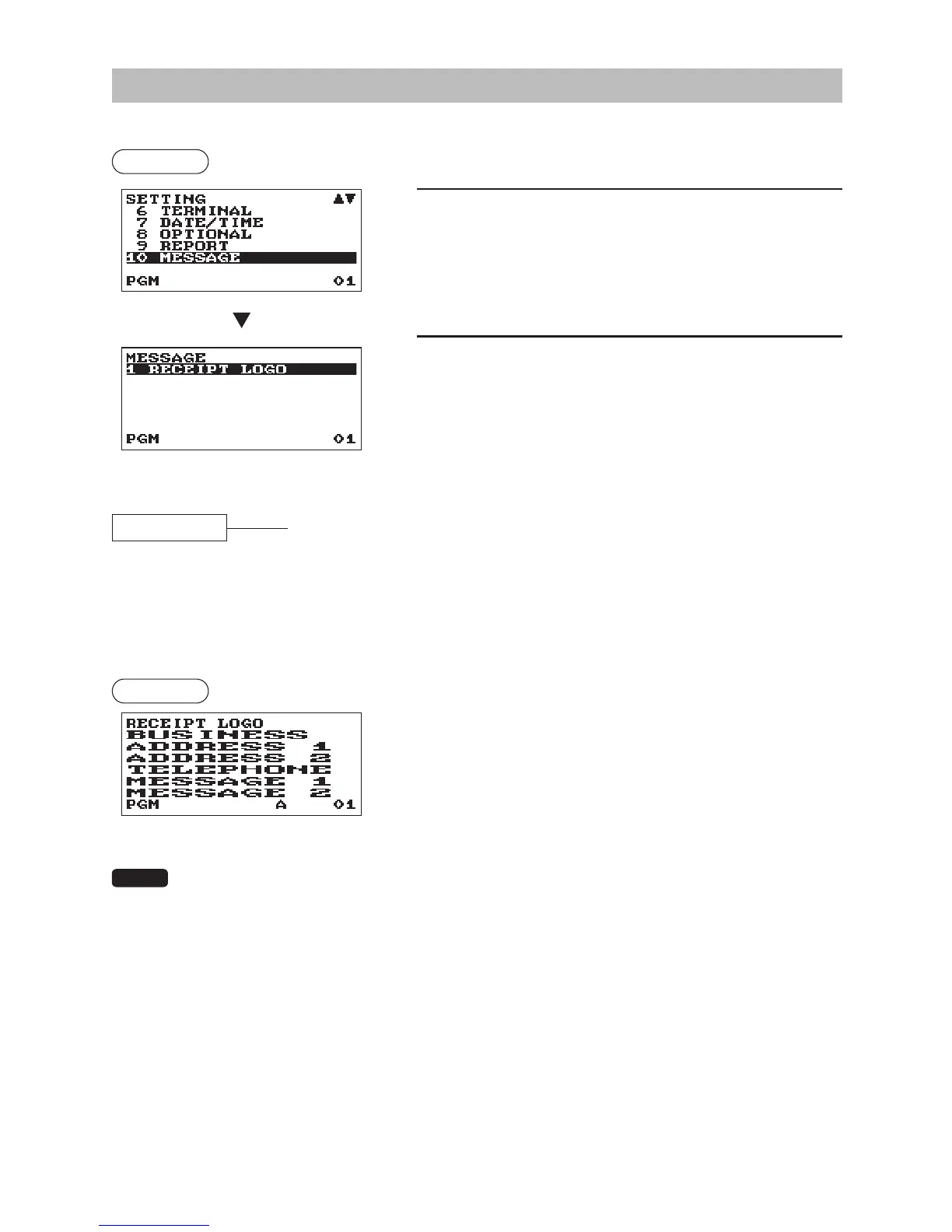
Use the following procedure to select any option included in the message group:
Procedure
1.
In the SETTING window, select “10 MESSAGE.”
• The MESSAGE window will appear.
2.
Select any option from the following options list:
1
RECEIPT LOGO
Receipt logo
The following illustration shows those options included in this programming group.
10 MESSAGE 1 RECEIPT LOGO
l
See “Receipt logo” this page.
■
Receiptlogo
Your register can print programmed messages for customers on every receipt.
The logo text is printed in a centering form on the receipt.
Procedure
Program each item as follows:
•RECEIPTLOGO(Usethecharacterentry)
Logo text for the receipt (max. 30 characters x 6 lines)
• The programmable number of lines for a message varies according to the following message
types:
PATTERN 1: 3 line text header
PATTERN 2: Image logo header
PATTERN 3: Image logo header + 3 line text footer
PATTERN 4: 6 line text header
PATTERN 5: Image logo header + 3 line text header
PATTERN 6: 3 line text header + 3 line text footer
• For the footer printing, a series of “= (character code: 061)” character (over 4 characters) will be
replaced with a clerk name in present use.



 To Next Page