84
■
Tax1through4
Procedure
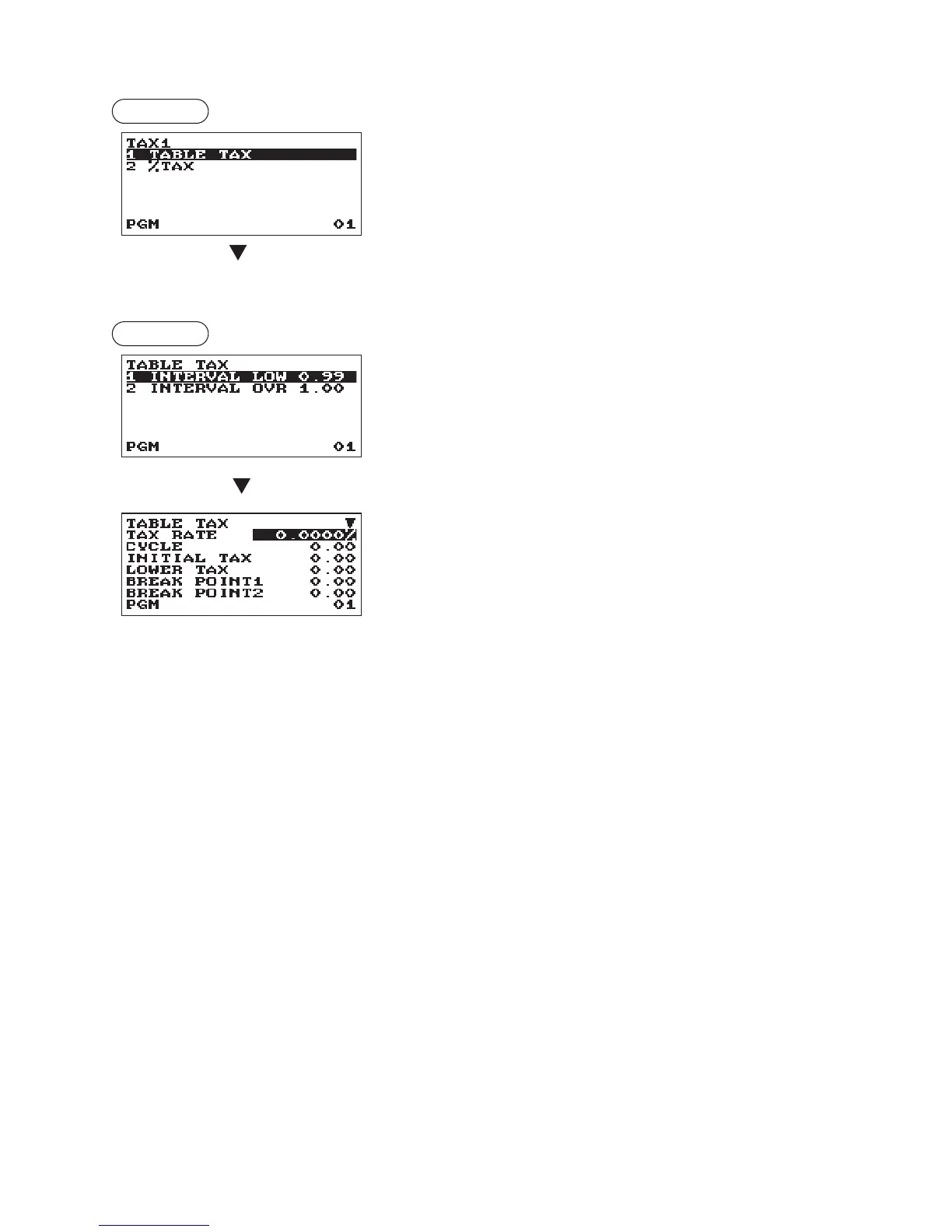
Selection of tax method
(To the following table tax or % tax)
TABLE TAX:
Programmed tax table is used.
% TAX:
Programmed % tax rate is used.
•Tabletax
Procedure
Selection of the interval
The screen continues.
•INTERVAL(Usetheselectiveentry)
LOW 0.99: Less than 0.99 (max. 72 break points)
OVR 1.00: More than 1.00 (max. 36 break points)
Program each item as follows:
•TAXRATE(Usethenumericentry)
Tax rate (max. 7 digits: 0.0000 to 999.9999%).
•CYCLE(Usethenumericentry)
Tax table cycle (max. 4 digits: 0.01 to 99.99).
•INITIALTAX(Usethenumericentry)
Initial tax (max. 3 digits: 0.01 to 9.99).
•LOWERTAX(Usethenumericentry)
Lowest taxable amount (max. 5 digits: 0.00 to 999.99).
•BREAKPOINT1through72(Usethenumericentry)
Break point amount (max. 5 digits: 0.01 to 999.99).
The programming data of tax table are as follows.



 To Next Page