39
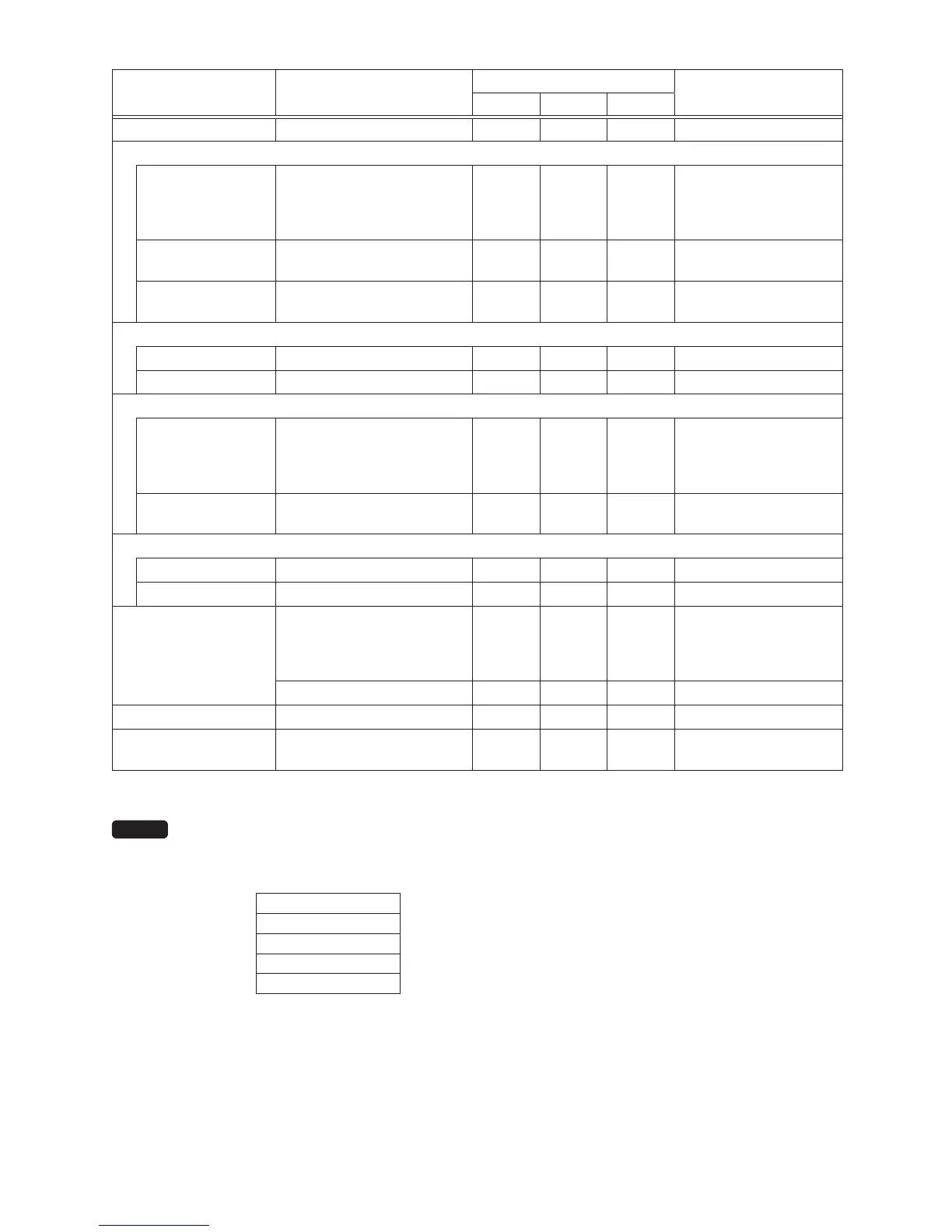
Reporttype Description
Operatingmodes
Datatobeentered
OPX/Z X1/Z1 X2/Z2
GENERAL General report X1, Z1 X2, Z2
<DEPT. MENU>
BY RANGE Department by group report X1 X2
Department code
(The range can be
specied by entering
start and end codes.)
BY GROUP
Individual department group
report
X1 X2
Department group no. (1
to 12)
GROUP TOTAL
Department group total
report
X1 X2
<TRANS. MENU>
TRANSACTION Transaction report X1 X2
TL-ID Total-in-drawer report X1 X2
<PLU/UPC MENU>
BY RANGE
PLU/UPC sales report by
specied range
X1, Z1 X2, Z2
PLU/UPC code
(The range can be
specied by entering
start and end codes.)
BY DEPT
PLU/UPC report by
associated department
X1, Z1 X2, Z2 Department code
<CLERK MENU>
ALL CLERK All clerk report X1, Z1 X2, Z2
IND. CLERK Individual clerk report X, Z X1, Z1 X2, Z2 For the assigned clerk
HOURLY
Hourly report (all or by
specied range)
X1
For an individual time
range (The range can
be specied by entering
start and end times.)
Hourly report (all) Z1
DAILY NET Daily net report X2, Z2
SRM REPORT
SRM (Sales Recording
Module) report
X2
Only for the Quebec
scal
The following reports relating to PLU/UPC is issued in the sequence of PLUs and UPCs.
PLU/UPC and PLU/UPC BY DEPT.
Also the UPC codes are printed in the sequence shown below.
EAN-13
EAN-8
UPC-A
UPC-E
ITF-14



 To Next Page