EasyManua.ls Logo

Singer 560 - Adjusting Pattern Knitting Settings

Singer 560
124 pages
Print Icon
To Next Page IconTo Next Page
To Previous Page IconTo Previous Page
Loading...
t-'--..==-~
111111111111111111111111111111111111
B
A•n•uuuunn•nuuuu•u•nu•
0
~~~~~~~~~~~~
~
\\\1 \\II \1\1
~I
I
II
I
I
~~
fl f;
f
~
r r1
~ ~ ~
[ f r1
fl~
~
fl~
fl
~ ~
~
fJ
~
[/~
[/~~
fl@~~
~
~~
~\
r r
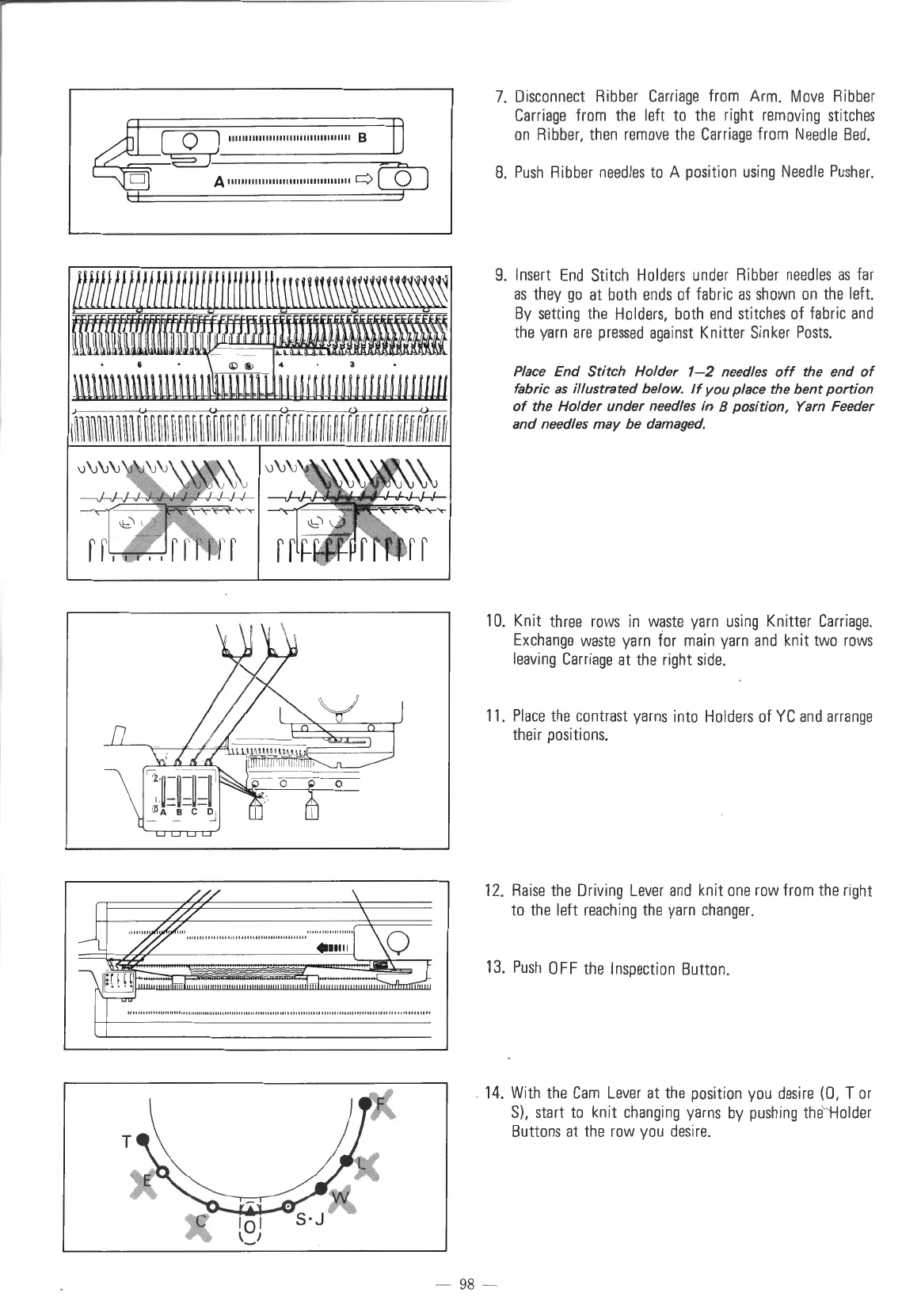
7.
Disconnect
Ribber
Carriage
from
Arm.
Move
Ribber
Carriage
from
the
left
to
the
right
removing
stitches
on
Ribber,
then
remove
the
Carriage
from
Needle
Bed.
8.
Push
Ribber
needles
to
A
position
using Needle
Pusher.
9.
Insert
End
Stitch
Holders
under
Ribber
needles
as
far
as
they
go
at
both
ends
of
fabric
as
shown
on
the
left.
By
setting
the
Holders,
both
end
stitches
of
fabric
and
the
yarn
are
pressed
against
Knitter
Sinker
Posts.
Place
End
Stitch
Holder
1-2
needles
off
the end
of
fabric
as
illustrated below.
If
you
place the
bent
portion
of
the
Holder
under
needles in 8
position,
Yarn Feeder
and
needles
may
be damaged.
10.
Knit
three
rows
in
waste
yarn
using
Knitter
Carriage.
Exchange
waste
yarn
for
main
yarn
and
knit
two
rows
leaving
Carriage
at
the
right
side.
11.
Place
the
contrast
yarns
into
Holder
s
of
YC
and
arrange
their
positions.
12.
Raise
the
Driving
Lever
and
knit
one
row
from
the
right
to
the
left
reaching
the
yarn
changer.
13.
Push
OFF
the
Inspection
Button.
14.
With
the
Cam
Lev
er
at
the
position
you
desire
(0,
Tor
S),
start
to
knit
changing
yarns
by
pushing
the
Holder
Buttons
at
the
row
you
desire.
-
98
-

Table of Contents

Other manuals for Singer 560

Related product manuals