EasyManua.ls Logo

Singer 560 - Setting Pattern Controls

Singer 560
124 pages
Print Icon
To Next Page IconTo Next Page
To Previous Page IconTo Previous Page
Loading...
-
-
-
iii
I
2 3 4
5
~
g g g g
Q
6
u~
1 c 1 - 1 w 1 1
WPI••I
= 1
0 0 0 0 0 0
0
0
0
-:;
...
0
0
T
..
1"!_..,'
1111
0
0
-
f-
'--
0
0
:!"_'!II
0
0
I,
0
0
0
0
0
-
!-
0
I
'X
II
JU_
t:D
..
I
~
I
~
~-
~
1
11111
]
11
11
1]
11111
]
1111
1]
11111
]1
1111
l
lll
lji!
tl
ljl
l11
1]11l
l
i1
0
jj
6
12 18
24
J O
42
48
54
eo
0
0
0000
©
'
....
A
....
1
0
OOLr-
D·······················
I.
II
II
I
II
00
'-1<'
II
ch"
--,
0 0
0000
©
'
....
"""
[
0
ooL~
B••••••••••••••••••••••••••••••••
~~
..
_'P
II
cl:J
1!11
4J
IIIII
illlt
iliiiiiiiilliilililliiiiii
i
ii
I
III
QJI
II
[[Ill
lifffffffffffffff
ff
fff
fff
f f
ffttffffffff
f
fff
fH
fH
ffff
ffff
tlf
II
I
'''''':ill
ll l l
llllllllllllllll
l
lllll:lll
l
llllllllllllllllllllllli'''''
t
r,~ r,~
r,~
:
r,~ r,~
r']
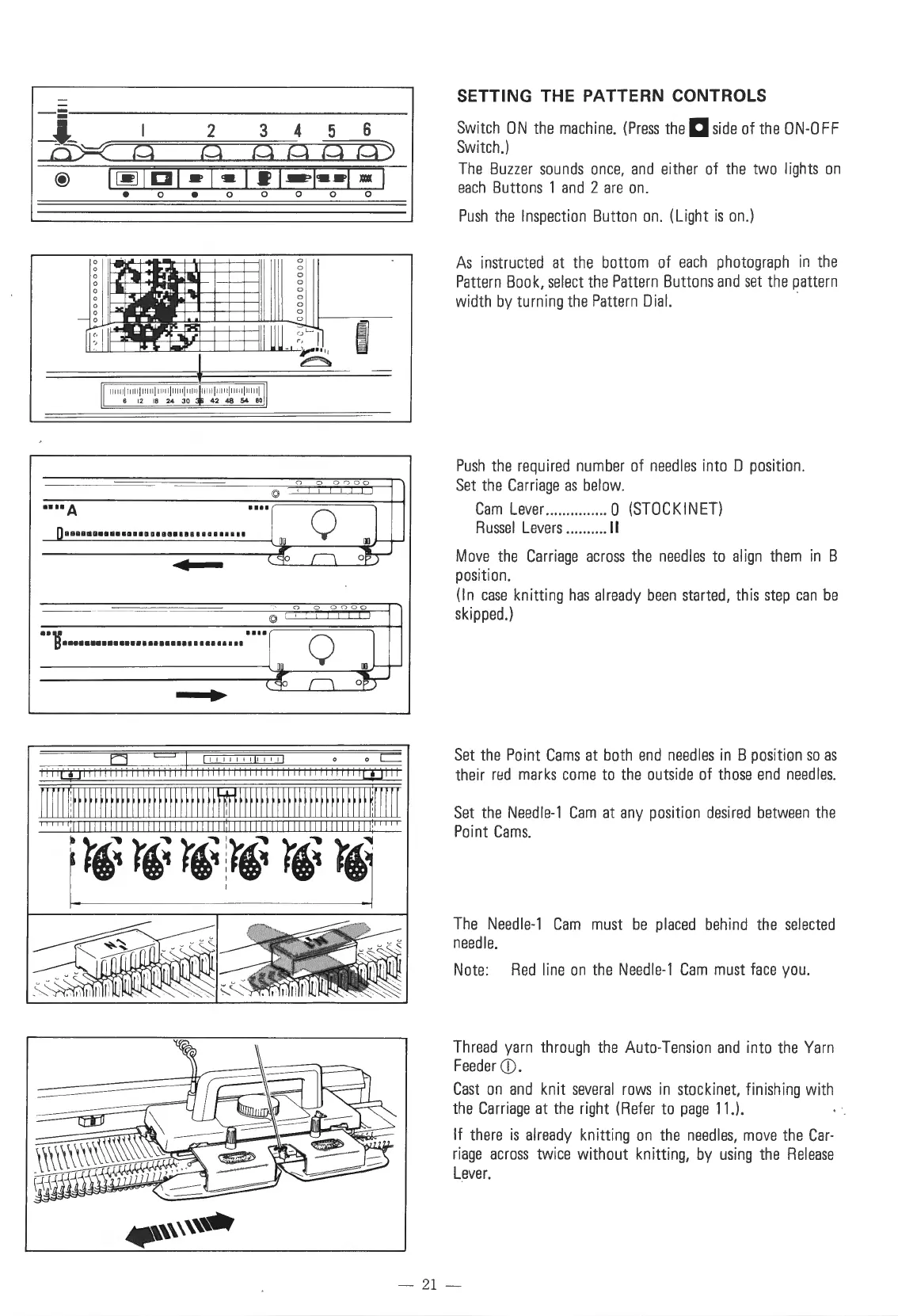
SETTING THE PATTERN CONTROLS
Switch
ON
the
machine.
(Press
the
Dside
of
the
ON-OFF
Switch.)
The
Buzzer
sounds
once,
and
either
of
the
two
lights
on
each
Buttons
1
and
2
are
on.
Push
the
Inspection
Button
on.
(Light
is
on.)
As
instructed
at
the
bottom
of
each
photograph
in
the
Pattern
Book,
select
the
Pattern
Buttons
and
set
the
pattern
width
by
turning
the
Pattern
Dial.
Push
the
required
number
of
needles
into D position.
Set
the
Carriage
as
below.
Cam
Lever
............... 0
(STOCKINET)
Russel
Levers
..........
11
Move
the
Carriage
across
the
needles
to
align
them
in
B
position.
(In
case
knitting
has
already
been
started,
this
step
can
be
skipped.)
Set
the
Point
Cams
at
both
end
needles
in
B
position
so
as
their
red
marks
come
to
the
outside
of
those
end
needles.
Set
the
Needle-1
Cam
at
any
position
desired
between
the
Point
Cams.
The
Needle-1
Cam
must
be
placed
behind
the
selected
needle.
Note
:
Red
line
on
the
Needle-1
Cam
must
face
you.
Thread
yarn
through
the
Auto-Tension
and
into
the
Yarn
Feeder
CD
.
Cast
on
and
knit
several
rows
in
stockinet, finishing with
the
Carriage
at
the
right
(Refer
to
page
11.).
If
there
is
already
knitting
on
the
needles,
move
the
Car-
riage
across
twice
without knitting,
by
using
the
Release
Lever.
- 21 -

Table of Contents

Other manuals for Singer 560

Related product manuals