EasyManua.ls Logo

Singer 560 - Cam Lever and Stitch Dial

Singer 560
124 pages
Print Icon
To Next Page IconTo Next Page
To Previous Page IconTo Previous Page
Loading...
3
5
CAM
LEVER
AND
STITCH
DIAL
T
CD
® ® @ @ ®
(J)
®
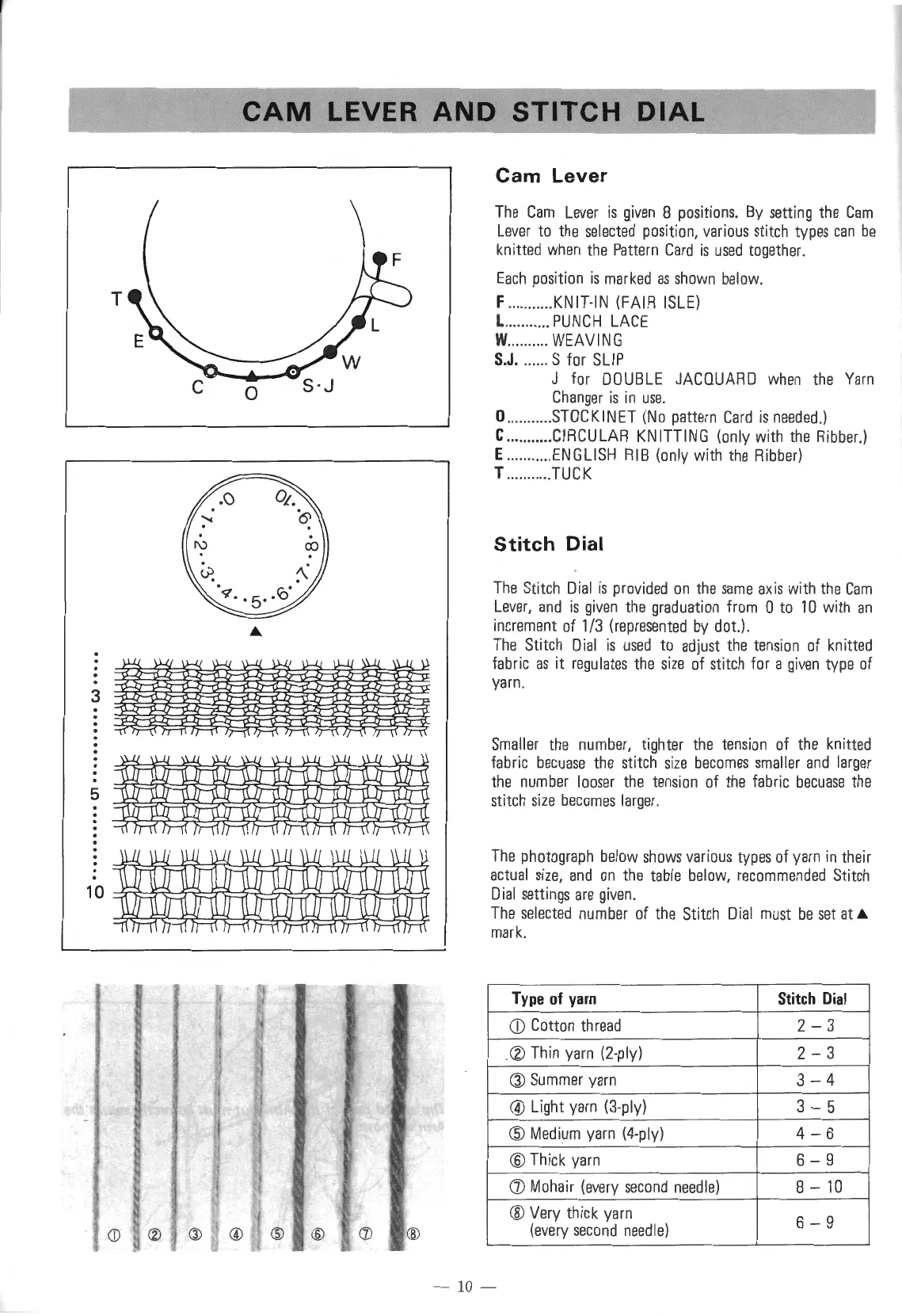
Cam
Lever
The
Cam
Lever
is
given
8
positions.
By
setting
the
Cam
Lever
to
the
selected
position,
various
stitch
types
can
be
knitted
when
the
Pattern
Card
is
used
together.
Each
position
is
marked
as
shown
below.
F
....
.
....
..
KNIT-IN
(FAIR
ISLE)
L
..
.. ..
..
..
.
PUNCH
LACE
W
...
..
..
..
.
WEAVING
S.J
. .
..
..
. S for
SLIP
J for
DOUBLE
JACQUARD
when
the
Yarn
Changer
is
in
use
.
O
......
..
...
STOCKINET
(No
pattern
Card
is
needed
.)
C ...........
CIRCULAR
KNITTING
(only
with
the
Ribber.)
E
.....
.
..
...
ENGLISH
RIB
(only with
the
Ribber)
T
...
........
TUCK
Stitch
Dial
The
Stitch
Dial
is
provided
on
the
same
ax
is
with
the
Cam
Lever,
and
is
given
the
graduation
from
0
to
10
with
an
increment
of
1/3
(represented
by
dot.)
.
The
Stitch
Dial
is
used
to
adjust
the
tension
of
knitted
fabric
as
it
regulates
the
size
of
stitch
for a
given
type
of
yarn.
Smaller
the
number,
tighter
the
tension
of
the
knitted
fabric
becuase
the
st
i
tch
size
becomes
smaller
and
la
r
ger
the
number
looser
the
tension
of
the
fabric
becuase
the
stitch
size
becomes
larger.
The
photograph
below
shows
various
types
of
yarn
in
their
actual
size,
and
on
the
table
below,
recommended
Stitch
Dial
settings
are
given.
The
selected
number
of
the
Stitch
Dial
must
be
set
at
A.
mark.
Type
of
yarn
Stitch
Dial
CD
Cotton
thread
2-3
Thin
yarn
(2-ply)
2-
3
®
Summer
yarn
3-4
@ Light
yarn
(3-ply)
3-
5
@
Medium
yarn
(4-ply)
4-6
@Thick
yarn
6-9
(])
Mohair
(every
second
needle)
8-
10
@Very thick
yarn
6-
9
(every
second
needle)
- 10 -

Table of Contents

Other manuals for Singer 560

Related product manuals