EasyManua.ls Logo

Singer 560 - Ribber Stitch Drop and Float Issues

Singer 560
124 pages
Print Icon
To Next Page IconTo Next Page
To Previous Page IconTo Previous Page
Loading...
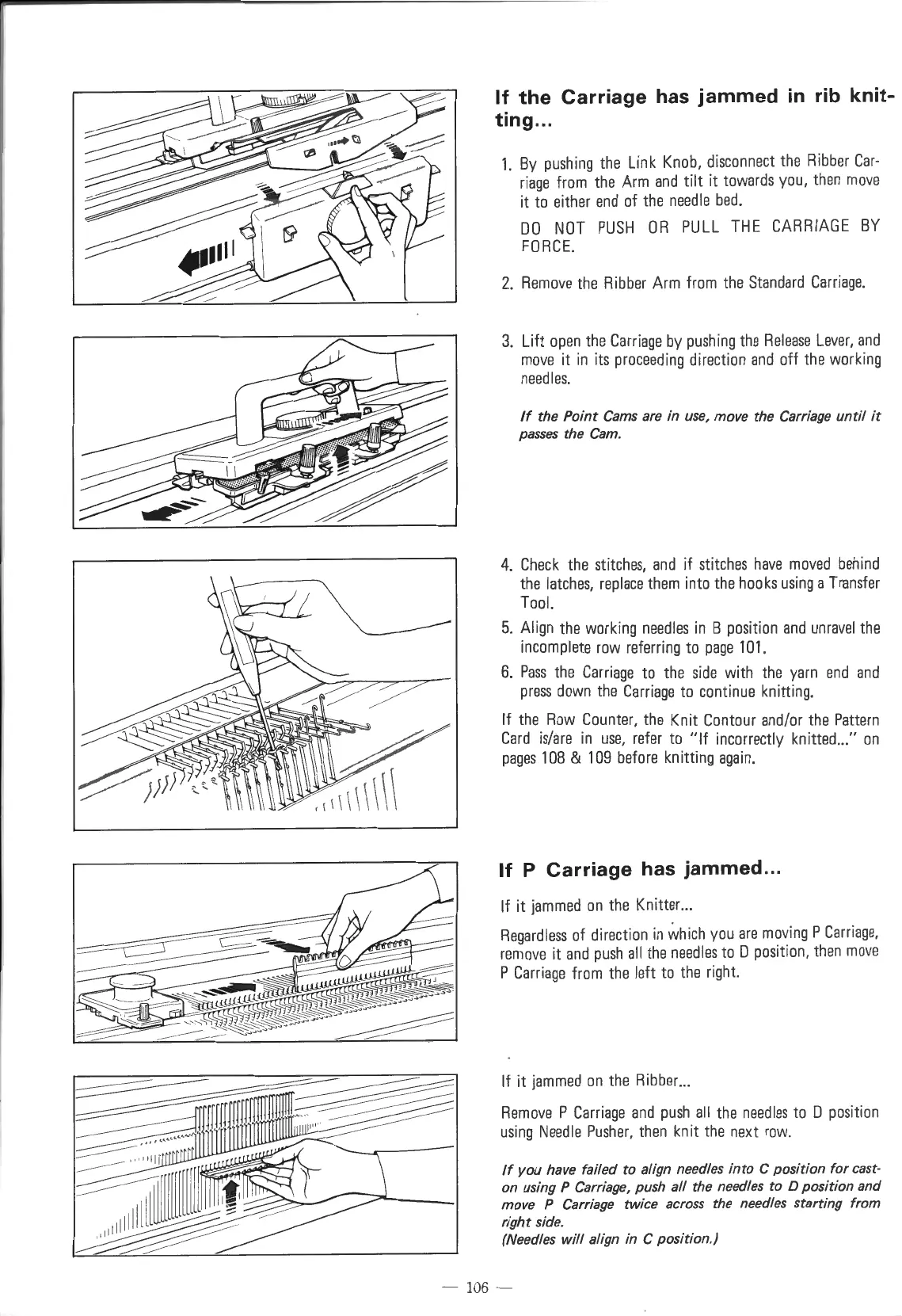
If
the
Carriage
has
jammed
in
rib
knit-
ting ...
1.
By
pushing
the
Link
Knob,
disconnect
the
Ribber
Car-
riage
from
the
Arm
and
tilt it
towards
you,
then
move
it
to
either
end
of
the
needle
bed.
DO
NOT
PUSH
OR
PULL
THE
CARRIAGE
BY
FORCE.
2.
Remove
the
Ribber
Arm
from
the
Standard
Carriage.
3.
Lift
open
the
Carriage
by
pushing
the
Release
Lever,
and
move
it
in
its
proceeding
direction
and
off
the
working
needles.
If
the Point
Cams
are
in
use, move the
Carriage
until
it
passes the
Cam.
4.
Check
the
stitches,
and
if
stitches
have
moved
behind
the
latches,
replace
them
into
the
hooks
using
a
Transfer
Tool.
5.
Align
the
working
needles
in
B
position
and
unravel
the
incomplete
row
referring
to
page
101.
6.
Pass
the
Carriage
to
the
side
with
the
yarn
end
and
press
down
the
Carriage
to
continue
knitting.
If
the
Row
Counter,
the
Knit
Contour
and/or
the
Pattern
Card
is/are
in
use,
refer
to
"If
incorrectly
knitted
...
"
on
pages
108
&
109
before
knitting
again.
If
P
Carriage
has
jammed
...
If it
jammed
on
the
Knitter
...
Regardless
of
direction
in
which
you
are
moving
P
Carriage,
remove
it
and
push
all
the
needles
to
D
position,
then
move
P
Carriage
from
the
left
to
the
right.
If it
jammed
on
the
Ribber
...
Remove
P
Carriage
and
push
all
the
needles
to
D
position
using
Needle
Pusher,
then
knit
the
next
row
.
If
you have failed to
align
needles into C position
for
east-
on using P
Carriage,
push
all
the needles to D position and
move P
Carriage
twice across the needles starting
from
right side.
(Needles will
align
in
C position.)
10
6 -

Table of Contents

Other manuals for Singer 560

Related product manuals