EasyManua.ls Logo

Singer 560 - Pattern Control Operations

Singer 560
124 pages
Print Icon
To Next Page IconTo Next Page
To Previous Page IconTo Previous Page
Loading...
PATTERN
CONTROLS
-
1
-
-
C88>
t•J-~
......
__./
7
t-3
ntr
@
I
00
I
[]
G
@
@
D
~~~~~
~~
~~~
~
~~~
~
'''"I e
I"
,=,,"""""
'LU""
I
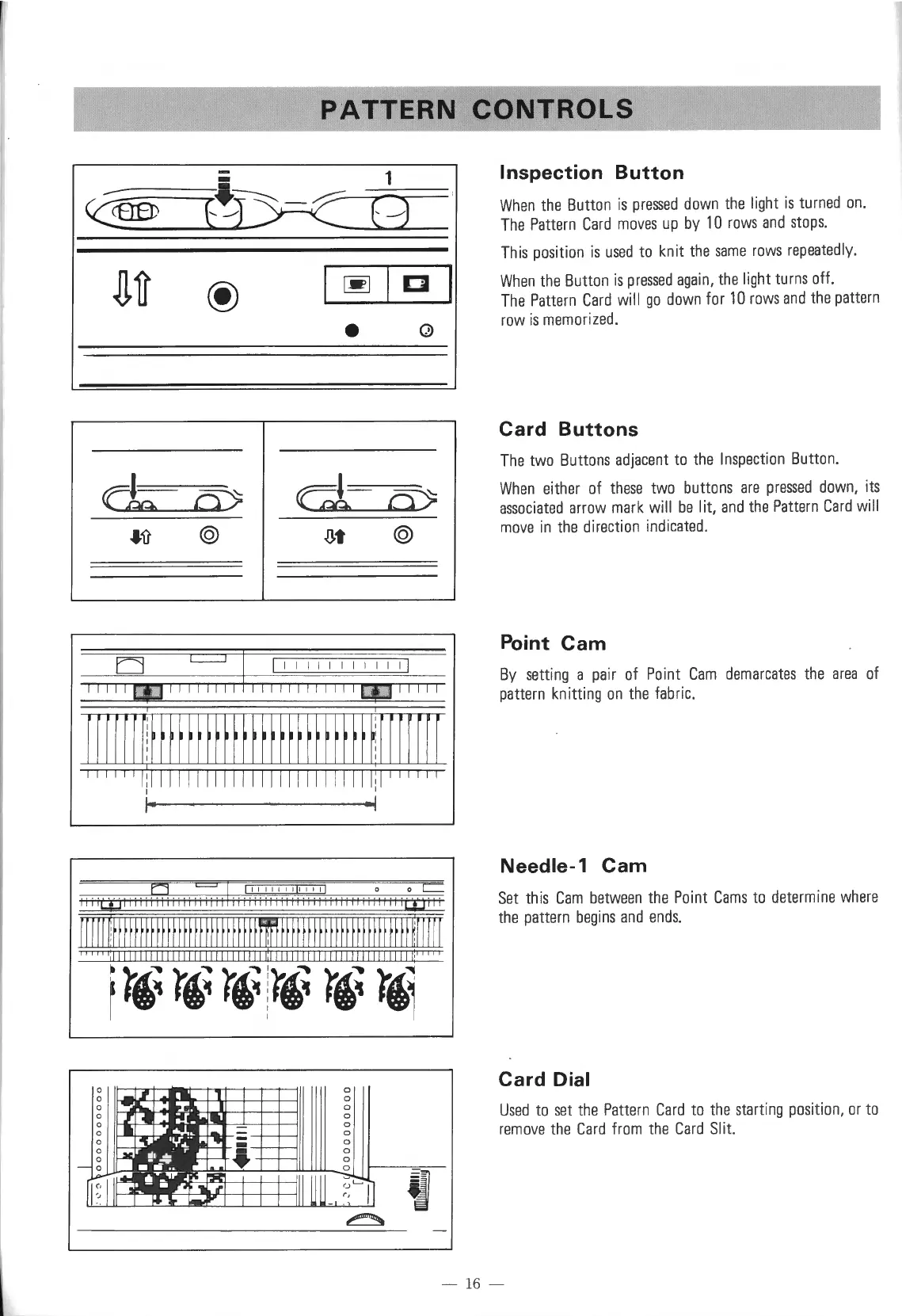
Inspection
Button
When
the
Button
is
pressed
down
the
light
is
turned
on.
The
Pattern
Card
moves
up
by
10
rows
and
stops.
This
position
is
used
to
knit
the
same
rows
repeatedly.
When
the
Button
is
pressed
again,
the
light
turns
off.
The
Pattern
Card
will
go
down
for
10
rows
and
the
pattern
row
is
memorized
.
Card
Buttons
The
two
Buttons
adjacent
to
the
Inspection
Button.
When
either
of
these
two
buttons
are
pressed
down,
its
associated
arrow
mark
will
be
lit,
and
the
Pattern
Card
will
move
in
the
direction
indicated.
Point
Cam
By
setting
a
pair
of
Point
Cam
demarcates
the
area
of
pattern
knitting
on
the
fabric.
Needle-1
Cam
~
~
I I I I I I t I t il I I I I 0 0
c=
iii
i
QJ
I
iiii
00
iiii
i=i
i
it
iii
ii
iii
i i
ii ii ii
iii
iiiiiliii
i
jJji
ii
Set
this
Cam
between
the
Point
Cams
to
determine
where
the
pattern
begins
and
ends.
[[I
r I
rtf
fff
ff
fff fff
ff
f f
ff
f
ff
f f f
ff
ffil
ff
f f
ff
f
ff
f
ff
f f
ff
f f f f
ff
f f
~~I
I I I
'''''':lllllllllllllllllllllllllllll:llllllllllllllllllllllllllli'''''
1
r,~ r,~
r,~
:
r,~ r,~
r,,
Card
Dial
Used
to
set
the
Pattern
Card
to
the
starting
po
si
tion,
or
to
remove
the
Card
from
the
Card
Slit.
- 16 -

Table of Contents

Other manuals for Singer 560

Related product manuals