EasyManua.ls Logo

Singer 560 - Carriage Jamming in Rib Knitting; P Carriage Jamming

Singer 560
124 pages
Print Icon
To Next Page IconTo Next Page
To Previous Page IconTo Previous Page
Loading...
~
Q Q
@
loo
l
cl
I
..
I
0
0 0 0
0
0
0
0
0
0
0
0
0
0
0
0
I I I I I I
IIIII
II
...,..
0
'-11
~~~~~
;
.........
~
ljllllll11111l11111l1,1111l11111l11111l1111~1
,.lM9036424Bii4
Q
f-.4
(~
[~~
•1~1
..
·1
'fill.
I
0 0
0
0
I
~
.[}11
@
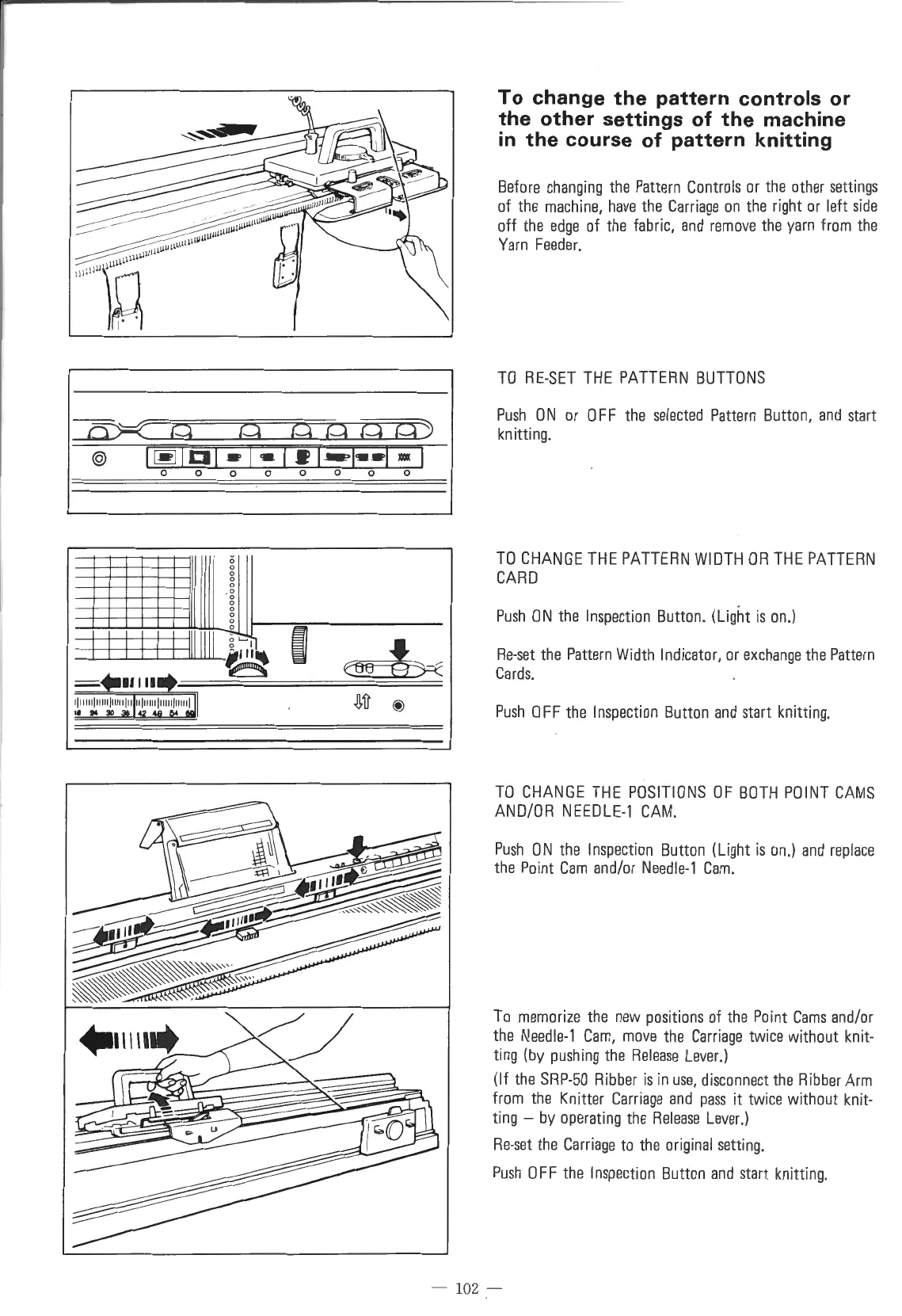
To
change
the
pattern
controls
or
the
other
settings
of
the
machine
in
the
course
of
pattern
knitting
Before
changing
the
Pattern
Controls
or
the
other
settings
of
the
machine,
have
the
Carriage
on
the
right
or
left
side
off
the
edge
of
the
fabric,
and
remove
the
yarn
from
the
Yarn
Feeder.
TO
RE-SET
THE
PATTERN
BUTTONS
Push
0 N
or
0 F F
the
selected
Pattern
Button,
and
start
knitting.
TO
CHANGE
THE
PATTERN
WIDTH
OR
THE
PATTERN
CARD
Push
ON
the
Inspection
Button.
(Light
is
on.)
Re-set
the
Pattern
Width
Indicator,
or
exchange
the
Pattern
Cards
.
Push
OFF
the
Inspection
Button
and
start
knitting.
TO
CHANGE
THE
POSITIONS
OF
BOTH
POINT
CAMS
AND/OR
NEEDLE-1
CAM
.
Push
ON
the
Inspection
Button
(Light
is
on.)
and
replace
the
Point
Cam
and/or
Needle-1
Cam.
To
memorize
the
new
positions
of
the
Point
Cams
and/or
the
Needle-1
Cam,
move
the
Carriage
twice
without
knit-
ting
(by
pushing
the
Release
Lever
.)
(If
the
SRP-50
Ribber
is
in
use,
disconnect
the
Ribber
Arm
from
the
Knitter
Carriage
and
pass
it
twice
without
knit-
ting
-
by
operating
the
Release
Lever.)
Re-set
the
Carriage
to
the
original
setting.
Push
OFF
the
Inspection
Button
and
start
knitting.
-
10
2 -

Table of Contents

Other manuals for Singer 560

Related product manuals