EasyManua.ls Logo

Singer 560 - Drawing a Pattern on the Design Card

Singer 560
124 pages
Print Icon
To Next Page IconTo Next Page
To Previous Page IconTo Previous Page
Loading...
0
0
0
0
0
0
0
0
0
0
0
0
0
0
0
0
0
0
0
0
0
0
0
0
0
0
0
0
0
0
DRAWING
A
PATTERN
ON
THE
DESIGN
CARD
t_
~···
..
..
. .
..
...
\
0
0
0
0
0
0
0
0
0
0
0
0
0
0
0
0
0
0
0
0
0
0
0
0
0
0
0
0
0
0
0
0
0
0
0
0
0
0
0
0
0
0
0
~
"
~
-
~
~
=
~
!;
Ftb..
-
~
!illiiiil!
~
~
1§1"
-
~
:
w
=
~
~
-
~
6
12
18
24
30 36
42
48
4
~
'1.\
_
....
~
""'!~
~
~,~
,
t~
.
.4
I
~
--"1
~
--.r
·.~2,..
v
~~
~
~~
,
II!.
~fll"
I!!~
IIIII""
I:.
I
~
,.
...-""
rJ
r-
-
•o
c
c
r-
_.,
c
r-
-
10
c
c
r-
-
41
c
c
f--
-
40
c
r-
-
..
c
c
r-
-
>0
c
c
f--
-
zs
c
r-
-
•o
c
c
f--
_
,.
c
c
r-
-
'0
c
r-
- .
c
c
'----
c
c
c
c
c
c
c
c
c
c
c
54
60
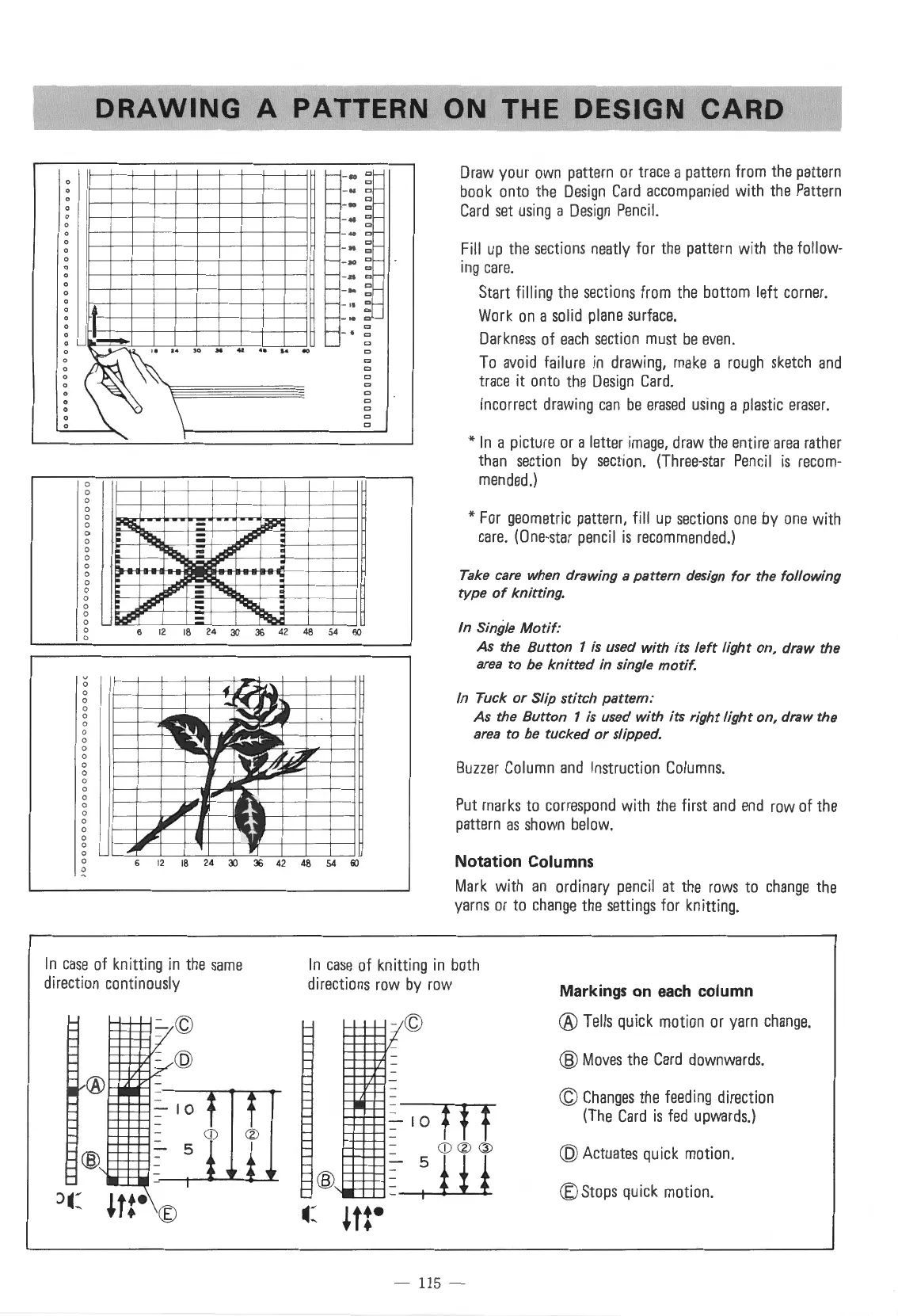
Draw
your
own
pattern
or
trace
a
pattern
from
the
pattern
book
onto
the
Design
Card
accompanied
with
the
Pattern
Card
set
using
a
Design
Pencil.
Fill
up
the
sections
neatly
for
the
pattern
with
the
follow-
ing
care.
Start filling
the
sections
from
the
bottom left
corner.
Work
on
a
solid
plane
surface.
Darkness
of
each
section
must
be
even.
To
avoid
failure
in
drawing,
make
a
rough
sketch
and
trace
it
onto
the
Design
Card.
Incorrect
drawing
can
be
erased
using
a
plastic
eraser.
*In
a picture
or
a letter
image,
draw
the
entire
area
rather
than
section
by
section.
(Three-star
Pencil
is
recom-
mended
.)
*For
geometric
pattern, fill
up
sections
one
by
one
with
care.
(One-star
pencil
is
recommended.)
Take care when drawing a pattern design for the following
type
of
knitting.
In
Single Motif:
As
the Button 1 is used with its
left
light on, draw the
area
to
be
knitted
in single motif.
In
Tuck or Slip stitch pattern:
As
the Button 1 is used with its right light on, draw the
area
to
be
tucked or slipped.
Buzzer
Column
and
Instruction
Columns.
Put
marks
to
correspond
with
the
first
and
end
row
of
the
pattern
as
shown
below.
Notation Columns
Mark
with
an
ordinary
pencil
at
the
rows
to
change
the
yarns
or
to
change
the
settings
for knitting.
In
case
of knitting
in
the
same
direction continously
In
case
of knitting
in
both
directions
row
by
row
Markings
on
each
column
- ©
- 115 -
®
Tells
quick
motion
or
yarn
change.
®
Moves
the
Card
downwards.
©
Changes
the
feeding
direction
(The
Card
is
fed
upwards.)
@Actuates
quick
motion.
®Stops
quick
motion.

Table of Contents

Other manuals for Singer 560

Related product manuals