EasyManua.ls Logo

Singer 560 - Dropped Stitch Resolution

Singer 560
124 pages
Print Icon
To Next Page IconTo Next Page
To Previous Page IconTo Previous Page
Loading...
..)
0
0
I
0
0
-,.b-~
~
-10
~
I
'~
J[
\
lid~
,~~
w
~
\
~
II
\
~
~
@
[
55
-
-
+
50
-
-
45
-
-
-
40
-
-
35
-
-
-
-
30
"'
-~
-
-
-
-
25
-
-
-
\
II
~t
@
00
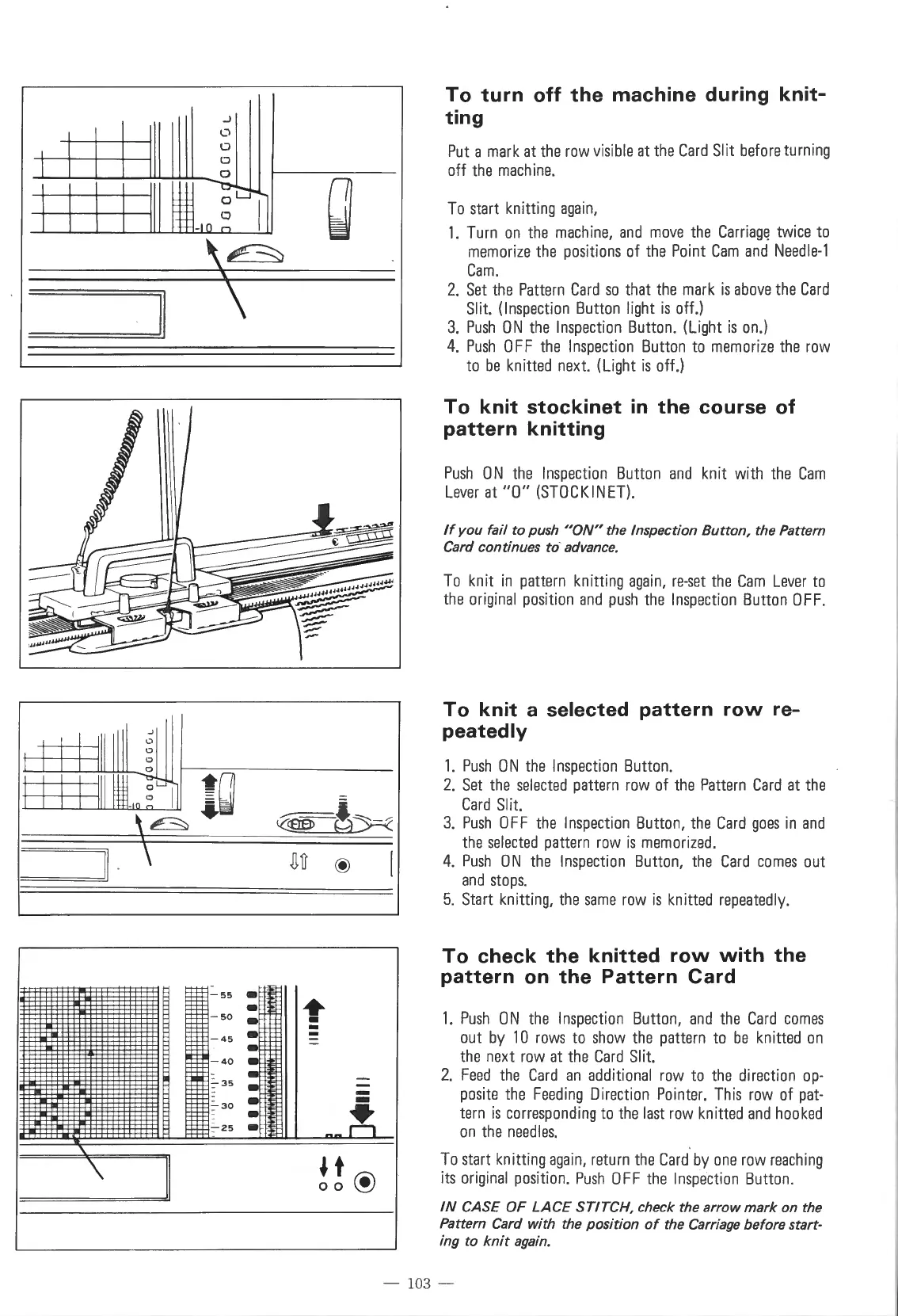
To
turn
off
the
machine
during
knit-
ting
Put
a
mark
at
the
row
visible
at
the
Card
Slit
before
turning
off
the
machine.
To
start
knitting
again,
1.
Turn
on
the
machine,
and
move
the
Carriag~
twice
to
memorize
the
positions
of
the
Point
Cam
and
Needle-1
Cam.
2.
Set
the
Pattern
Card
so
that
the
mark
is
above
the
Card
Slit.
(Inspection
Button
light
is
off.)
3.
Push
ON
the
Inspection
Button.
(Light
is
on.)
4.
Push
0
FF
the
Inspection
Button
to
memorize
the
row
to
be
knitted
next.
(Light
is
off.)
To
knit
stockinet
in
the
course
of
pattern
knitting
Push
ON
the
Inspection
Button
and
knit
with
the
Cam
Lever
at
"0"
(STOCKINET).
If
you
fail
to push
"ON"
the Inspection Button, the Pattern
Card
continues to-advance.
To
knit
in
pattern
knitting
again,
re-set
the
Cam
Lever
to
the
original
position
and
push
the
Inspection
Button
OFF.
To
knit
a selected
pattern
row
re-
peatedly
1.
Push
0 N
the
Inspection
Button
.
2.
Set
the
selected
pattern
row
of
the
Pattern
Card
at
the
Card
Slit.
3.
Push
0 F F
the
Inspection
Button,
the
Card
goes
in
and
the
selected
pattern
row
is
memori
z
ed.
4.
Push
0 N
the
Inspection
Button,
the
Card
comes
out
and
stops.
5.
Start
knitting,
the
same
row
is
knitted
repeatedly.
To
check
the
knitted
row
with
the
pattern
on
the
Pattern
Card
1.
Push
ON
the
Inspection
Button,
and
the
Card
comes
out
by
10
rows
to
show
the
pattern
to
be
knitted
on
the
next
row
at
the
Card
Slit.
2.
Feed
the
Card
an
additional
row
to
the
direction
op-
posite
the
Feeding
Direction
Pointer.
This
row
of
pat-
tern
is
corresponding
to
the
last
row
knitted
and
hooked
on
the
needles.
To
start
knitting
again,
return
the
Card
by
one
row
reaching
its
original
position.
Push
0
FF
the
Inspection
Button.
IN CASE OF LACE STITCH, check the arrow mark on the
Pattern
Card
with the position
of
the
Carriage
before start-
ing to
knit
again.
103 -

Table of Contents

Other manuals for Singer 560

Related product manuals