If
a needle has been
damaged
...
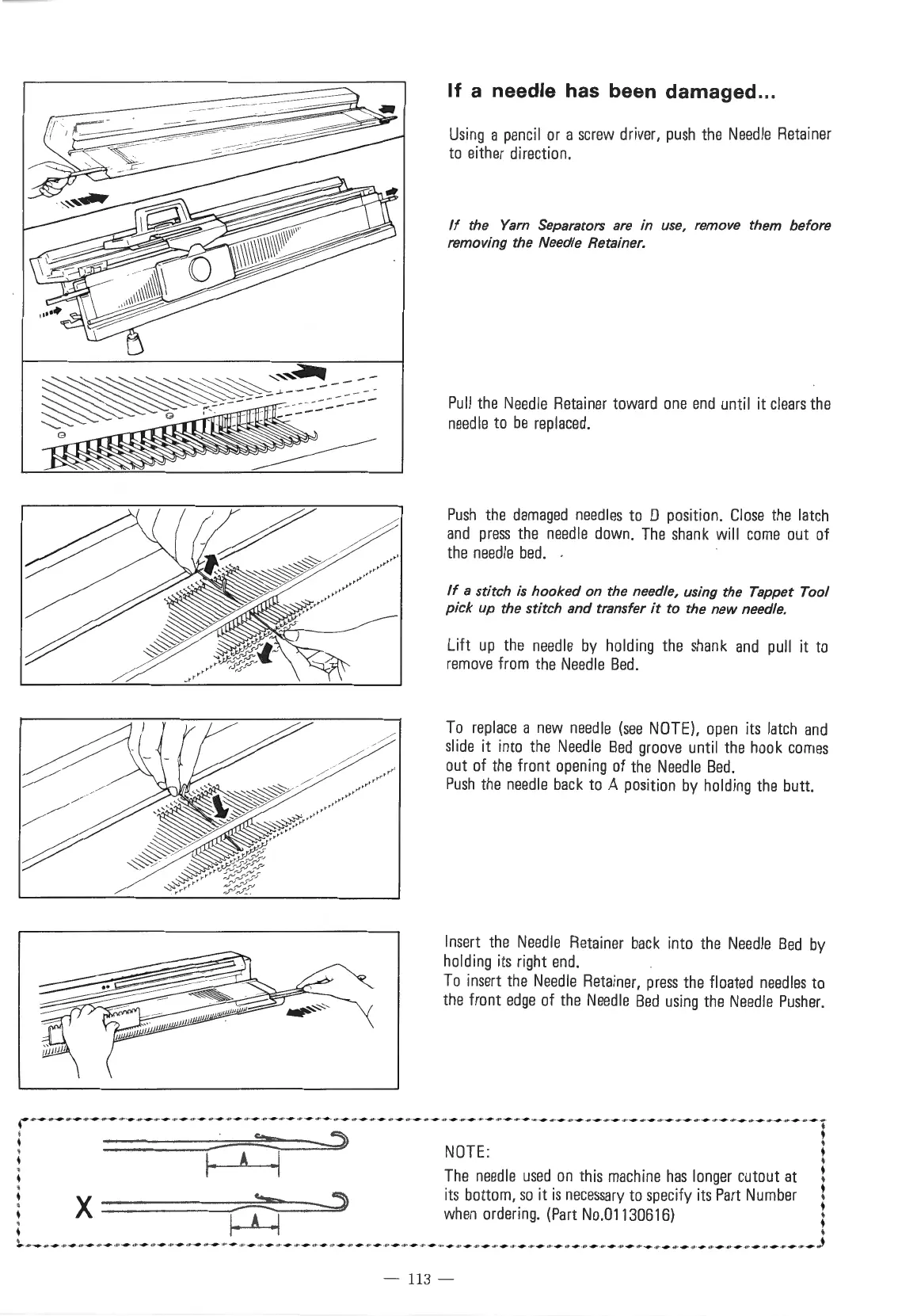
Using
a
pencil
or
a
screw
driver,
push
the
Needle
Retainer
to
either
direction.
If
the
Yarn
Separators
are
in use, remove them before
removing the Needle Retainer.
Pull
the
Needle
Retainer
toward
one
end
until it
clears
the
needle
to
be
replaced.
Push
the
damaged
needles
to
0
position.
Close
the
latch
and
press
the
needle
down.
The
shank
will
come
out
of
the
needle
bed.
.
If
a stitch
is
hooked
on the needle, using the Tappet Tool
pick up the stitch and transfer
it
to the
new
needle.
Lift
up
the
needle
by
holding
the
shank
and
pull
it
to
remove
from
the
Needle
Bed
.
To
replace
a
new
needle
(see
NOTE),
open
its
latch
and
slide
it
into
the
Needle
Bed
groove
until
the
hook
comes
out
of
the
front
opening
of
the
Needle
Bed.
Push
the
needle
back
to
A
position
by
holding
the
butt.
Insert
the
Needle
Retainer
back
into
the
Needle
Bed
by
holding
its
right
end.
To
insert
the
Needle
Retainer,
press
the
floated
needles
to
the
front
edge
of
the
Needle
Bed
using
the
Needle
Pusher.
· ·-·-·-·-·-·-·-·-·-·-·-·-·-·-·-·-·-·-·-·-·-·-·-·-·-·-·-·-·-·-·-·-·-·-·-·-·-·-·-·-·-·-·-·-!
~
-:----5)
NOTE
: •
I· A ·I
The
needle
used
on
this
machine
has
longer
cutout
at
t
X
~
~
its
bottom,
so
it
is
necessary
to
specify
its
Part
Number
t
, 1 A 1
when
ordering.
(Part
No.01130616)
;
.
~
.
~
-
-
-
-
-
-
-
-
-
-
-
-
-
-
-
-
-
-
-
-
-
-
-
-
-
-
·~
-
-
-
-
-
-
-
-
-
-
-
-
-
-
-
-
-
-
-
-
-
-
-
-
-
-
-
-
-
-
-
-
-
-
-
-
-
-
-
-
-
-
-
-
-
-
-
-
-
-
-
-
-
-
-
-
-
-
-
-
-)
- 113 -



 To Next Page