EasyManua.ls Logo

Singer 560 - Ribber Setup and Operations; Set up Knitter; Remove Carriage Fastener; Set Cam Lever

Singer 560
124 pages
Print Icon
To Next Page IconTo Next Page
To Previous Page IconTo Previous Page
Loading...
CD
T
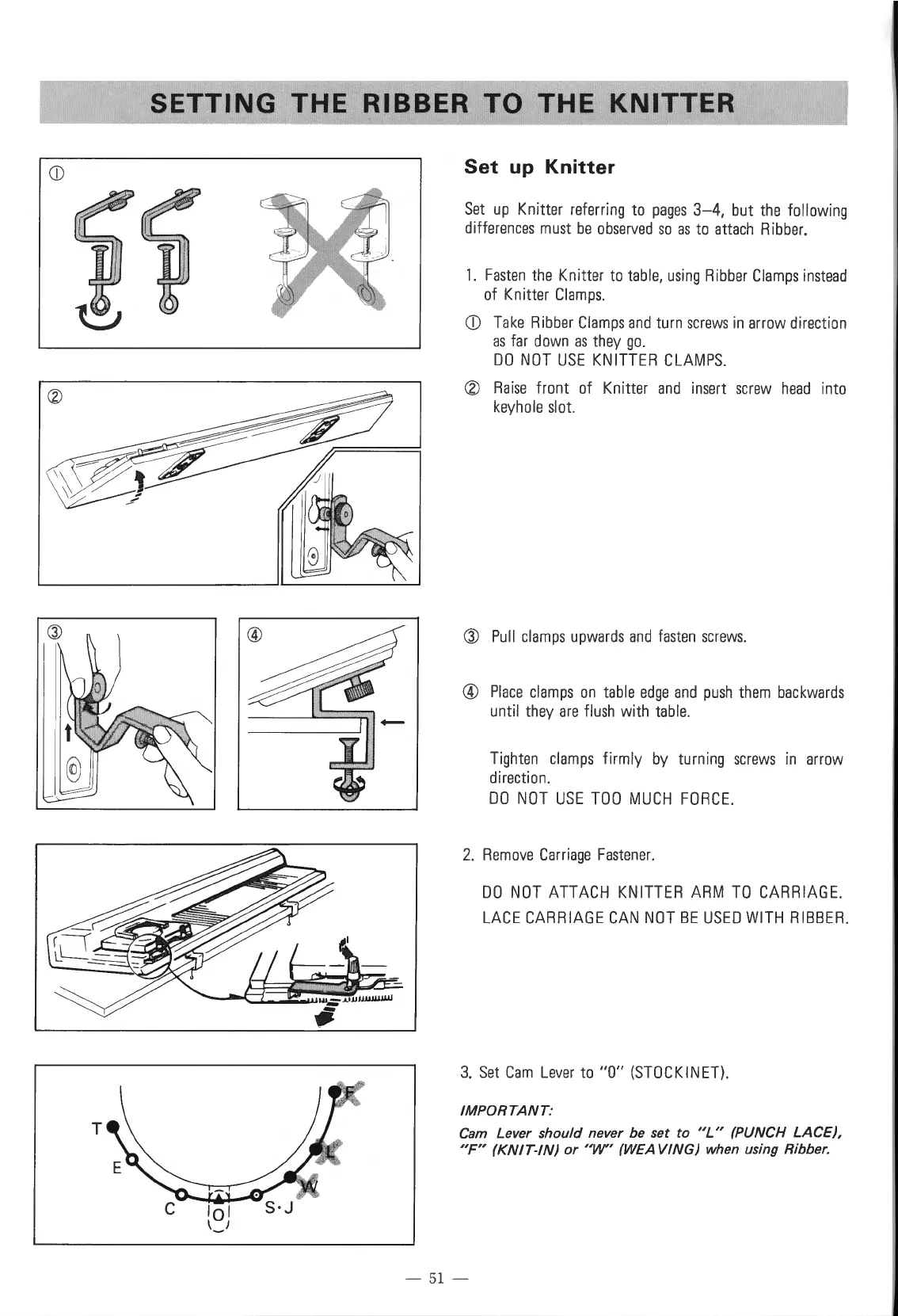
SETTING
THE
RIBBER
TO
THE
KNITTER
Set
up
Knitter
Set
up
Knitter
referring
to
pages
3-4,
but
the
following
differences
must
be
observed
so
as
to
attach
Ribber.
1.
Fasten
the
Knitter
to
table,
using
Ribber
Clamps
instead
of
Knitter
Clamps.
CD
Take
Ribber
Clamps
and
turn
screws
in
arrow
direction
as
far
down
as
they
go.
DO
NOT
USE
KNITTER
CLAMPS.
®
Rai
se front
of
Knitter
and
insert
screw
head
into
keyhole
slot.
Q)
Pull
clamps
upwards
and
fasten
screws
.
@
Place
clamps
on
table
edge
and
push
them
backwards
until
they
are
flush
with
table.
Tighten
clamps
firmly
by
turning
screws
in
arrow
direction
.
DO
NOT
USE
TOO
MUCH
FORCE.
2.
Remove
Carriage
Fastener
.
DO
NOT
ATTACH
KNITTER
ARM
TO
CARRIAGE.
LACE
CARRIAGE
CAN
NOT
BE
USED
WITH
RIBBER
.
3.
Set
Cam
Lever
to
"0"
(STOCKINET).
IMPORTANT:
Cam
Lever should never be set
to
"L"
(PUNCH
LACE),
"F"
(KNIT-IN)
or
"W"
(WEAVING)
when using Ribber.
-
51
-

Table of Contents

Other manuals for Singer 560

Related product manuals