EasyManua.ls Logo

Singer 560 - Page 67

Singer 560
124 pages
Print Icon
To Next Page IconTo Next Page
To Previous Page IconTo Previous Page
Loading...
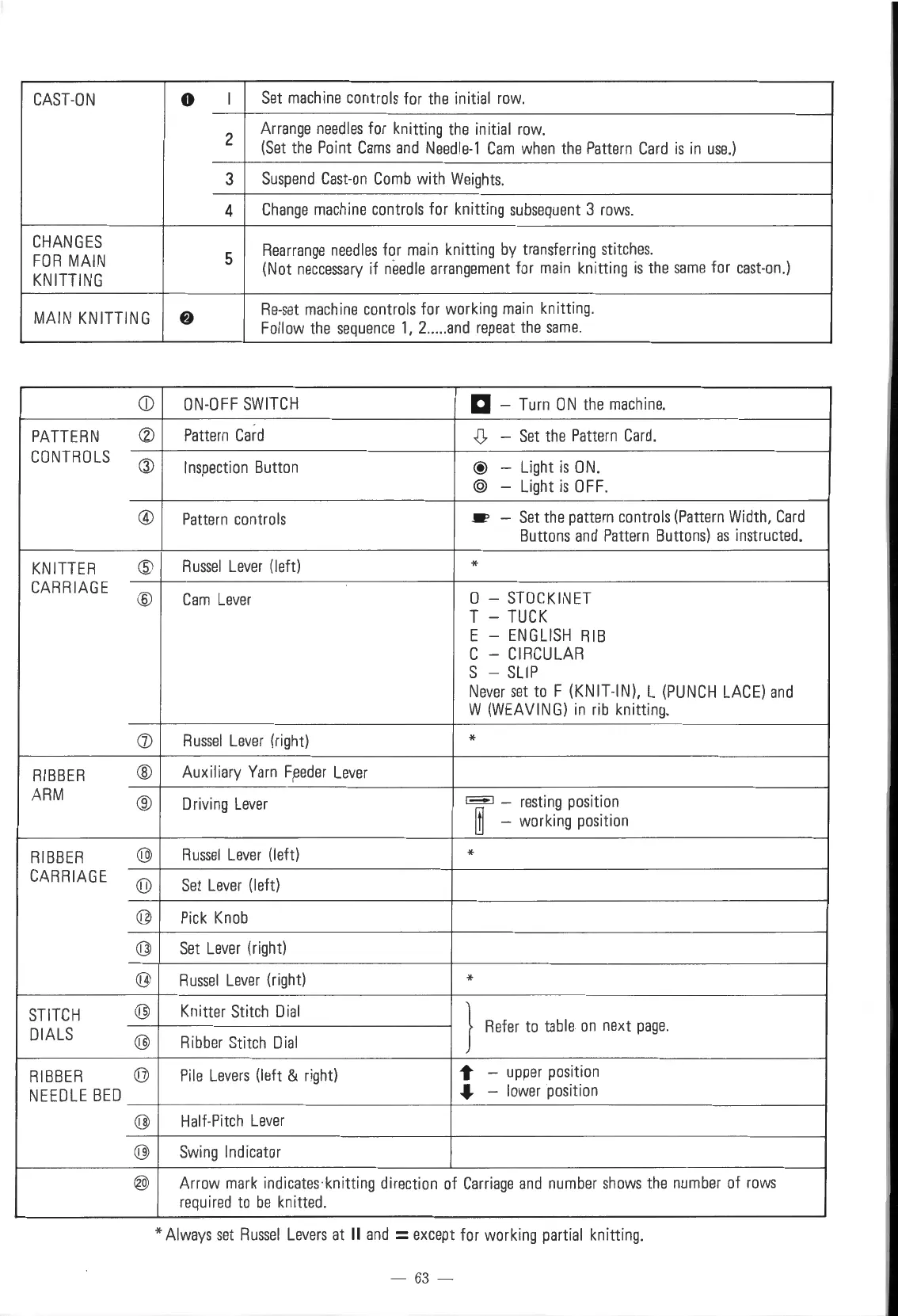
CAST-ON
0
I
Set
machine
controls
for
the
initial
row.
2
Arrange
needles
for knitting
the
initial
row.
(Set
the
Point
Cams
and
Needle-1
Cam
when
the
Pattern
Card
is
in
use.)
3
Suspend
Cast-on
Comb
with
Weights.
4
Change
machine
controls
for knitting
subsequent
3
rows.
CHANGES
Rearrange
needles
for
main
knitting
by
transferring
stitches
.
FOR
MAIN
5
(Not
neccessary
if
needle
arrangement
for
main
knitting
is
the
same
for
east-on.)
KNITTING
MAIN
KNITTING
8
Re-set
machine
controls
for
working
main
knitting.
Follow
the
sequence
1,
2
....
.
and
repeat
the
same.
CD
ON-OFF
SWITCH
a -
Turn
ON
the
machine.
PATTERN
®
Pattern
Card
,(),
-
Set
the
Pattern
Card.
CONTROLS
Q)
Inspection
Button
@
-
Light
is
ON.
@
- Light
is
OFF.
®
Pattern
controls
_.,
-
Set
the
pattern
controls
(Pattern
Width,
Card
Buttons
and
Pattern
Buttons)
as
instructed.
KNITTER
@
Russel
Lever
(left)
*
CARR
I
AGE
@
Cam
Lever
0 -
STOCKINET
T -
TUCK
E -
ENGLISH
RIB
C -
CIRCULAR
S -
SLIP
Never
set
to
F (KNIT-IN), L
(PUNCH
LACE)
and
W
(WEAVING)
in
rib
knitting.
([)
Russel
Lever
(right)
*
RIBBER
®
Auxiliary
Yarn
F,
eeder
Lever
ARM
®
Driving
Lever
,_,
-
resting
position
rn
-
working
position
RIBBER
@
Russel
Lever
(left)
*
CARRIAGE
(iJ)
Set
Lever
(left)
@
Pick
Knob
@J
Set
Lever
(right)
@
Russel
Lever
(right)
*
STITCH
@ Knitter
Stitch
Dial
}
DIALS
Refer
to
table
on
next
page.
@
Ribber
Stitch
Dial
RIBBER
@
Pile
Levers
(left &
right)
1"
-
upper
position
NEEDLE
BED
...
-
lower
position
@
Half-Pitch
Lever
@
Swing
Indicator
@
Arrow
mark
indicates
knitting direction
of
Carriage
and
number
shows
the
number
of
rows
required
to
be
knitted.
*Always
set
Russel
Levers
at
II
and
=except for
working
partial
knitting.
-
63
-

Table of Contents

Other manuals for Singer 560

Related product manuals