Sirona Dental Systems GmbH 14 SIVISION 3 / SIROCAM 3 / SIROCAM C
C3
+
14.4 SIROCAM C intraoral camera (extra equipment)
59 06 404 D 3390
D 3390.201.01.18.02
89
Hygienic protective sleeves for SIROCAM C
Hygienic protective sleeves are available for the camera.
They can be ordered under REF 59 14 705. Package
size: 500 pcs.
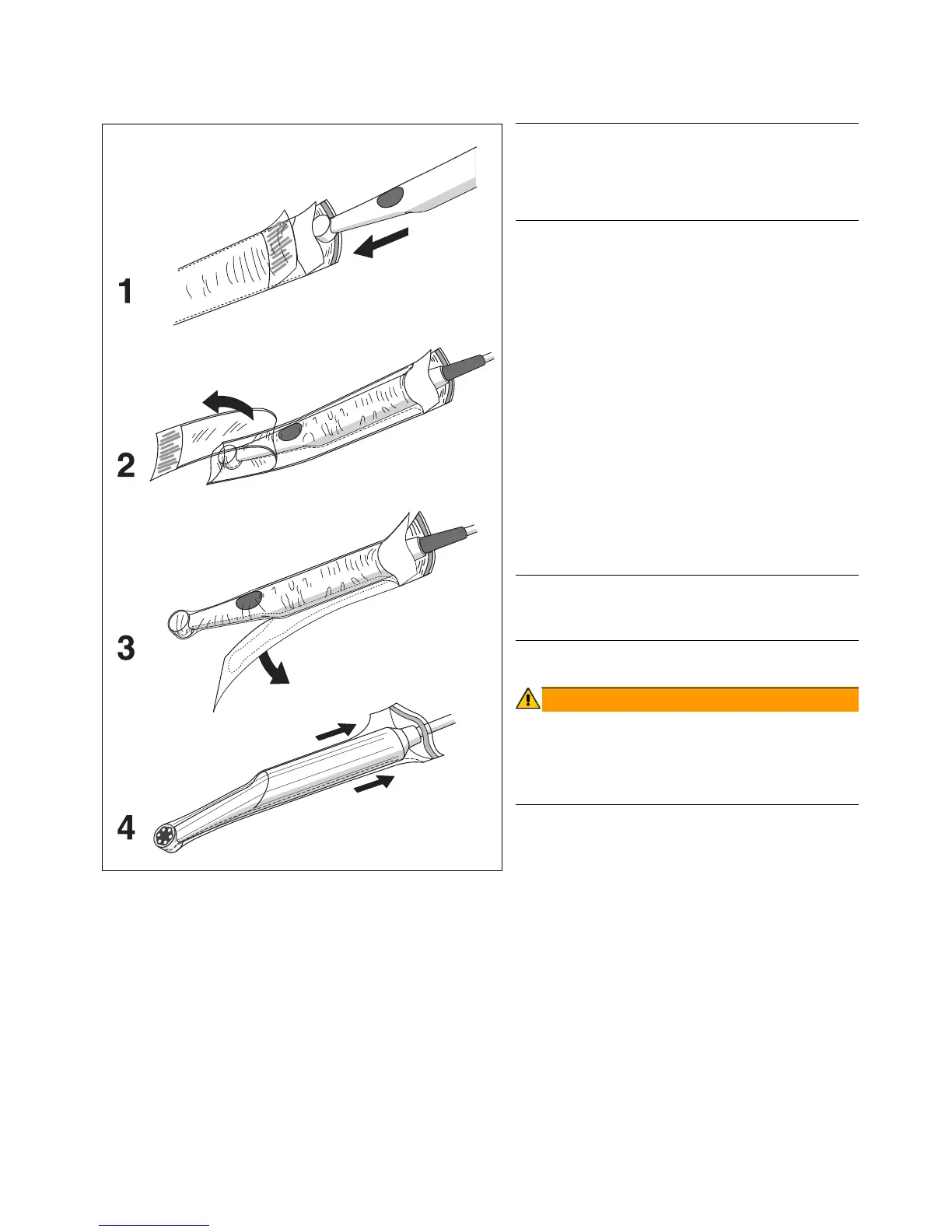
How to use the hygienic protective sleeves:
1. Hold the hygienic protective sleeve with its paper
side face-down and insert the camera with the opti-
cal system downward into the sleeve.
2. Pull off the upper protective foil with the blue stripe.
3. Then pull off the backing paper.
4. Finally, stretch the hygienic protective sleeve over
the camera from front to rear.
For optimum image quality, there must not be any folds in
the transparent area of the cover above the lens window.
Use only the hygienic protective covers offered by
Sirona.
Prior to each application on a new patient, the camera
must be covered with a new hygienic protective sleeve.













 To Next Page