14 SIVISION 3 / SIROCAM 3 / SIROCAM C Sirona Dental Systems GmbH
14.8 SIROCAM 3 / SIROCAM C integrated in the assistant element (video) C3
+
59 06 404 D 3390
102 D 3390.201.01.18.02
14.8 SIROCAM 3 / SIROCAM C integrated in the assistant element
(video)
Operation in video mode
If a PC is connected, PC mode must be switched OFF!
See section "Switching between VIDEO mode and PC
mode" on page 110.
In this version, the SIROCAM 3 / SIROCAM C intraoral
camera is installed in holder 1 or 2 of the assistant
element.
It is operated exclusively with a separate foot button in
the chair base and the camera button.
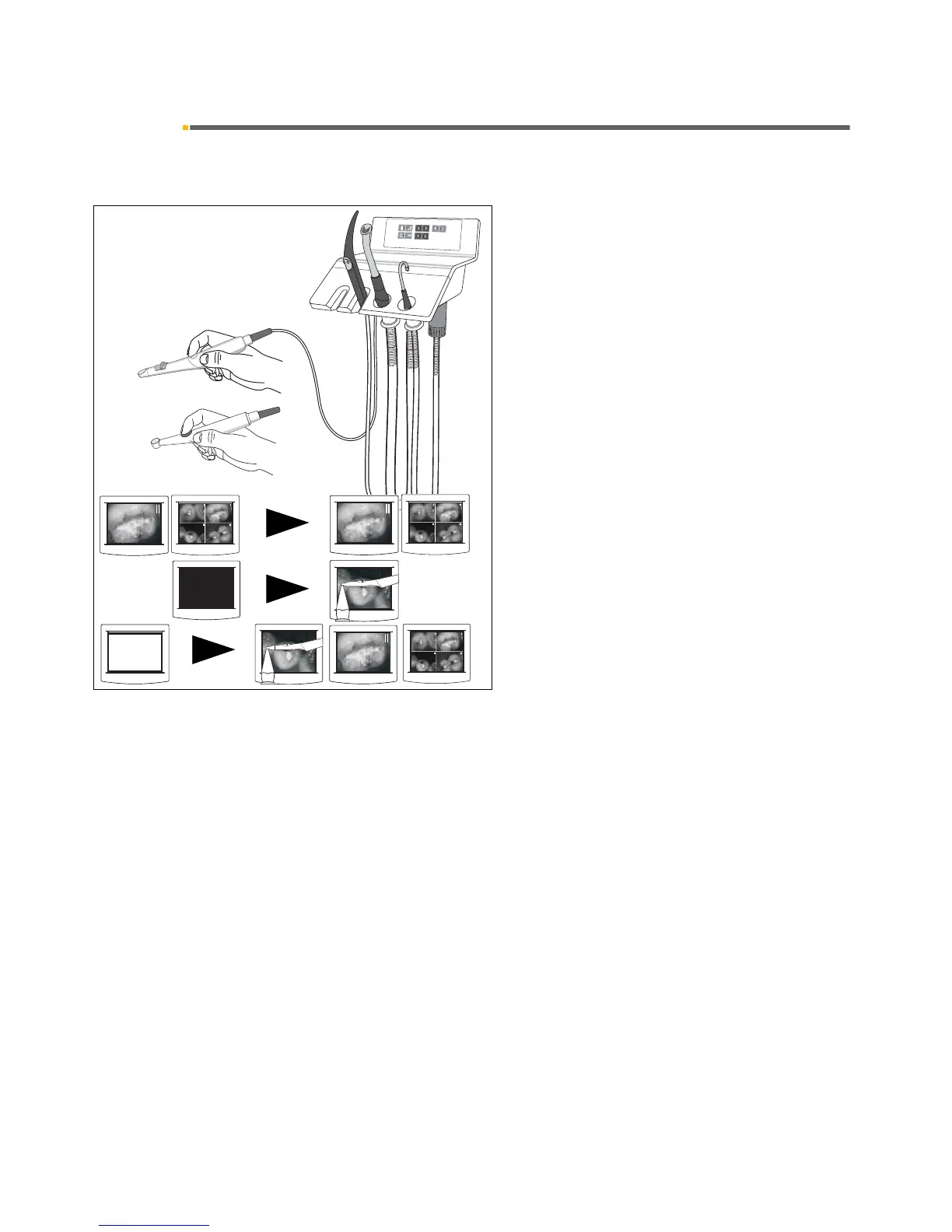
Picking up the camera
•If a STILL IMAGE or QUAD IMAGE was displayed
while the camera was in place, this view is retained.
•If a BLACK SCREEN was displayed while the
camera was in place, a LIVE IMAGE appears.
•If a WHITE SCREEN was displayed while the
camera was in place, the view preceding the WHITE
SCREEN, i.e. a LIVE, STILL or QUAD IMAGE,
reappears.













 To Next Page