14 SIVISION 3 / SIROCAM 3 / SIROCAM C Sirona Dental Systems GmbH
14.11 SIVISION 3– second monitor function without SIROCAM3 / SIROCAM C C3
+
59 06 404 D 3390
112 D 3390.201.01.18.02
14.11 SIVISION 3– second monitor function without SIROCAM3 /
SIROCAM C
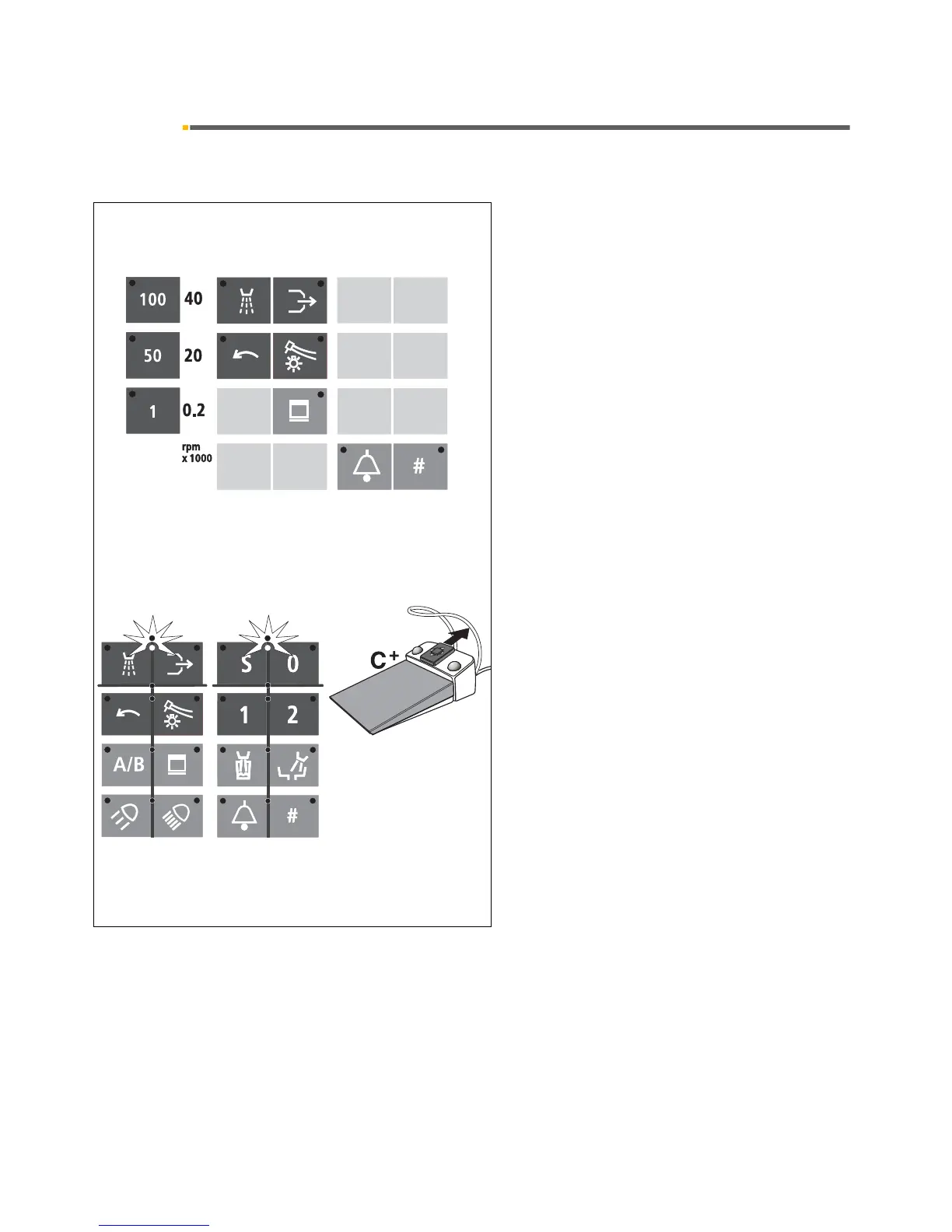
The monitor integrated in the treatment center serves as
primary or secondary monitor for the externally con-
nected PC. The following function keys of the control
panels as well as foot switch functions are available for
controlling PC functions:
• Spray
• Chip blower
• Electric motor CCW rotation
• Instrument light
• Call key (if not already used for relay functions)
• # key (if not already used for relay functions)
• All quick adjustment keys, i.e. 100, 50, and 1
• Cursor forward, if the cursor is between the
spray and chip blower keys
• Cursor forward, if the cursor is between the S
and 0 chair program keys
(Cursor slider forward.)
All instruments must be in place when you do so!
As well as the function keys:
• X-ray image viewer
They can be used to control e.g. SIDEXIS/VIDEXIS
functions such as Tile, Next Image, Full Frame, Zoom
In, Zoom Out, Rotate Image, but also other PC applica-
tions.
The factory settings and the configuration procedure are
described in the "SIVISION Installation Manual for PC
Software" REF 59 11 719.













 To Next Page