EasyManua.ls Logo

Smartgen ALC404 - Page 44

Smartgen ALC404
83 pages
Print Icon
To Next Page IconTo Next Page
To Previous Page IconTo Previous Page
Loading...
ALC404 LIGHTING TOWER CONTROLLER USER MANUAL
ALC404 Lighting Tower Controller 2018-11-06 Version 1.1 Page 44 of 83
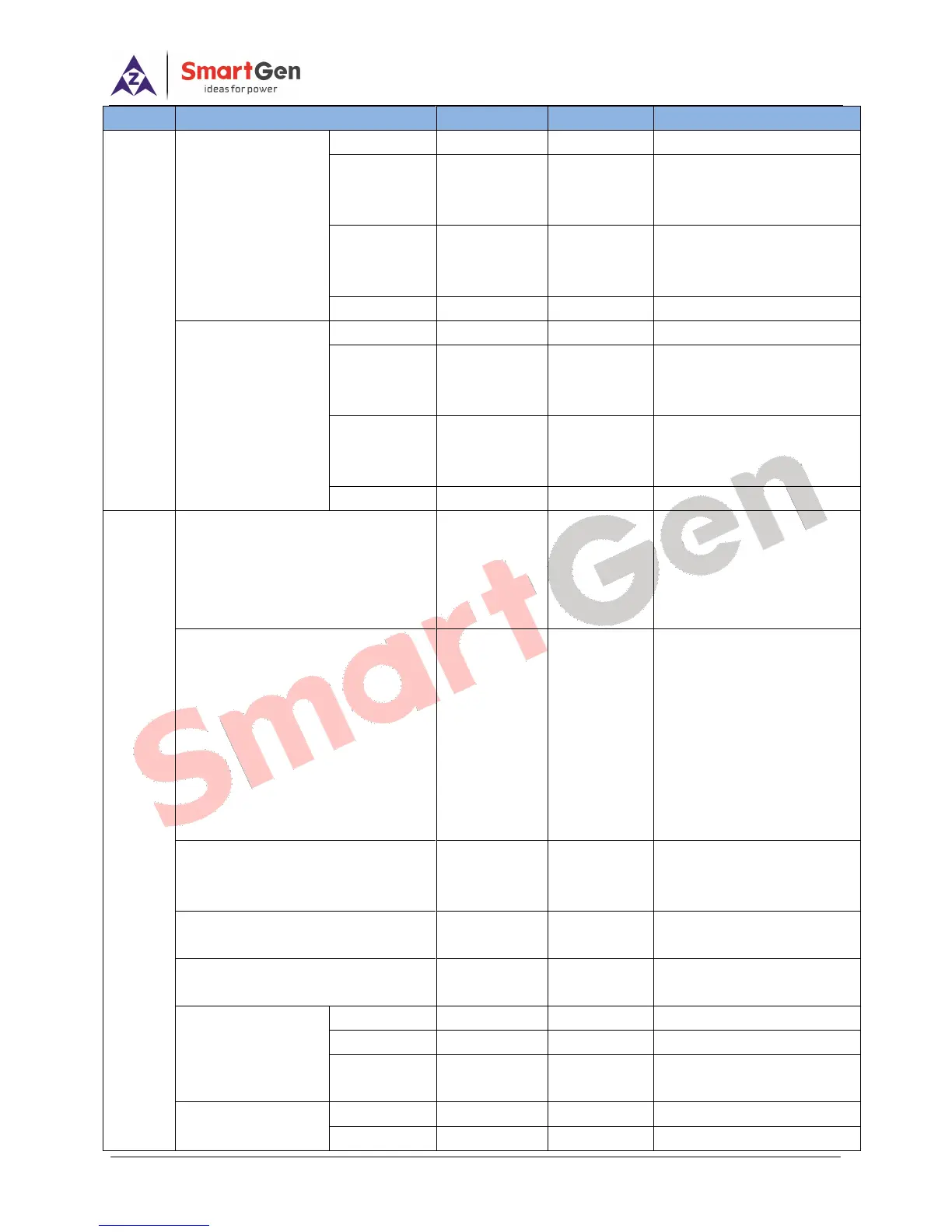
Category
Parameters
Range
Default
Description
Gen. Under
Frequency Warning
Enable
(0~1)
1
0 Disabled 1 Enabled
Set Value
(0~200)%
84
The setting limit is
percentage of generator
rated frequency.
Return
(0~200)%
86
The setting limit is
percentage of generator
rated frequency.
Delay
(0~3600)s
5
Gen Over
Frequency Warning
Enable
(0~1)
1
0 Disabled 1 Enabled
Set Value
(0~200)%
110
The setting limit is
percentage of generator
rated frequency.
Return
(0~200)%
108
The setting limit is
percentage of generator
rated frequency.
Delay
(0~3600)s
3
Mains
Mains Supply Type
(0~4)
0
0 3Phase 4Wire(3P4W)
1 3Phase 3Wire (3P3W)
2 1Phase 2Wire (1P2W)
3 2Phase 3Wire (2P3W)
4 DC Power
Mains Rated Voltage
(10~1000)V
230
Provide standard for
judging mains over/under
voltage. If voltage
transformer is used, it is PT
primary voltage.If AC
system set as 3P3W, it is
line voltage; and if other AC
system is selected, it is
phase voltage.
Mains Rated Frequency
(10.0~600.0)Hz
50.0
Provide standard for
judging mains over/under
frequency.
Mains Normal Delay
(0~3600)s
10
It is delay time to confirm
mains normal.
Mains Abnormal Delay
(0~3600)s
5
It is delay time to confirm
mains abnormal.
Voltage
Transformer (PT)
Enable
(0~1)
0
0 Disabled 1 Enabled
PT Primary
(10~1000)V
110
PT
Secondary
(10~1000)V
110
Mains Under Voltage
Warning
Enable
(0~1)
1
0 Disabled 1 Enabled
Set Value
(0~200)%
80
The setting limit is

Table of Contents

Related product manuals