SmartRG™ Residential Gateways
P a g e | 20 C o n f i d e n t i a l S m a r t R G © 2 0 1 2
No further configuration is necessary.
Configuring the Layer 2 Interface (Ethernet with VLAN Tags)
In some applications it may be necessary to segment the Ethernet WAN interface into separate
VLANs. A common application for a VLAN segmented WAN interface is bridged IPTV as detailed in
the “Bridged IPTV Configuration” section. To configure the layer 2 Ethernet interface to support
VLAN tagged traffic:
1. Select Advanced Setup -> Layer2 Interface. The default Ethernet WAN interface
(eth0.5/LAN4) will be displayed.
2. Check the “Remove” box and click Remove.
3. Click Add.
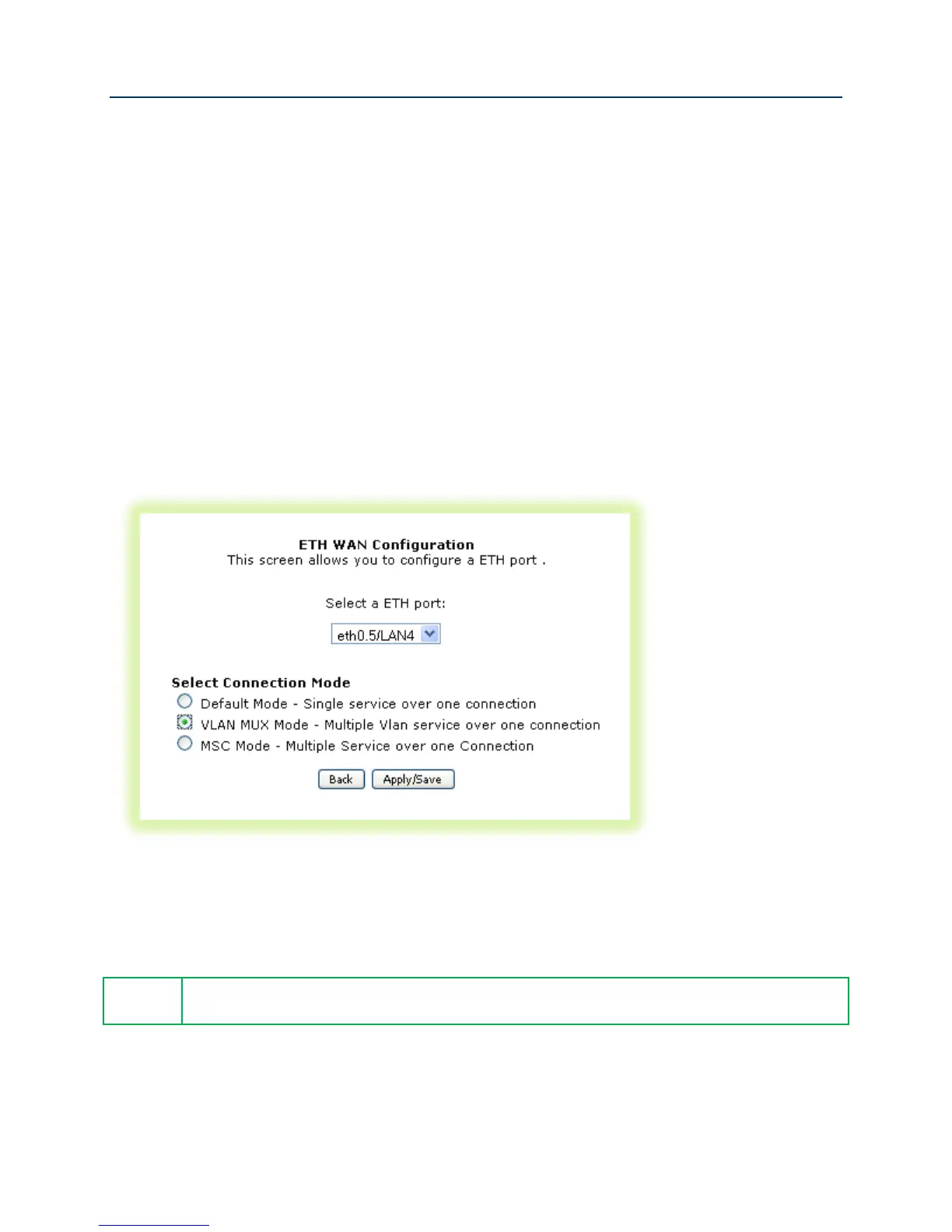
4. Select “VLAN MUX Mode.”
Figure 12 Ethernet Layer 2 Interface Configuration (VLAN Tagged)
5. Click Apply/Save.
802.1P (priority) and 802.1Q (VLAN tag) values will be set at the time of WAN Service
creation as detailed in, “Creating the WAN Service.”



 To Next Page