SmartRG™ Residential Gateways
P a g e | 24 C o n f i d e n t i a l S m a r t R G © 2 0 1 2
Creating the WAN Service
WAN Services are created on top of previously created Layer 2 interfaces. To create a WAN service:
1. Select Advanced Setup -> WAN Service and click Add.
2. Select a previously created layer 2 interface from the drop down list and click Next.
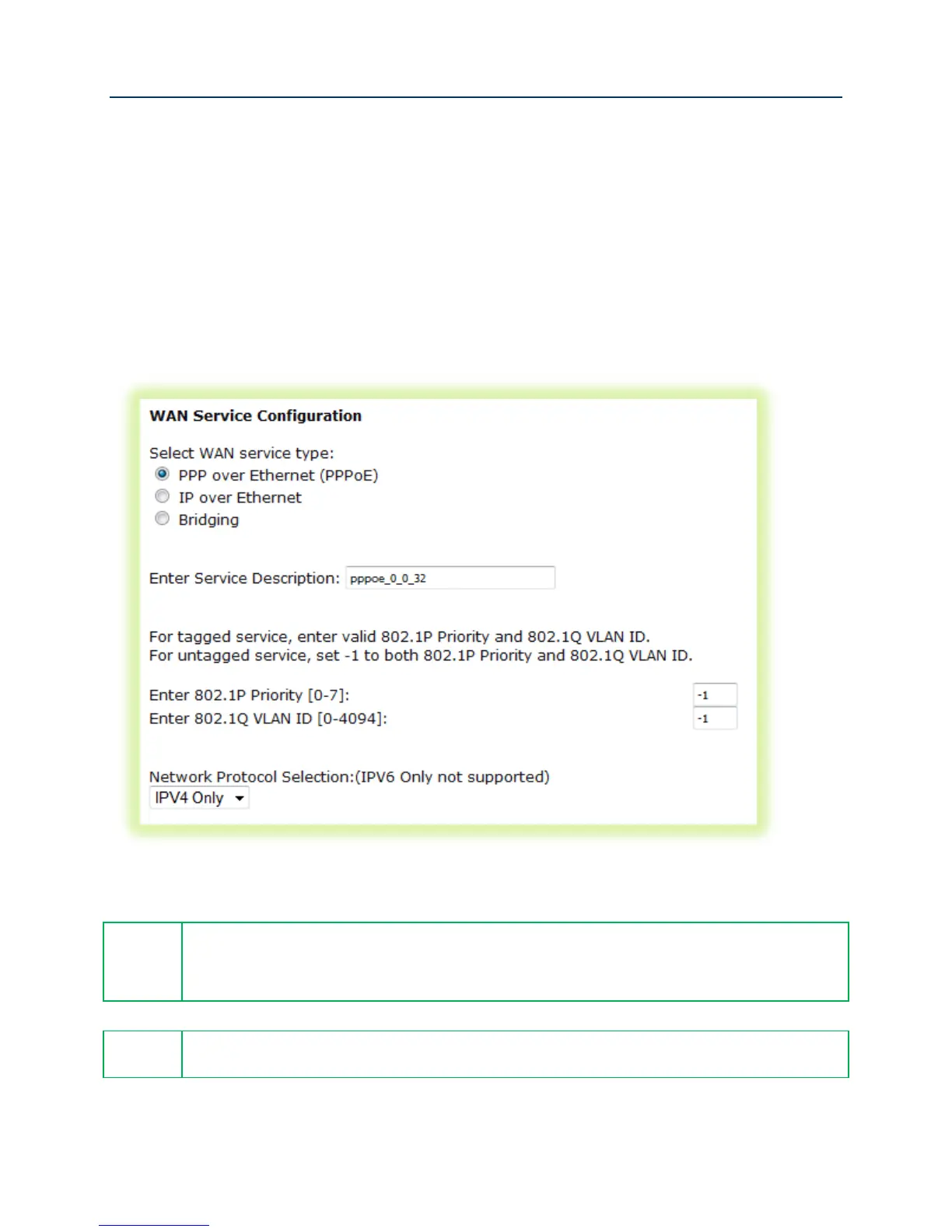
3. Select the “WAN Service type” – “PPP over Ethernet” or “IP over Ethernet” are appropriate
choices for routed WAN services. Bridged WAN services will be covered later in the “Bridged
IPTV Configuration” section.
Figure 15 WAN Service Configuration (With or Without VLAN Tagging Support)
If VLAN tagging support is desired, set the 802.1p and 802.1q values appropriately.
802.1P: 0 is lowest priority, 7 is highest priority, -1 is unused
802.1Q: -1 indicates no VLAN tagging
The SR-350N/NE and SR-500N/NE gateways support mixed VLAN tagged/untagged
traffic on the same WAN interface. Set the untagged WAN connection’s VLAN ID to -1.
4. Click Next.



 To Next Page