SmartRG™ Residential Gateways
P a g e | 52 C o n f i d e n t i a l S m a r t R G © 2 0 1 2
15. Select an “Ether Type” of IP (0x800).
16. Enter the source MAC and Mask values in 01:02:03:04:05:06/FF:FF:FF:00:00:00 format.
17. Assign the Classification Queue (identified by WAN interface&Precedence&Path).
18. Click Apply/Save.
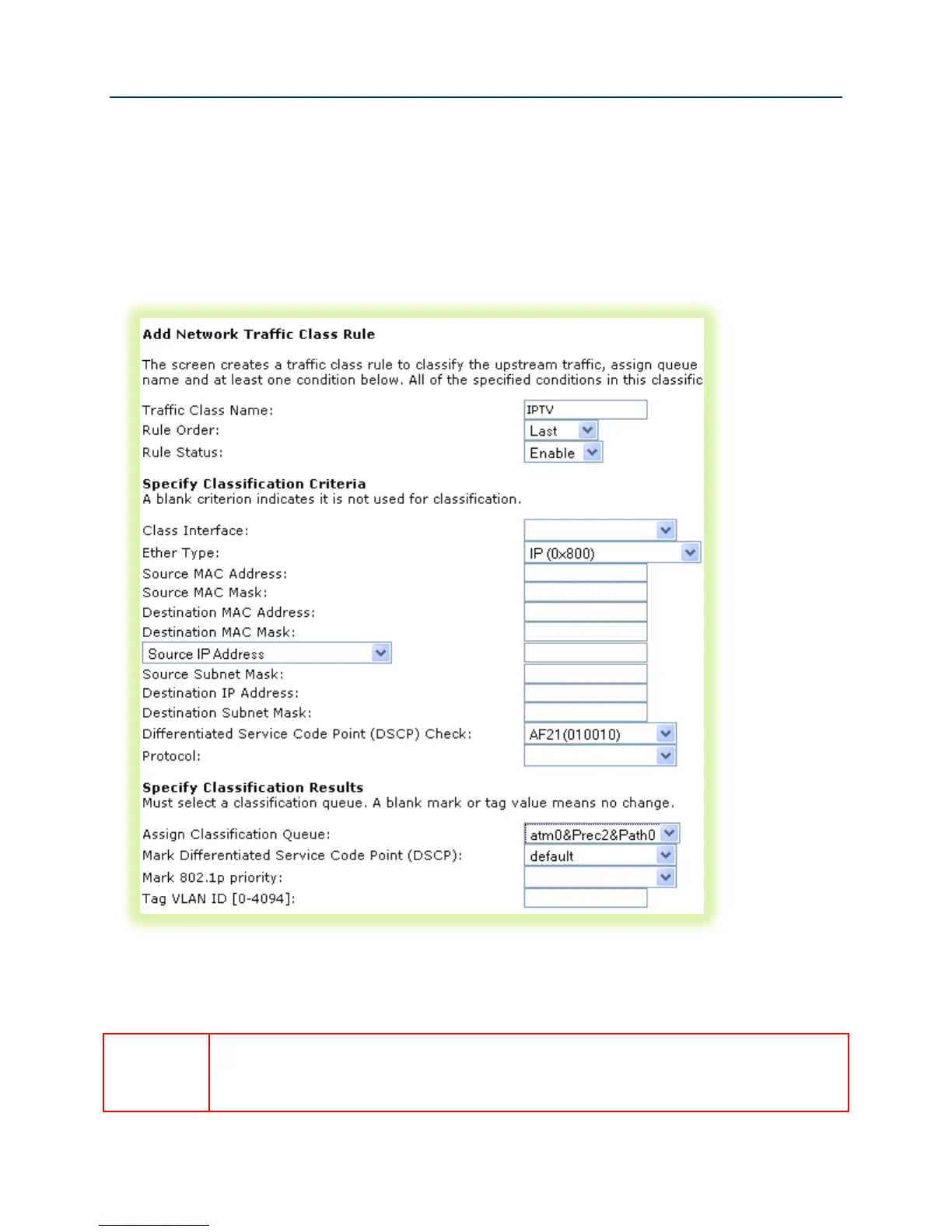
19. Create the IPTV traffic classifier by selecting Advanced Setup -> Quality of Service -> QoS
Classification and click Add.
Figure 44 QoS IPTV Classifier Configuration
20. Set the Name, Rule Order, and enable the classifier rule.
If you create the classifier rules in priority order (VoIP then IPTV), you may leave the
“Rule Order” set to “Last.” Each successive classifier rule created will become the
last one checked in the traffic identification process.



 To Next Page