Configuring Your SmartRG™ - Common Use Cases
S m a r t R G © 2 0 1 2 C o n f i d e n t i a l P a g e | 21
Configuring the Layer 2 Interface (ADSL)
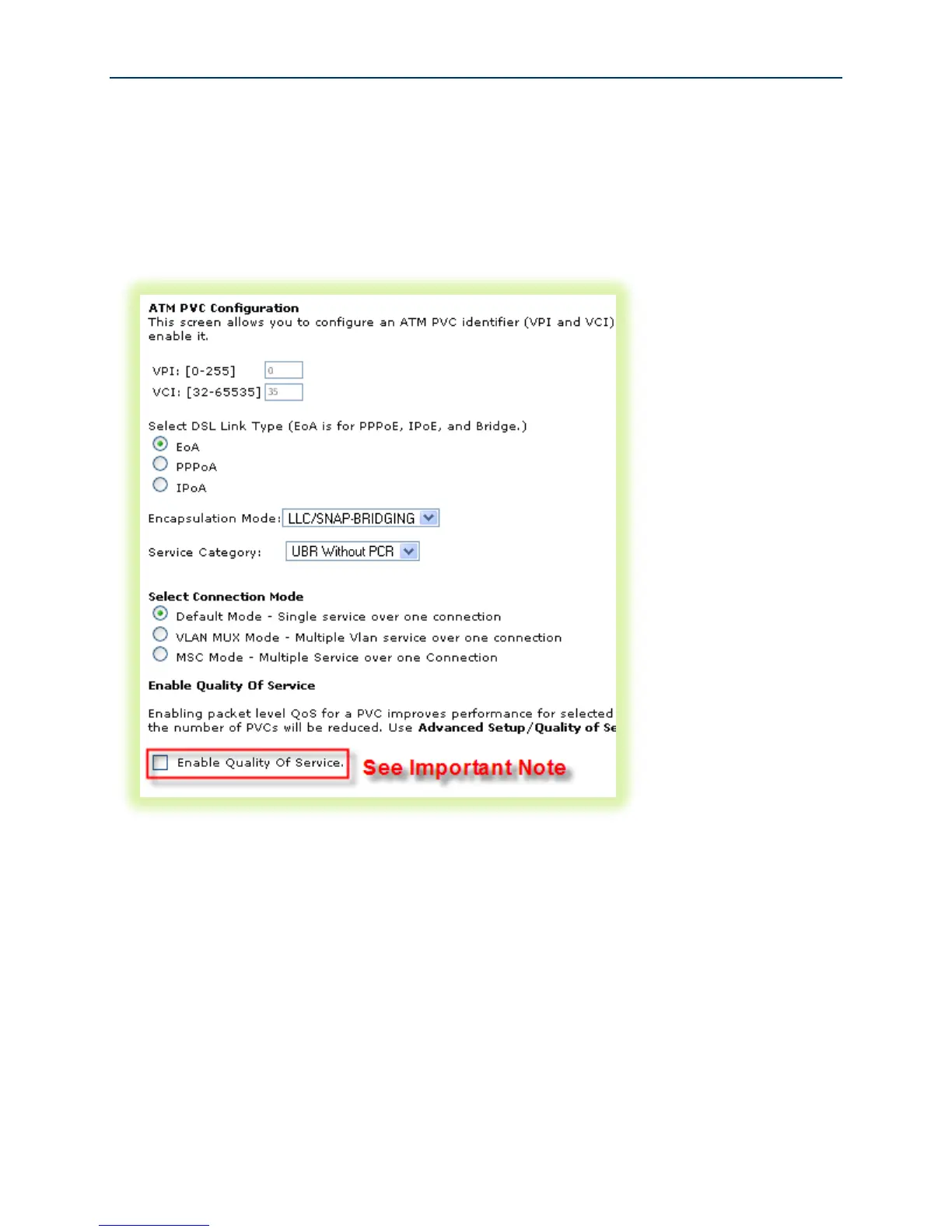
To configure an ADSL layer 2 interface:
1. Select Advanced Setup -> Layer2 Interface and click Add.
Figure 13 ADSL Layer 2 Interface Configuration
2. Enter the PVC’s identifier (VPI/VCI).
3. Select the “DSL Link Type” – Ethernet over ATM (RFC 2684) is typical.
4. Select the “Encapsulation Mode” – LLC/SNAP-BRIDGING is typical.
5. Select the “Service Category” (upstream ATM shaping) – “UBR Without PCR” (Unspecified
Bit Rate Without Peak Cell Rate) is typical.
6. Select the “Connection Mode” – Choose Default Mode for non-VLAN tagged traffic. Choose
VLAN MUX Mode if you intend to segment LAN traffic into separate VLAN tagged WAN
services.



 To Next Page