Sirius 800 www.snellgroup.com Nucleus Upgrade (RollCall) and Maintenance
Issue 1 Rev 1 Page 91 © 2014 Snell Limited
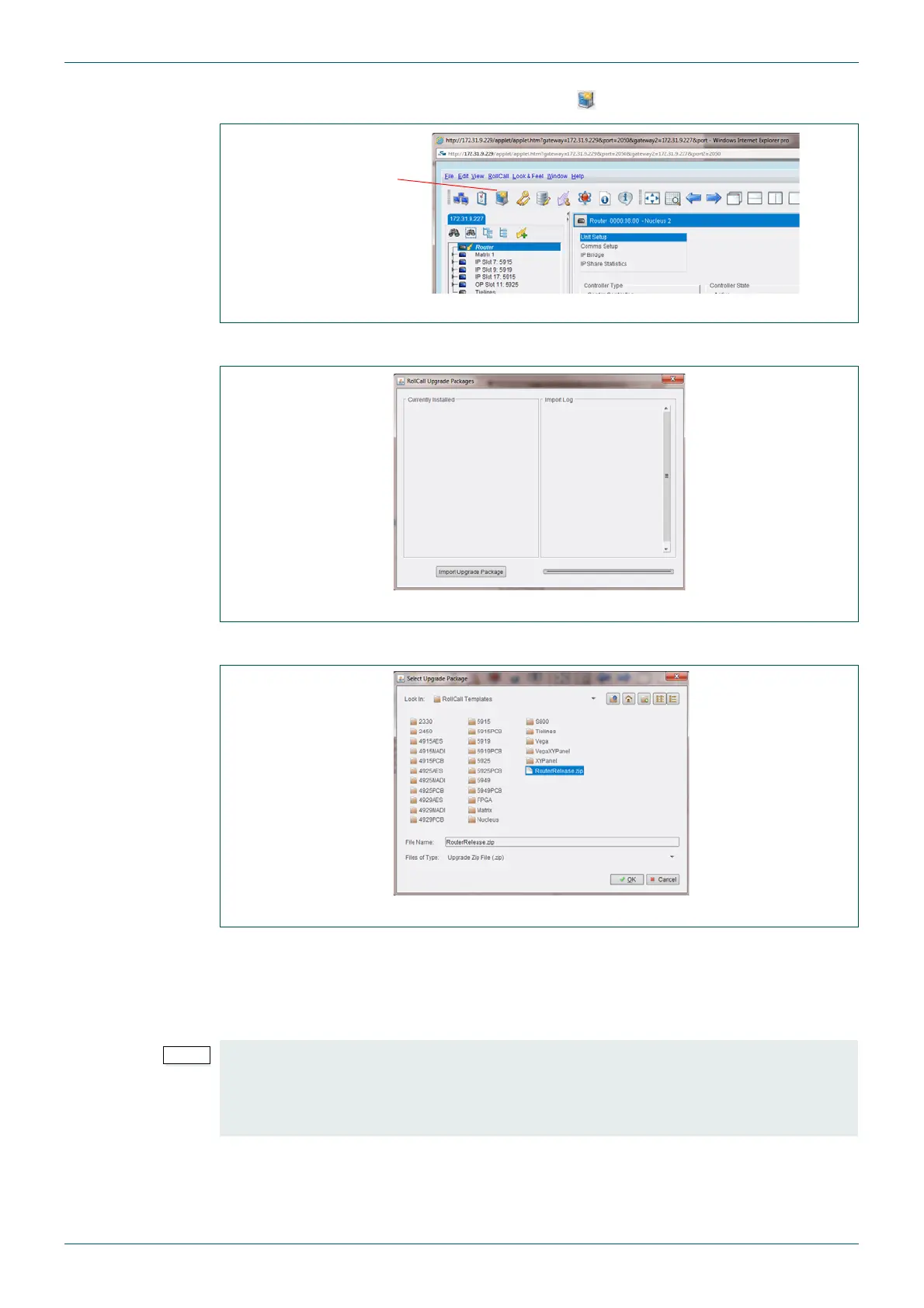
6. Click on the Import New Upgrades button ( ) in the main toolbar (see Fig 54.).
7. The RollCall Upgrade Packages Screen is displayed.
8. Click on the Import Upgrade Packages button.
9. Browse to the directory containing the upgrade package, see below:
Nucleus2 2463 and Nucleus 2450 - “RouterRelease.zip”
By default this is located in: C:\Program Files\Snell\MCM\Controllers\
RollCall_Templates\
10. Select the correct upgrade package for your Nucleus router controller type (see
previous step) and click OK.
Fig 54. Import New Upgrades Screen
Fig 55. RollCall Upgrade Packages Screen
Fig 56. Select Upgrade Package Screen
• The default directory shown assumes Workbench was installed in the default
directory.
• If Workbench is installed in the default location on a 64 bit Windows computer then
it will be located in the “Program Files (x86)” directory.
Import New
Upgrades button



 To Next Page