24
D712/710 User Manual Getting to Know Your Phone
Function key line
The symbols on the buttons in this line depict the functions that can be activated by pressing the
function key underneath the respective symbol. See "Appendix 1 - Display symbols and Icons" on
page 87 for a complete list. The factory defaults are:
Dir
Directory - see "Directory" on page 33
Settin
Settings menu - see "Settings" on page 25
CFwd
noFwd
Forwarding all calls (on/o) - see "Call forwarding" on page 55
DND
In DND mode incoming calls, with the exception of calls from phones on the VIP list of
your phone directory, do not ring; callers hear the busy signal. This button is replaced
by the
Info
button whenever a status message becomes newly available.
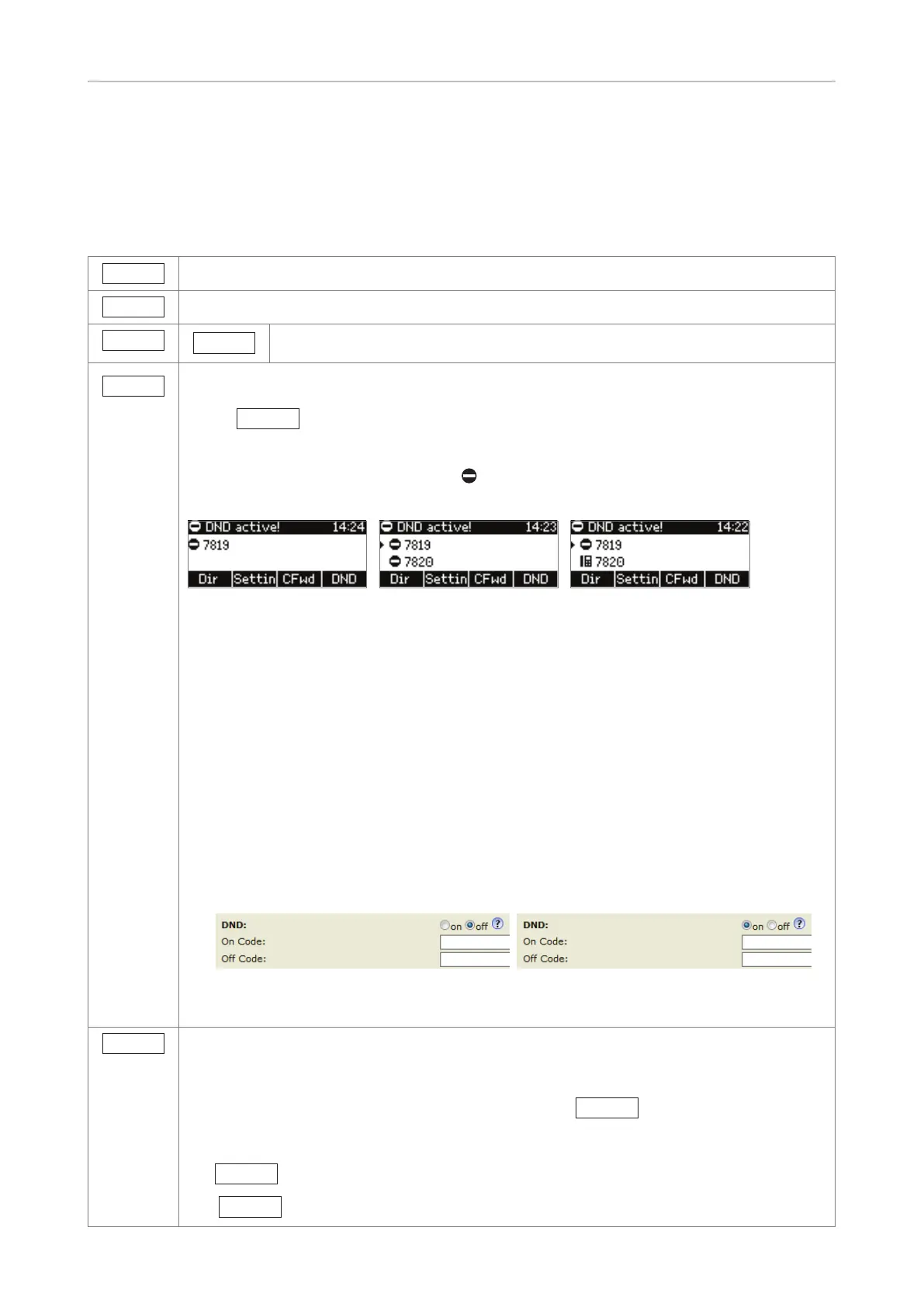
To turn DND on and o, press the function key. When DND is on, the display will say
"DND activated", and the DND symbol
replaces the phone symbol that normally
precedes the identity (Fig. 1).
Fig. 1 Fig. 2 Fig. 3
If there is more than one active identity on the phone, pressing the key will turn "do not
disturb" (DND) mode on/o for all identities (Fig. 2).
Note: If you don't want to turn on DND for all active identies on the phone or if another
function has been mapped onto the function key, you can use the phone's web interface
to turn on DND for each identity separately.
1. Open the phone's web interface and click Configuration Identity (1-4) in the menu
on the left side of the window. The page will open with the Login tab on the display.
2. Click on the Features tab.
3. Turning DND on and o:
◦ To turn DND on, click on the radio button "on".
◦ To turn DND o, click on the radio button "o".
4. Click on "Apply".
5. Click on "Save".
Info
Displaying all currently available status messages. If a dierent function is mapped
onto this key, it will be replaced by this status key whenever there is a new status
message.
Press the key to display the status messages; press
Del
to delete displayed
status messages one after the other. This will also delete the message in the status
bar, for example call forwarding settings. Once all messages have been deleted, both
the
Info
key as well as the message in the info/status bar will disappear.
The
DND
function key is now visible and available again.



 To Next Page