63
D712/710 User Manual Configuring the Function Keys
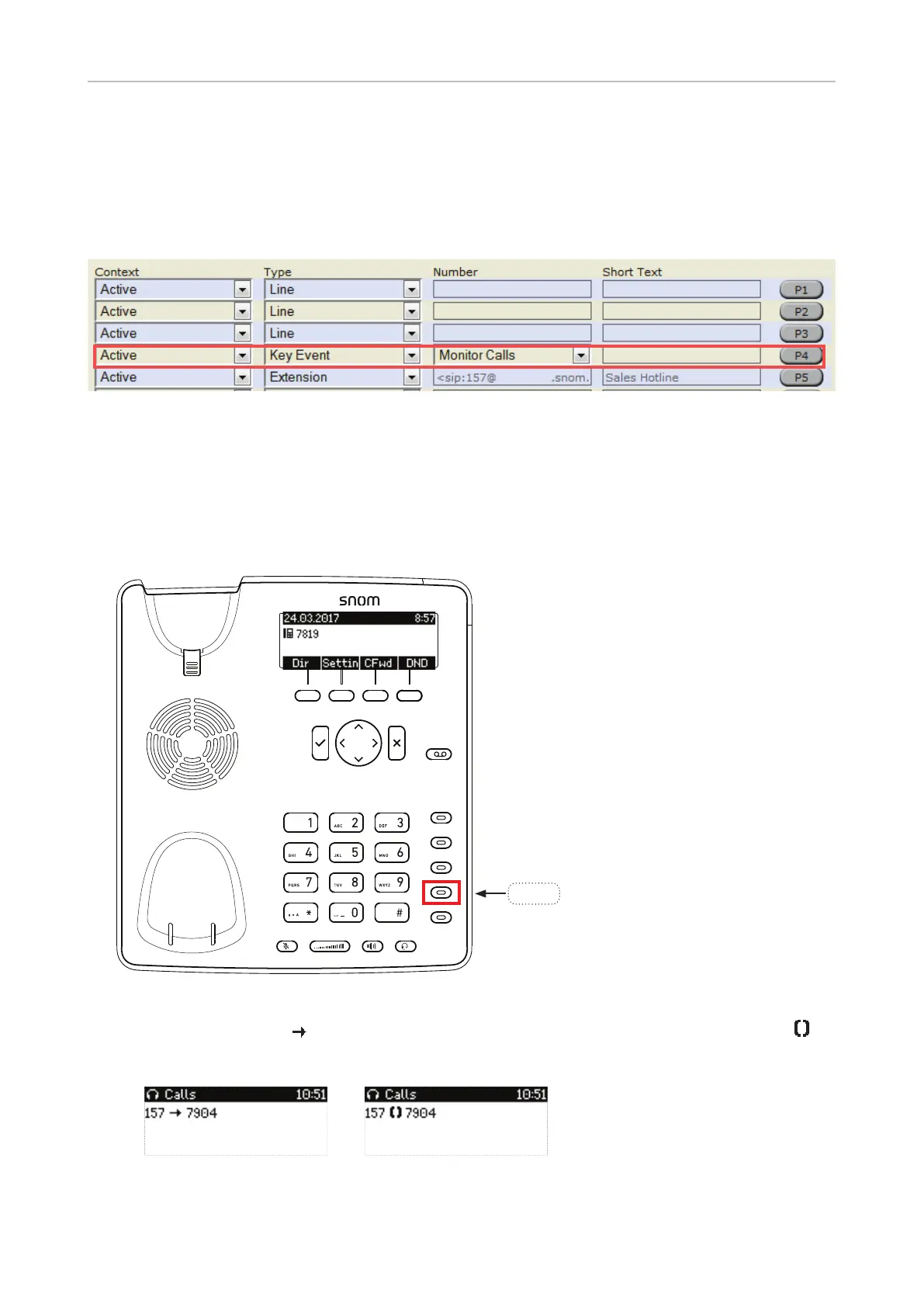
Example 2, Monitoring calls on-screen
When you are monitoring another extension or phone line, you may want to see more information on
the display, for example the number of an incoming call to that extension or line. In our example, key
P4 will be programmed to show ongoing activity on monitored extensions or lines on the display.
1. On the phone's web interface, click on "Function Keys" in the menu on the left.
2. Under "Context" of P4, select Active or one of the configured identities from the drop-down list.
3. Under "Type" of P4, select "Key Event" from the drop-down list.
4. Under "Number" of P4, select "Monitor Calls" from the drop-down list.
5. Click on "Apply" and "Save".
Press key P4 on the phone to show any ongoing activity on monitored extensions or lines on the
display. For example: "157 7904" indicates that extension 157 is calling extension 7904; "157
7904" indicates that 157 is connected to 7904 and that 157 is the caller, 7904 the callee.
Monitored extension ringing
Monitored extension busy
P4



 To Next Page