16
D712/710 User Manual Getting to Know Your Phone
Getting to know your phone
At a glance
The factory settings at a glance:
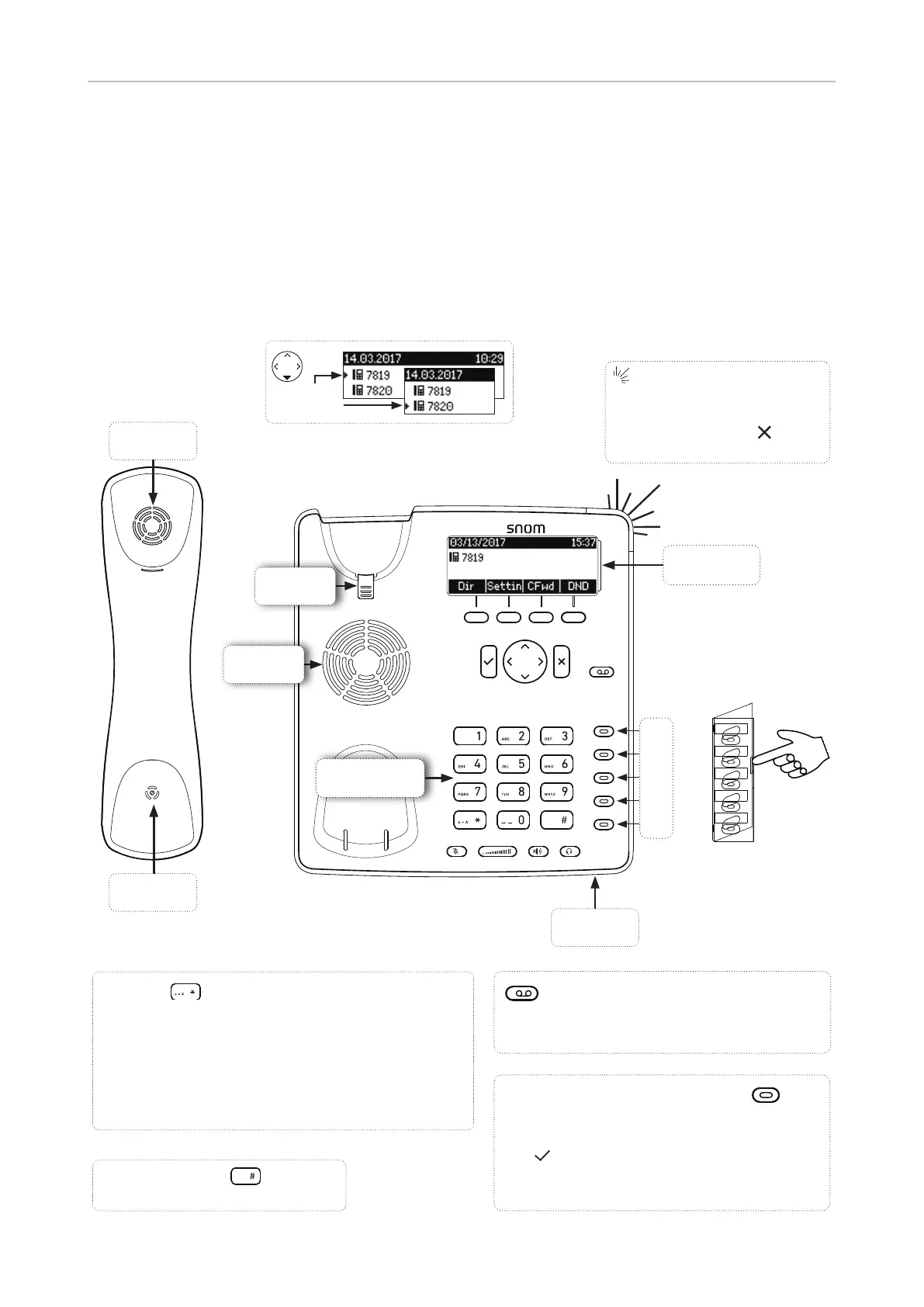
Handset
microphone
Handset
speaker
Freely programmable keys with LED
Default setting: Line
• Fast-blinking LED: Incoming call. Press key
or to accept
• Steadily lit LED: In call
• Slow-blinking LED: Call on hold
Outgoing
identity
Message waiting key with LED
• LED is lit when message is waiting on mailbox
• Press to listen to message(s)
Call LED
• Blinking fast: Incoming call
• Steady light: In call OR
• Missed call. Press to turn
o .
Alphanumeric
keypad
Display -
idle screen
Handset
rest tab
Casing
speaker
Casing mi-
crophone
P1
P2
P3
P4
P5
Star key
• In editing mode:
- Press for one second to change input mode
(numerals > lower case > upper case)
- Press briefl y to type *
• On idle screen: Press for 3 seconds to lock/
unlock the keypad
Pound (hash) key :
Rescue mode for TFTP update



 To Next Page