30
Reverb
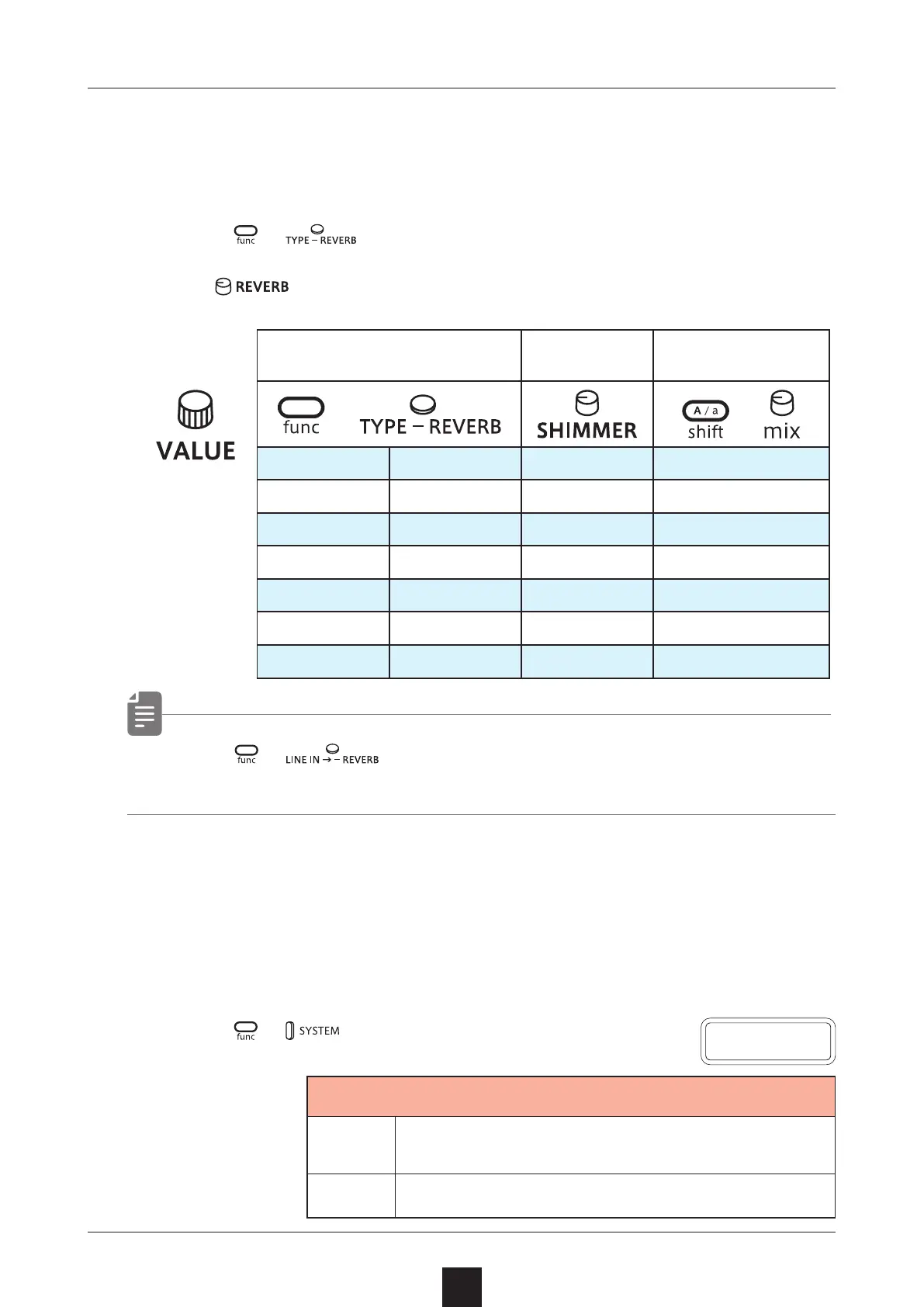
Texture Lab includes a sublime high-quality shimmer reverb that
adds a layer of reverberations an octave above the original pitch.
Adjusting the reverb
1
Press + to select the eect.
2
Use to adjust the parameter.
Reverb type
Reverb shim
-
mer amount
Reverb mix level
+
+
OFF
OFF ---- ----
HALL
Hall Amount Level
ROOM
Room Amount Level
ARNA
Arena Amount Level
PLAT
Plate Amount Level
TNNL
Tunnel Amount Level
INF
Innite Amount Level
• Use + to adjust the reverb send level for LINE IN
input.
Deactivating the reverb reset when changing
patterns
If you want to play pattern chains without the reverb resetting, set
the same reverb type on the patterns you want to chain and set the
reverb reset to OFF.
1
Press
+ multiple times to select R.RST.
2
Select OFF.
R
.
R S T
Reverb Reset
OFF
Do not reset the reverb when changing
the patterns with the same reverb type.
ON
Reset reverb when the pattern is changed.



 To Next Page