Product Guide
2-24
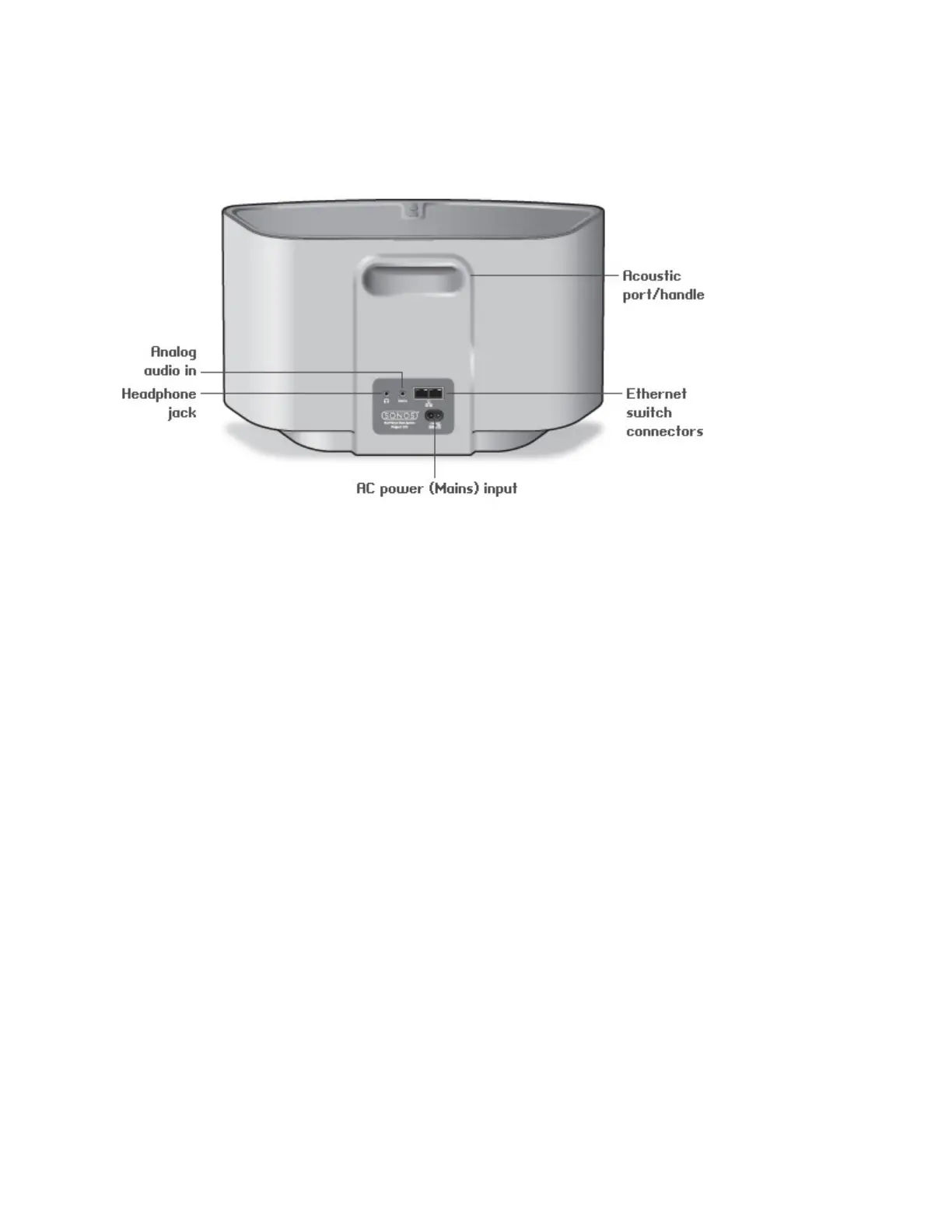
SONOS PLAY:5 Back
Acoustic port / handle The acoustic port doubles as a handle so you can easily lift and carry the PLAY:5 from
room to room. Please do not block or obstruct this port when the PLAY:5 is playing music.
Ethernet switch connectors (2) Use Category 5 Ethernet cable to connect to a router, computer, or additional network
device such as a network-attached storage (NAS) device.
LED indicators:
• Green (link connection)
• Flashing Yellow (network activity)
AC power (mains) input
(~100-240 V, 50-60 Hz)
Use the supplied power cord to connect to a power outlet.
3.5mm (1/8") stereo audio in
(2V)
Use the supplied 3.5mm to 3.5mm stereo audio cable to connect the audio outputs from
a portable music player to the Sonos component’s analog audio input.
To connect a different audio component, such as a CD player, use a 3.5mm (1/8") mini-
stereo to RCA audio cable. Plug the mini-stereo end into the audio input on the PLAY:5
and plug the RCA end into the audio outputs on the audio component.
3.5mm (1/8") headphone jack Headphone jack accepts any standard 3.5mm (1/8") headphone plug.


 To Next Page
 Loading...