Product Guide
B-6
* Specifications subject to change without notice.
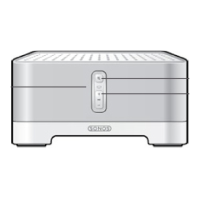
SONOS CONTROL (formerly Controller 200)
Networking*
Wireless Connectivity
SonosNet 2.0, a secure AES encrypted, peer-to-peer wireless mesh network
Network Bridging
2-port switch (10/100Mbps, auto MDI/MDIX) allows Ethernet devices to connect through
SonosNet.
Internet connectivity
Internet connection required for access to Internet radio stations, online music services and
software updates. (DSL, cable modem or LAN-based high-speed Internet connection required.)
Internet functionality may require payment of separate fee to a service provider; local and/or
long distance telephone charges may apply.
General
Power Supply
AC 120/240V, 50-60 Hz, auto-switchable
Front Panel Buttons
Volume and Mute
Front Panel LED Indicators
Status indicator and Mute status
Dimensions (H x W x D)
8.50 x 14.40 x 4.80 in. (217 x 365 x 123 mm)
Weight
9.15 lbs. (4.15kg)
Operating Temperature
32º to 104º F (0º to 40º C)
Storage Temperature
4º to 158º F (-20º to 70º C)
Product Finish
White finish with light metallic grill
Feature Description
Display and User Interface
Screen
3.5 in. (diagonal) color LCD with LED backlighting. 640 x 480 pixels (full VGA resolution)
Touch Screen
Capacitive touch screen technology with rugged, scratch-resistant glass face. Find and select
music by touching, typing and flicking a finger.
Screen Type1
Transflective LCD screen, suitable for both indoor and outdoor use. Adjustable LED
backlighting. Backlighting automatically activated via light sensor.
Function Buttons
3 buttons with adjustable backlight: Mute, Volume (-/+) and Rooms. Backlighting
automatically activated via light sensor.
Indicators
Wireless signal strength, clock, and battery charge indicators (on-screen); orange LED
indicator appears when the Controller is starting-up or when the battery is too low to power-on
the screen.
Light Sensor
Senses the ambient light in a room and adjusts the button and screen backlights.


 To Next Page
 Loading...