5-12
5. Optical Axis Adjustment
Align the lens optical axis with the that of the CCD imager.
If deviated, center of picture can lose focus when zoom is operated
from the WIDE end to the TELE end.
Subject Siemens star
Measurement Point
Check on monitor TV
Measuring Instrument
Adjusting Page F
Adjusting Address 43
Switch setting:
1) DIGITAL ZOOM (Menu display) ...................................OFF
2) STEADY SHOT (Menu display) .....................................OFF
Preparations before adjustments:
1) Playback the monoscope segment of the system check tape
(XH5-5 (NTSC), XH5-5P (PAL)).
2) Attach the optical axis frame chart (transparent) on monitor
TV screen. Center of monoscope image and that of optical axis
frame must agree.
3) Set to the camera mode.
Adjusting method:
1) Select page: 0, address: 01, and set data: 01.
2) Select page: 6, address: 40, and set data: 02.
3) Select page: 6, address: 41, and set data: 01.
4) Select page: F, address: 43, set data: 00, and press the PAUSE
button of the adjustment remote commander.
5) Place the Siemens star 2.0 m away from the front of the lens.
6) Shoot the Siemens star with the zoom TELE end.
7) Point the lens toward the Siemens start chart until center of the
Siemens star is located in the center of the optical axis frame.
8) Shoot the Siemens star with the zoom WIDE end.
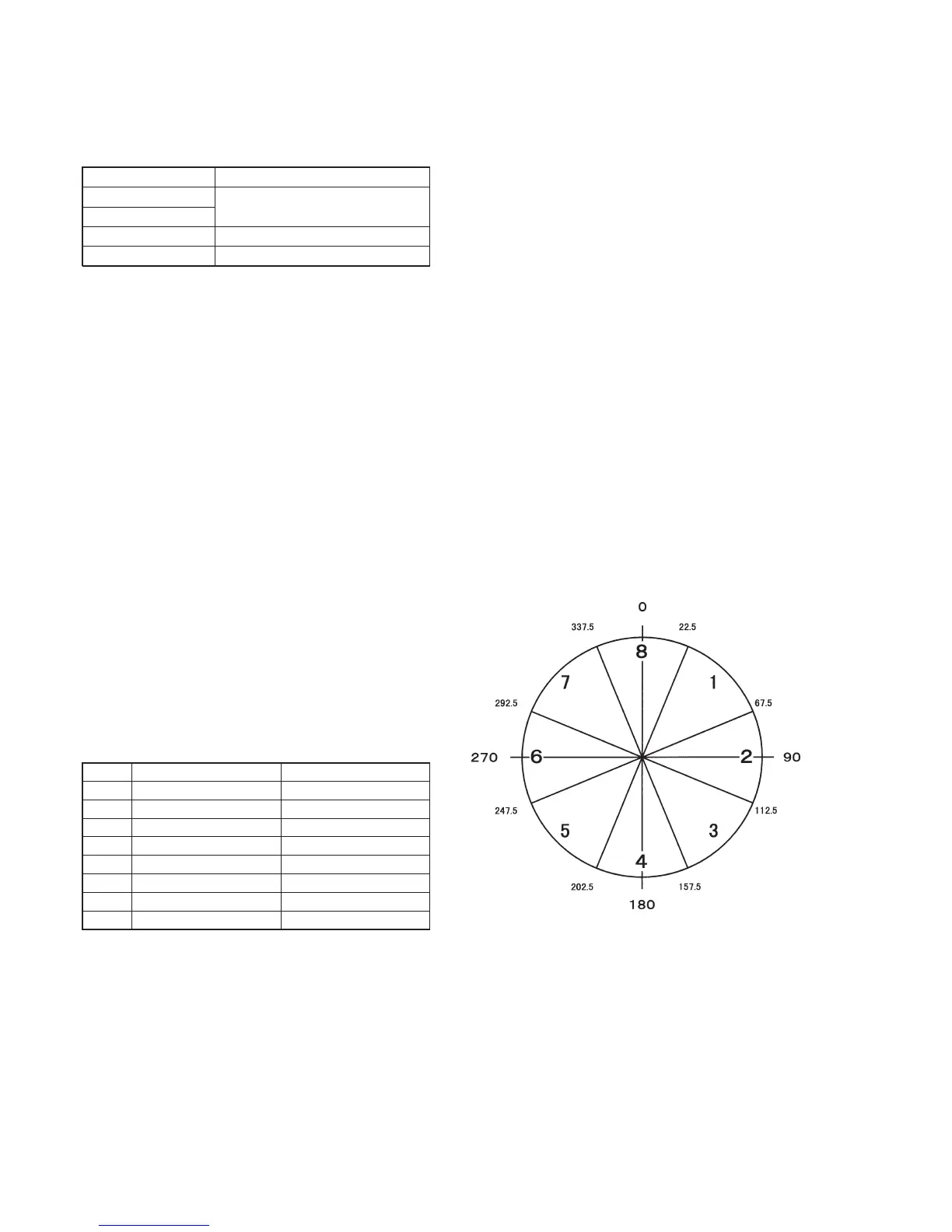
9) Measure on monitor in which area of the optical axis frame the
center of the Siemens star is located. Measure the amount of
displacement (distance between the center of the Siemens star
and the center of the optical axis frame). The measurement
value is named L1.
10) Read the correction data corresponding to the area from the
following table.
11) Set the correction data to page: F, address: 43 and press the
PAUSE button.
12) Shoot the Siemens star with the zoom TELE end.
13) Point the lens toward the Siemens start chart until center of the
Siemens star is located in the center of the optical axis frame.
14) Shoot the Siemens star with the zoom WIDE end.
15) Measure the amount of displacement (distance between the
center of the Siemens star and the center of the optical axis
frame). The measurement value is named L2.
16) Compare the values L1 and L2, and confirm that L2 is smaller
than L1. If L2 is larger than L1, select page: F, address: 43 and
set data: 00, and press the PAUSE button.
Correction data
01
02
03
04
05
06
07
08
Area
1
2
3
4
5
6
7
8
Display phase
22.6˚ to 67.5˚
67.6˚ to 112.5˚
112.6˚ to 157.5˚
157.6˚ to 202.5˚
202.6˚ to 247.5˚
247.6˚ to 292.5˚
292.6˚ to 337.5˚
337.6˚ to 22.5˚
Fig. 5-1-6
Processing after Completing Adjustments:
1) Select page: 0, address: 01, and set data: 00.
2) Select page: 6, address: 40, and set data: 00.
3) Select page: 6, address: 41, and set data: 00.



 To Next Page