8-10
DSR-2000/2000P
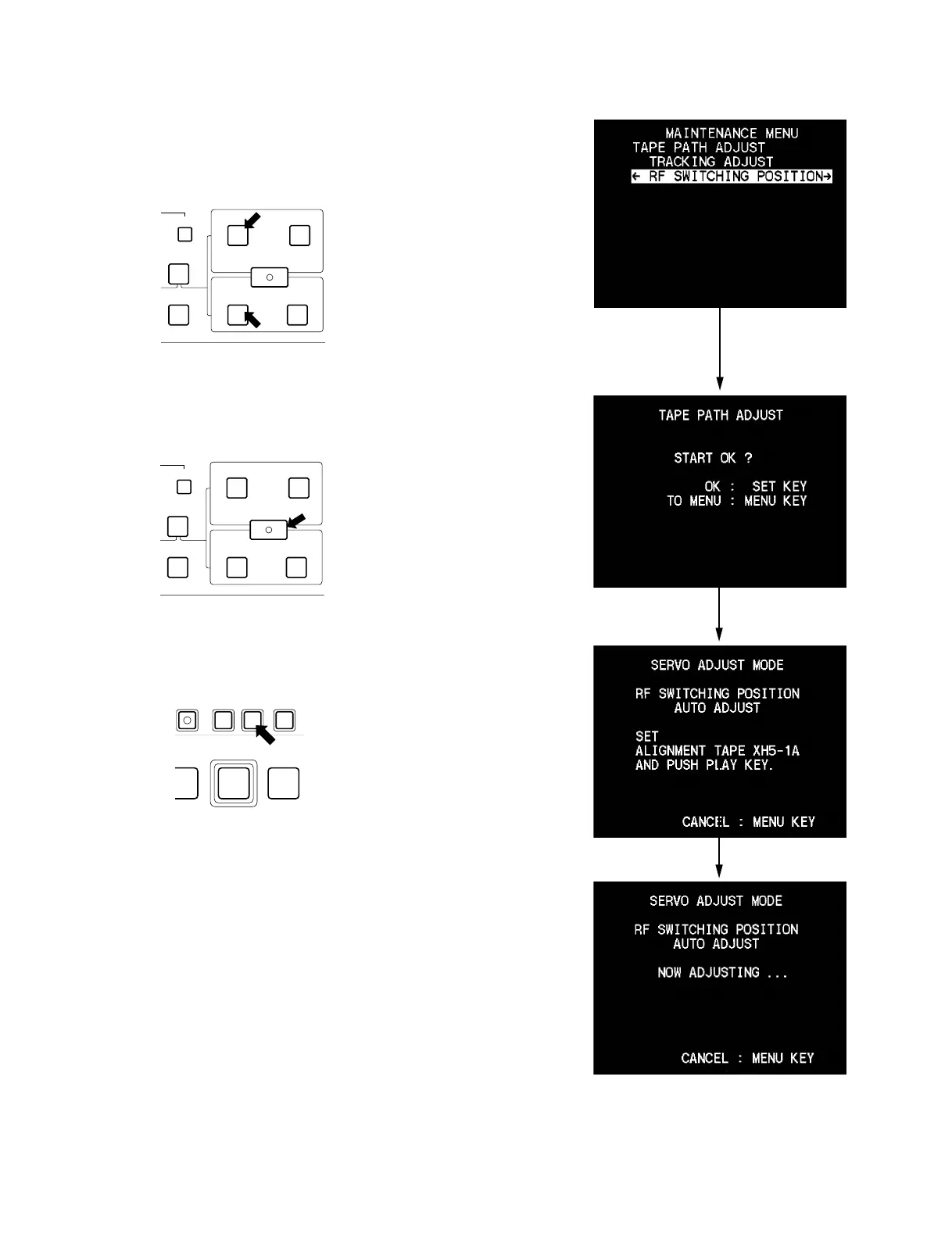
4. Move the cursor to “RF SWITCHING POSITION”
which is displayed with a white background using the
[AUDIO|IN] (9) or [IN] (0) key.
5. Select “START OK?” by pressing the
[ENTRY|SHIFT] (8) key.
6. Press the [SET] key.
7. Playback the alignment tape XH5-1A2 for NTSC or
XH5-1AP2 for PAL. (display 2)
Then the unit starts the RF switching position automat-
ic adjustment. (display 3)
DELETE
ENTRY SHIFT
AUDIO
TC
IN OUT
IN OUT
CH-4
REVIEW
EDIT
(9)
(0)
DELETE
ENTRY SHIFT
AUDIO
TC
IN OUT
IN OUT
CH-4
REVIEW
EDIT
(8)
REC
SET HOLDMENUPB
COUNTER SEL
EDIT
PREROLL
1
2
3
8-3. RF Switching Position Adjustment



 To Next Page