9
1-4. Cautions when Replacing the Lithium Battery
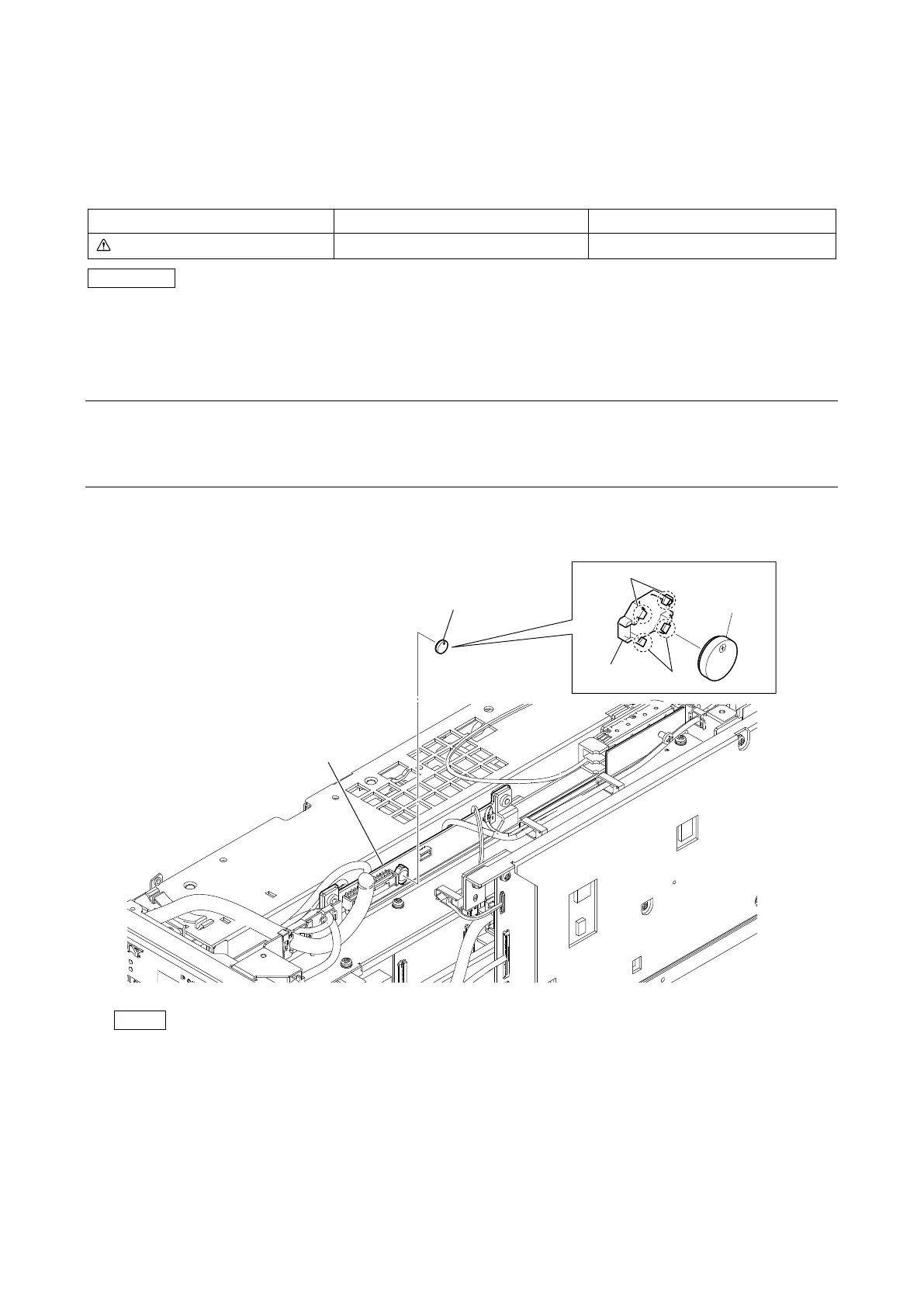
The lithium battery is installed on the VIF-82 board. This lithium battery is used to back up the real-time clock (RTC).
RTC stops operating when the battery life expires. Replace the battery and reset the DATE & TIME (M03) of the MAINTENANCE
menu. (Refer to OPERATION MANUAL.)
Lithium Battery (ML621 (U))
CAUTION
Ensure that the battery is installed with + and – poles connected to the correct terminals. An incorrect connection may cause an
explosion or leakage of fluid.
1-4-1. Replacing Procedure
Preparation
1. Remove the top cover. (Refer to “2-2. Top Cover”.)
Procedure
1. Remove the lithium battery from the four hooks of the battery holder.
Note
When installing the lithium battery, install it to the orientation shown in the figure.
2. Install the removed parts by reversing the steps of removal.
Lithium Battery
Hooks
Hooks
Lithium Battery
Battery holder
VIF-82 board



 To Next Page