56
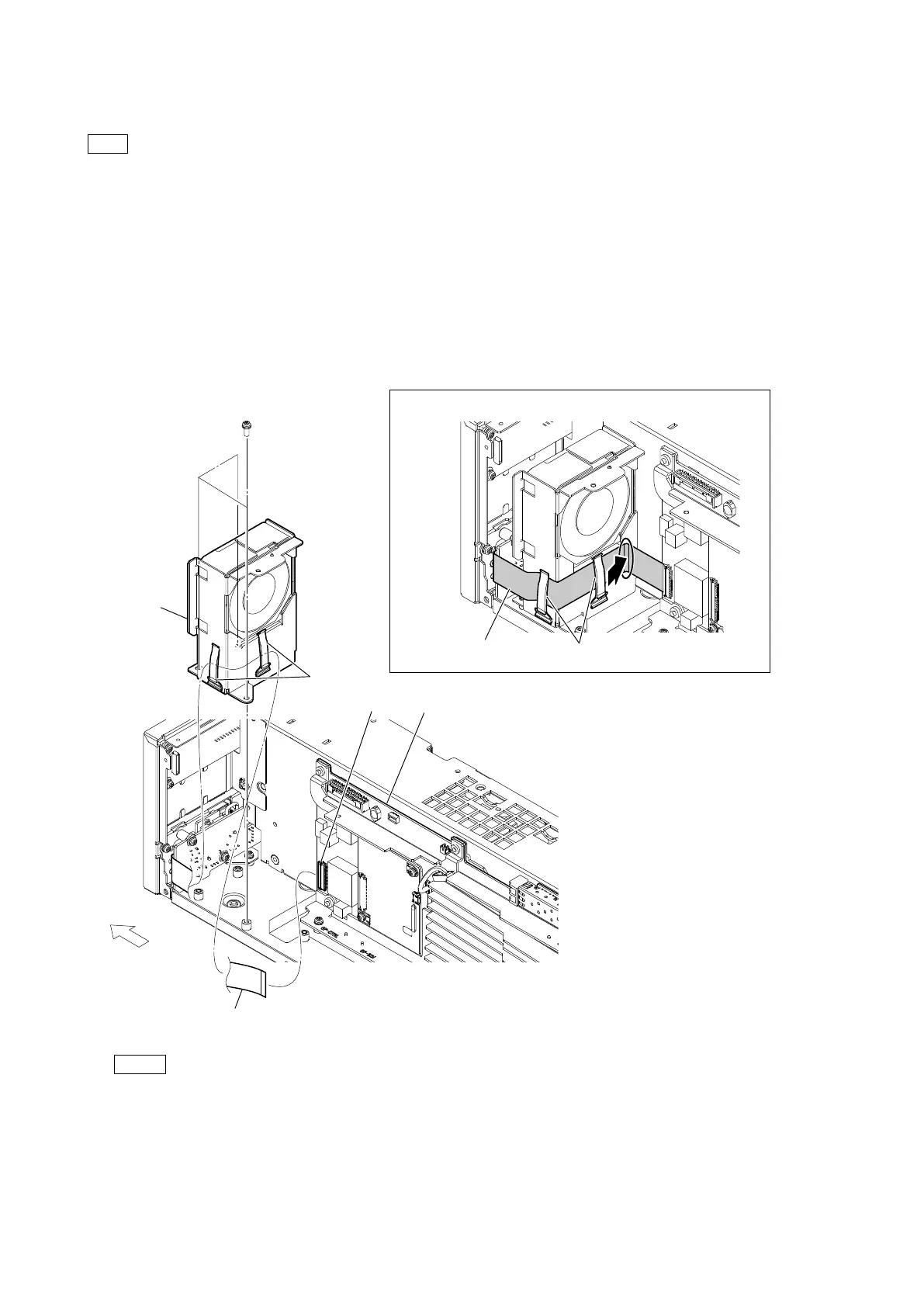
2-11. DC Fan (60 Square) (Front)
Tip
The following part cannot be reused. When replacing the DC fan (60 square).
• Fan cushion (60 x 25)
Preparation
1. Remove the top cover. (Refer to “2-2. Top Cover”.)
2. Remove the NET-37 board assembly. (Refer to “2-3. NET-37 Board Assembly”.)
Procedure
1. Disconnect the flexible flat cable from the connector (CN401) on the VIF-82 board.
2. Release the flexible flat cable from the two cable clamps.
3. Remove the three screws, and then remove the DC fan subassembly (front).
Note
• At the time of the installation, tighten the screws in the following sequence: (a), (b), (c).
• At the time of the installation, clamp the flexible flat cable with the two cable clamps and push it in the direction of the
arrow.
PSW
3 x 8
(a)
(b)
(c)
DC fan
subassembly
(front)
Flexible flat cable
CN401
Arrangement of the flexible flat cable
Cable clamps
Flexible flat cable
Cable
clamps
VIF-82 board
Front side



 To Next Page