55
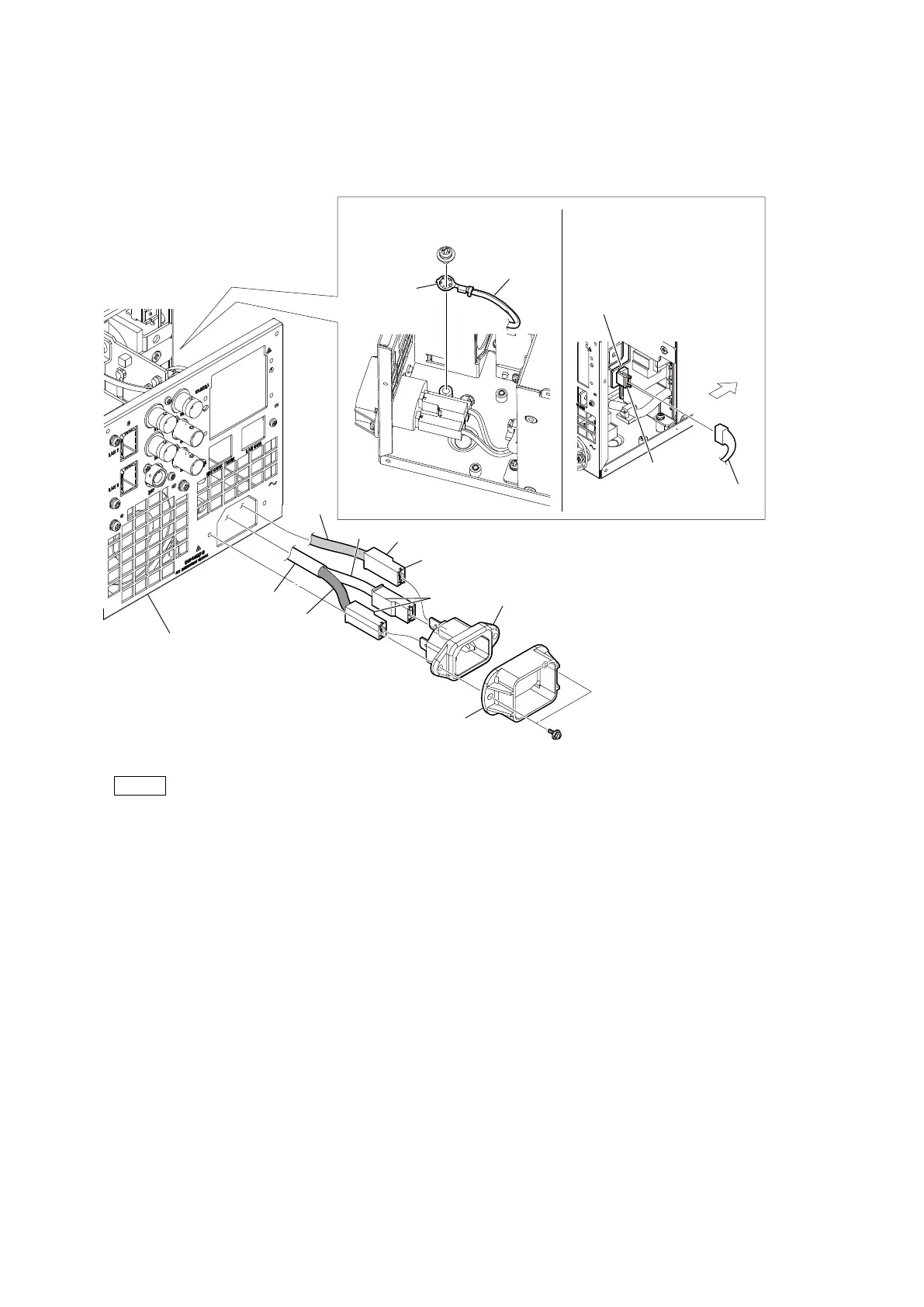
2. Disconnect the AC-IN harness from the connector (CN102) on the PS-939 board.
3. Remove the screw (PSW4 x 8), and then remove the earth lug terminal
4. Remove the two screws (PSW3 x 10), and then remove the plug holder (A)
5. Pull out the AC inlet from the hole of the rear panel.
6. Disconnect the AC harness and earth harness from the AC inlet.
Note
When installing harnesses in the AC inlet, pay attention to the following.
• Insert the three harness terminals into the AC inlet terminal with the wire color and convex part's direction shown in the
figure.
• Insert until the harness terminals are locked.
7. Install the removed parts by reversing the steps of removal.
PSW
3 x 10
PSW
4 x 8
Front side
Rear panel
AC-IN harness
Brown
White
Green
Earth harness
Convex
portions
Convex portion
AC inlet
Plug holder (A)
Earth
harness
Earth lug
terminal
AC-IN harness
PS-939 board
CN102



 To Next Page