59
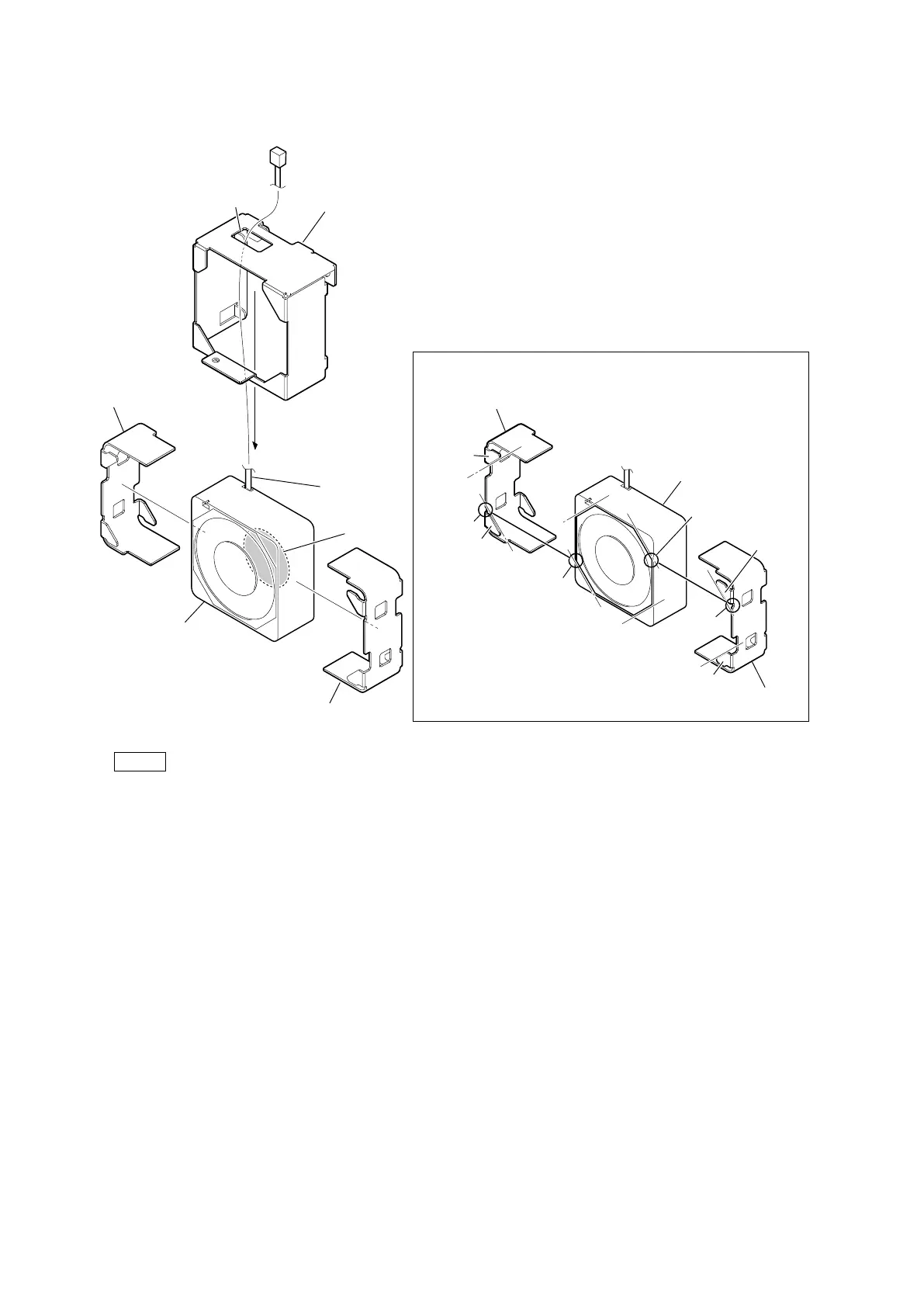
2. Remove the DC fan (60 square) and the fan cushion (60 x 25) together from the R-fan mounting bracket.
3. Remove the two fan cushions (60 x 25) from the DC fan (60 square).
Note
• When attaching the DC fan subassembly, pay attention to the position of label and harness.
• When replacing the DC fan (60 square), attach two new fan cushions (60 x 25) at the positions shown above.
– Align portion A of the fan cushion (60 x 25) with portion B of the DC fan (60 60 square).
– Align the notch of the fan cushion (60 x 25) with the corner of the DC fan (60 60 square) shown above.
4. Install the removed parts by reversing the steps of removal.
DC fan (60 square)
Fan cushion (60 x 25)
R-fan mounting bracket
Hole
Fan cushion (60 x 25)
Label
Harness
DC fan (60 square)
Notch
Notch
A
B
B
B
B
A
A
A
Square
Square
Fan cushion (60 x 25)
Fan cushion (60 x 25)
Attaching position of the fan cushion (60 x 25)



 To Next Page