SPACE s.r.l.
Soc.a socio unico
PFB035 SERIES – PFB040 SERIES
PFB045 SERIES – PFB060 SERIES
SPRT102/4 SERIES – SPRT102/5 SERIES
SPRT102/6 SERIES – SPRT102/7 SERIES
Code M0247 - Ver.1.4
(09/2016)
SPACE s.r.l. – 10090 TRANA (TO) Via Sangano, 48
Tel. (+39) 011/ 934 40 300 – Fax (+39) 011/ 933 88 64
e-mail: info@spacetest.it - www.spacetest.com
3.5. Remote control
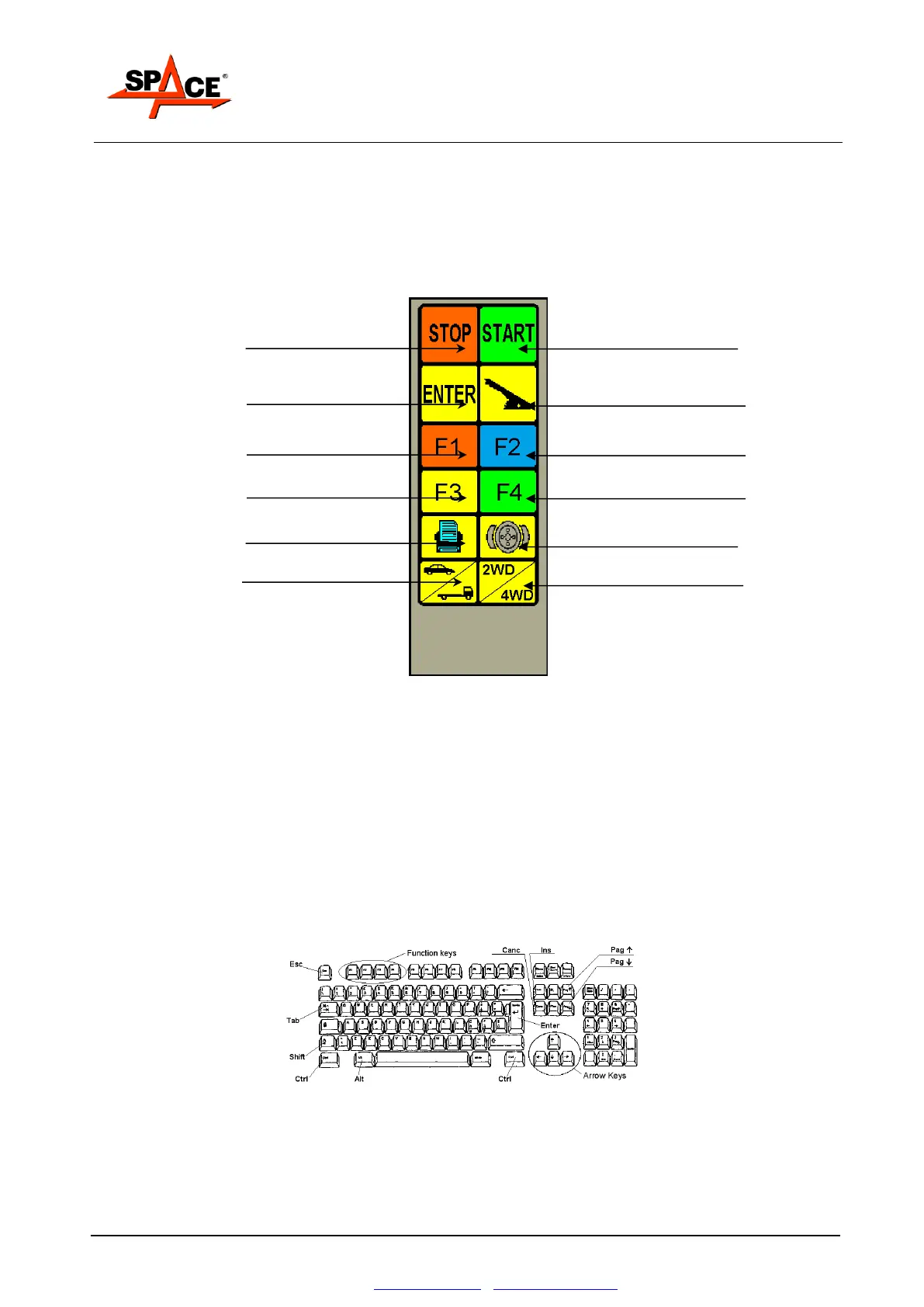
The control interface with the console consists mainly of the 12-key infrared beam remote control.
The entire test procedure can be conducted from the remote control. Thanks to the icons, the keys
are easy to distinguish during the test.
The function keys (F1, F2, F3 and F4) take on different meanings from time to time. Reference
must be made to the graphic representation of such keys on the lower part of the monitor.
Interruption or end of test key
Parking brake selection key
Brake ovality (out-of-roundness)
procedure selection key
Car /Truck procedure selection
key
2WD / 4WD procedure selection key
Figure 10
3.6. Control keyboard
All models feature a standard 102-key keyboard connected to the PC.
The PC keyboard acts as an interface for entering details of the car, for headings, for first
configuration setting and for entering the maximum parameters acceptable for the measured
quantities.
These parameters can only be changed by qualified users according to acceptability criteria which
can change according to reference norms, specific analyses and studies, etc.
In case of faulty operation of the remote control, the test can be fully performed through the PC
keyboard on the function keys.
Figure 11


 To Next Page