SPACE s.r.l.
Soc.a socio unico
PFB035 SERIES – PFB040 SERIES
PFB045 SERIES – PFB060 SERIES
SPRT102/4 SERIES – SPRT102/5 SERIES
SPRT102/6 SERIES – SPRT102/7 SERIES
Code M0247 - Ver.1.4
(09/2016)
SPACE s.r.l. – 10090 TRANA (TO) Via Sangano, 48
Tel. (+39) 011/ 934 40 300 – Fax (+39) 011/ 933 88 64
e-mail: info@spacetest.it - www.spacetest.com
11. BACK-UP and RESTORE
Using the BACK-UP/ RESTORE function, all the data of
the client databank can be collected together on
whichever mass storage device.
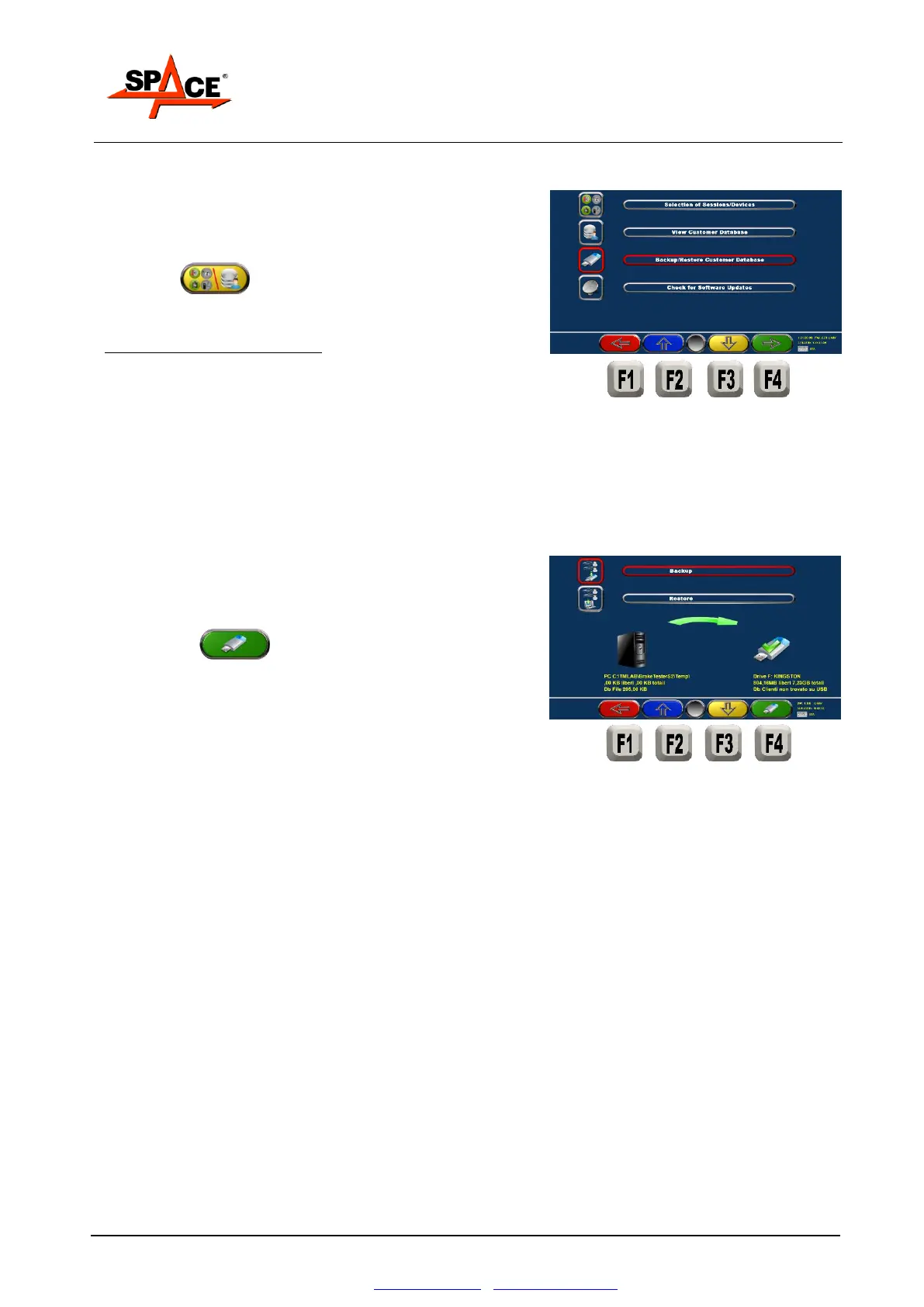
Press F3 from the initial page (see Figure 27)
and select “Backup/Restore Client Data Bank”
POSSIBLE SELECTIONS:
Press F1 to return to the previous page.
Press F2/F3 to move upward or downward.
Press F4 to select the desired function.
At this point, insert the USB mass storage device.
Press F2/F3 to move the selection upward or
downward (Backup or Restore).
Press F4 to confirm the copy of the data on
the USB support (Backup) or the restore from the USB
device to the PC (Restore).
Press F1 to quit.


 To Next Page