SPACE s.r.l.
Soc.a socio unico
PFB035 SERIES – PFB040 SERIES
PFB045 SERIES – PFB060 SERIES
SPRT102/4 SERIES – SPRT102/5 SERIES
SPRT102/6 SERIES – SPRT102/7 SERIES
Code M0247 - Ver.1.4
(09/2016)
SPACE s.r.l. – 10090 TRANA (TO) Via Sangano, 48
Tel. (+39) 011/ 934 40 300 – Fax (+39) 011/ 933 88 64
e-mail: info@spacetest.it - www.spacetest.com
5.3.1. Inspections (Checks)
BRAKE LIMITS
The efficiency and alarm unbalance thresholds and the zero (OFFSET) of the calibrations CANNOT
be changed except by skilled SPACE S.R.L. engineers. For this reason, access requires a password.
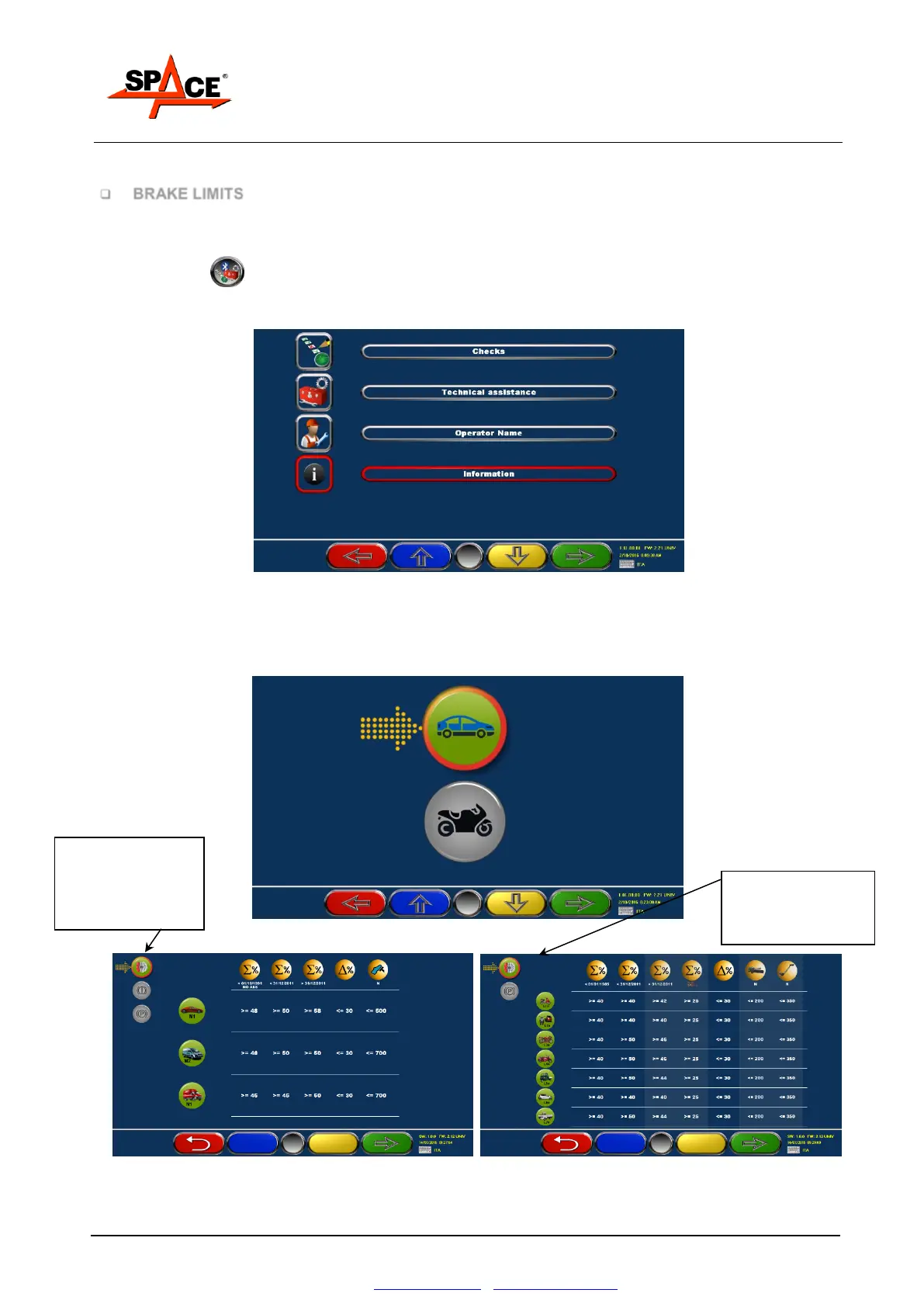
The operator can in any case see the thresholds and the calibration offset as follows:
Press key F5 from the initial page (Figure 27). Select with the keys “F2/F3” the menu
“Information” and confirm with ENTER/F4. Select in the next menu the “Brake Limits” and
confirm with ENTER/F4.
Figure 31
If the program is set to work with both cars and 2, 3 and 4 wheels, the page in Figure 32 will be
shown.
Select with “F2” the type of vehicle that need to be checked and press “ENTER/F4”: a chart
appears with the efficiency and unbalance thresholds (see Figure 33).
Figure 32
Figure 33
Press “F1”, to come back to the previous page.
CAR chart
Press F4 to see the
charts for service,
emergency and
parking brakes.
Chart for 3-4 wheels
Press F4 to see the
charts for service and
parking brakes.


 To Next Page