SPACE s.r.l.
Soc.a socio unico
PFB035 SERIES – PFB040 SERIES
PFB045 SERIES – PFB060 SERIES
SPRT102/4 SERIES – SPRT102/5 SERIES
SPRT102/6 SERIES – SPRT102/7 SERIES
Code M0247 - Ver.1.4
(09/2016)
SPACE s.r.l. – 10090 TRANA (TO) Via Sangano, 48
Tel. (+39) 011/ 934 40 300 – Fax (+39) 011/ 933 88 64
e-mail: info@spacetest.it - www.spacetest.com
Final brake test summary
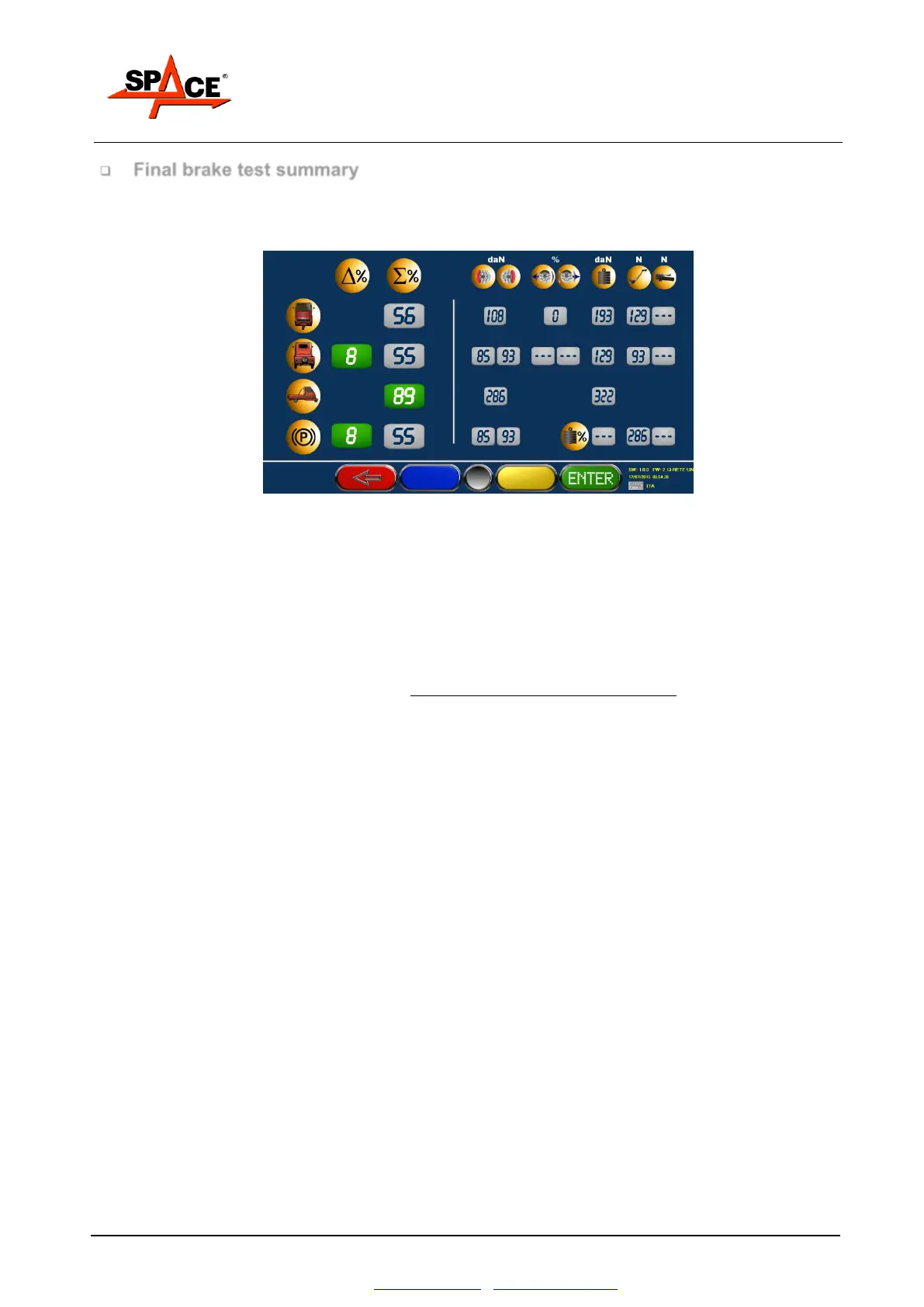
After storing the front and rear axle and parking brake tests, and after disengaging the rollers, the
screen shows a summary page with all brake tester procedure results. It’s possible to see this page
also during the test.
Figure 77
The first line contains the data of the front axle, from left to right:
Unbalance value % (in this case with the front axle with a single wheel) (symbol %)
Braking efficiency value of the service brake (symbol %),
Maximum front brake force value.
Front axle weight
Ovality value in percentage and maximum pressure value of lever/pedal in N
The second line contains the data of the rear axle, from left to right:
Unbalance value % (symbol %)
Braking efficiency value of the service brake, referred to the total weight of the vehicle (symbol %)
Maximum rear brake force value
Rear axle weight
Ovality value in percentage and maximum pressure value of lever/pedal in N
The third line near the symbol of the vehicle with both the axel means:
Braking efficiency of the total service brake value (symbol %),
Maximum total braking force of service value.
Total weight value
The forth line near the symbol of the parking brake, from left to right:
Unbalance value % (symbol %)
Braking efficiency value of the service brake (symbol %),
Maximum parking brake force value
Maximum value of lever/pedal effort in N
If the vehicle is for freight transport, near the weight icon is shown the load percentage; if this value pass the
65% of the weight, the display is green, otherwise it’s red, to show that the limit has not been passed.
The unbalance in % between the wheels (symbol %) and the braking efficiency in % (symbol %)
are represented with big numbers and the background the same color as the outcome of the test:
RED if out of tolerance, GREEN if inside.
The other values (maximum braking force, ovality, pressure on lever and pedal, weight on the
axels) are reported with GREY background (their outcome is not subject to comparison with
tolerance thresholds).
Press ENTER/F4, if the brake test is complete, to go to the program next phase.



 To Next Page