Alternative fixed IP addresses can be set using the console diagnostic port. You will need a PC or Mac running terminal emulator
software. Connect the PC serial port to the rear of the console using a 9 way ‘D’ type extension cable (male to female) – see the
X
-Rack/Diag table in Appendix C for the pin out.
® Set the terminal as follows: Baud rate 19200
8 data bits
No parity
N
o start bit
1 stop bit
Flow control Xon/Xoff
® Press the ‘Return’ key (
<CR>
) and the terminal window should echo a ‘
>
’ if communication is established. To fix the IP address
type the following:
ip <CR>
setip nnn nnn nnn nnn <CR>
where ‘
nnn...
’ is the IP address, e.g. ‘
10 1 1 1 10
’.
setmask nnn nnn nnn nnn <CR>
where ‘
nnn...
’ is the subnet mask, e.g. ‘
255 255 255 0
’. Note that
this should match other devices local to the console.
setgate nnn nnn nnn nnn <CR>
where ‘
nnn...
’ is the gateway address e.g. ‘
10 1 1 1
’
usefixed <CR>
Direct Network Connection Configuration (Macintosh)
® Connect your Matrix to the computer using the network cable provided, and check that the IP address is set to
FFiixxeedd
in
the
IIPP
SSL soft keys (See Page 44).
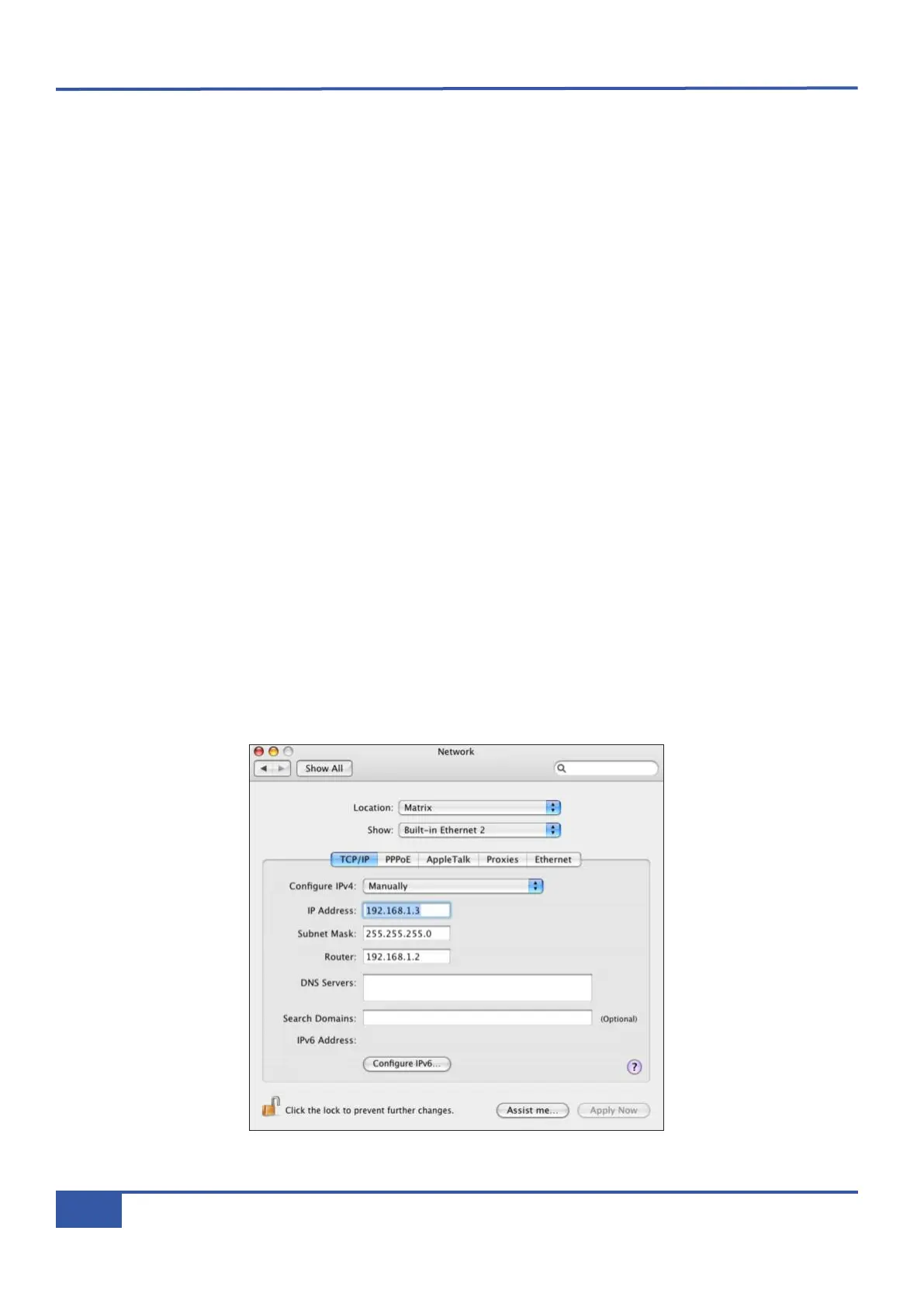
® Open the Network control panel in System Preferences, and create a new Location (called Matrix in the examples
shown below). Note that Ethernet Port 1 can also be used.
® Next select the Ethernet port to which you have connected Matrix and configure as shown below:
Chapter 1 - Setup
6
Matrix Owner’s Manual



 To Next Page