Stonex R25/R25LR Total Station - User Manual 56
Status: using ◄/► keys select if activate or not the accuracy limit;
St. dev. East: enter a limit for the standard deviation values in the East direction;
St. dev. North: enter a limit for the standard deviation values in the North direction;
St. dev. Height: enter a limit for the standard deviation values for the height;
St. dev. Angle: enter a limit for the standard deviation values for the Azimuth.
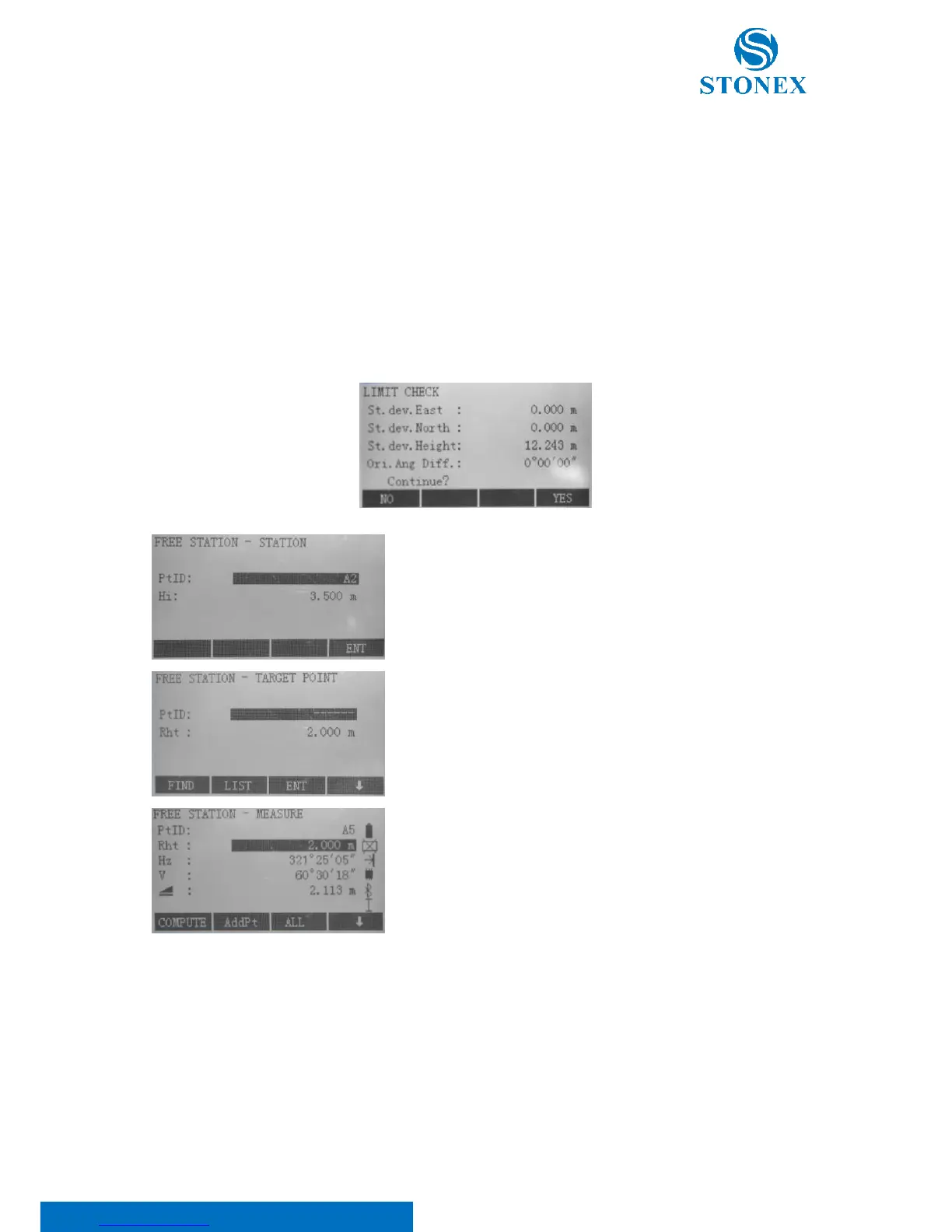
If the calculated deviation exceeds the limit, a warning dialog box ejects, which reminds you whether to proceed or
not.
Input of the name of the station (PtID) and the height of the
instrument (Hi). Press F4[ENT].
Input of the target ID (PtID) and the reflector height (Rht).it is also
possible to select a point from the memory through F1[FIND] or
F2[LIST] or to input coordinates pressing F4[ ↓ ] and F1[ENH]. Press
F3[ENT].
It will enter the Measure mode.
The following options are available:
• [ALL]: Trigger angle and distance measurements (3-point
resection);
• [REC]: Save horizontal direction and vertical angle (resection);
• [AddPt]: Input another backsight point;
• [COMPUTE]: It’ll calculate and display the station coordinates, if
at least 2 points and a distance are measured.



 To Next Page