Stonex R25/R25LR Total Station - User Manual 83
NOTE: As to this type of traverse measuring, the last survey station must be measured again on where point 1 is,
but occupied point can’t be set to point 1, otherwise this operation will make measurements of the first survey
station covered. For example, occupied point of the last survey station can be set to point 6 whose coordinate
inputting is the same as point 1’s.
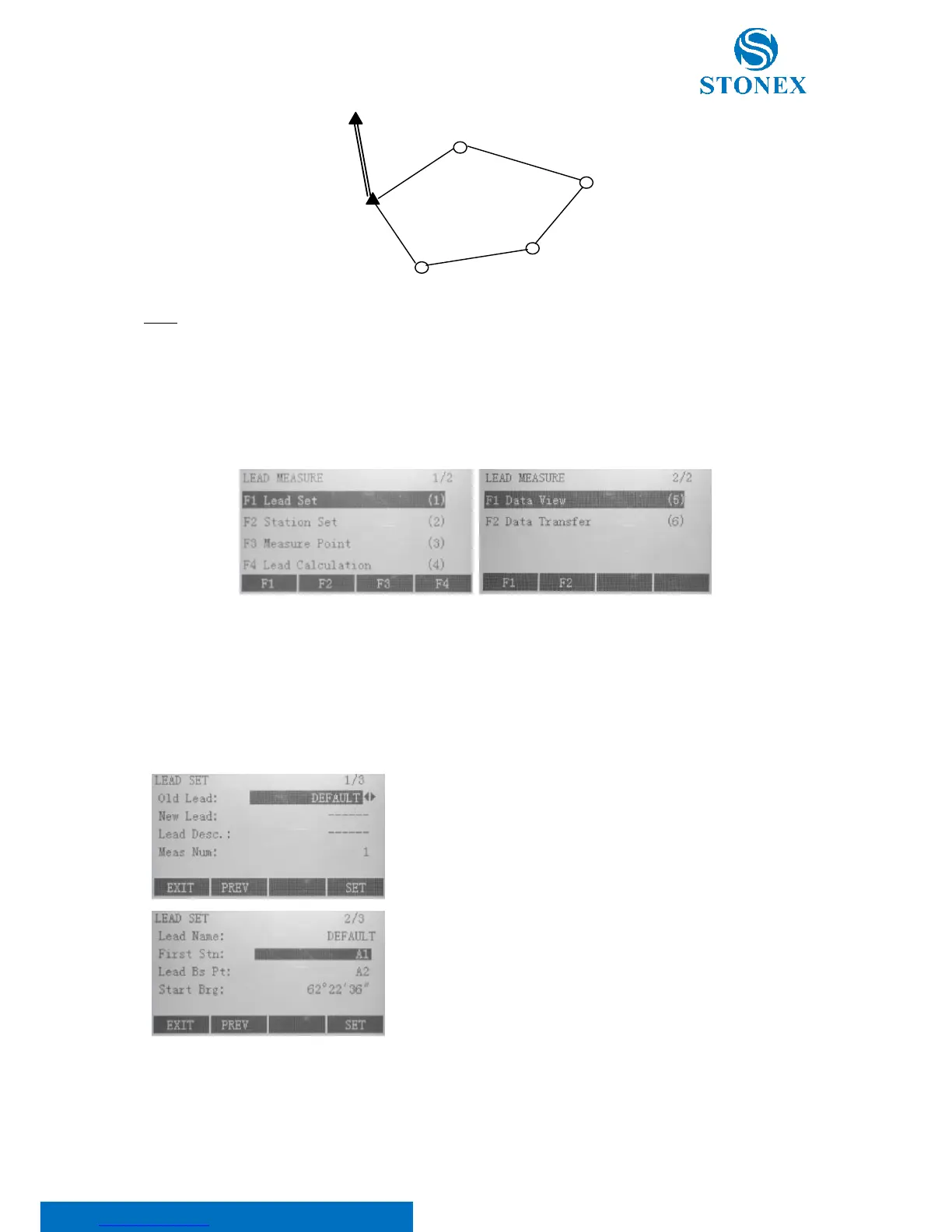
Lead measure menu contains two pages, as shown, through which you can toggle by {PAGE} key.
8.10.1. Lead set
On the first page of “Lead Measure” press F1 to activate lead setting which consists of three pages (toggle by {PAGE}
key).
Old Lead: select the existed old lead name. If you want to repristinate
the old lead, select it and press F4[SET]
New Lead: edit the new lead name
Lead Desc: edit the lead description
Meas Num: input the number of observation sets
Lead Name: the lead name is reported
First Stn: enter the name of the first survey station, from which the
first observations will be done
Lead Bs Pt: enter the name of the lead backsight point
Start Brg: input the initial azimuth



 To Next Page