Stonex R25/R25LR Total Station - User Manual 95
• [EDM] to switch to “EDM Settings” dialog. (see 5.3. EDM settings)
• [SaveAs] to store current measured point as reference point (control point) whose name is current
mileage.
• [PROJ] to set mileage as current ProjST (projection stake). This function is useful when add stakes on
terrain or surface features to set out.
NOTE:
• Make sure Offset, Deviation Angle and Stake Distance are set correctly when peg stake out.
• With the increment of main point datum of plane alignment, running speed of certain links during peg
stake out can be slowed down.
• Peg stake out result can be used as transect measure result.
Transect Measure
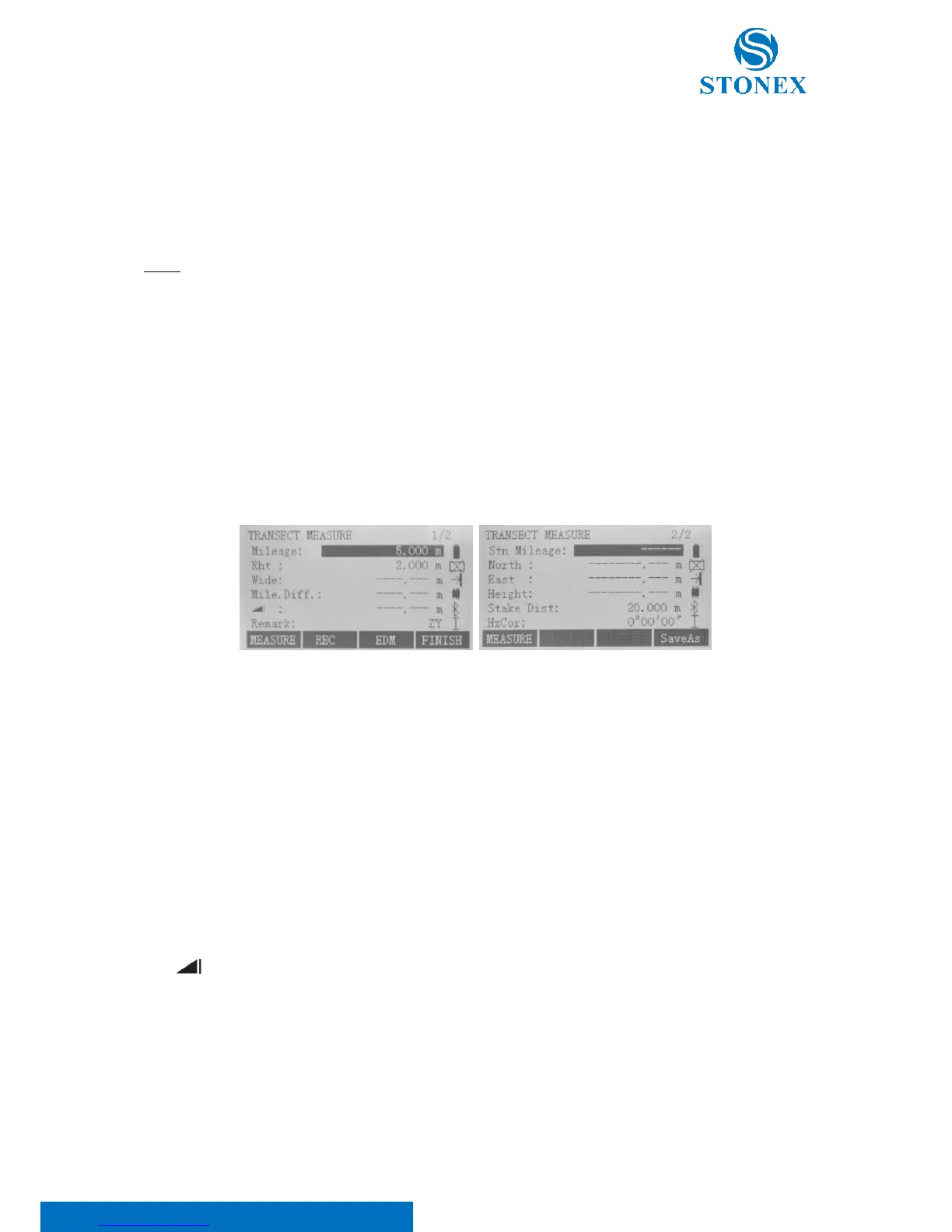
On “Road stake out” display, press F2 key to access “Transect measure” dialog.
Here:
Mileage is stake mark corresponding to transect to be measured;
Rht is the accurate prism height before measuring;
Wide is the offset distance that current measured point deviates from centerline;
Mile.Diff means the one that is the projection onto current sideline of difference between mileage
corresponding to current measured point and specified mileage. The value will be positive if mileage
corresponding to current measured point is greater than specified mileage. Conversely, it is negative. Prism
worker can move the prism to specified transect according to this field value;
is the height difference between current measured point and the last one;
Remark: it can be used when saved as reference point, and its simple description of the reference point to be
stored;
Stn Milelage is the stake mark of current occupied station point (pressing [SaveAs], this field will made as
point number);



 To Next Page